an you believe i was struggling for the long time to record and see how much i made or lost and where i was going wrong, if you want to know exactly where you are going wrong in trading you need this 100%
NinjaTrader 8 trade review indicator
Trade Analyzer PRO
Entry and stop marking
R target testing
CSV reports
Web dashboard
Trade Analyzer PRO
From: $0 for 1 week
A chart-to-report workflow for reviewing setups, target multiples, hit timing, and stop behavior.
Trade Analyzer PRO turns a marked setup into a structured record: direction, entry, stop, risk, targets, status, and hit time.
Built for NinjaTrader 8 charts.
Configurable reward targets.
Reports saved under Documents.
Upload exports to the report page for deeper review.
The indicator watches future bars after the marked trade and records what the market touched.
Use the configured middle-click workflow to place the setup on the NinjaTrader chart.
The indicator calculates the selected R multiples from the entry-to-stop risk.
Use Report to write a CSV with each stop and target row for later review.
Everything starts with a two-click trade marker. The report comes from the same chart state.
Start with entry or start with stop, depending on how you prefer to mark setups.
After the first click, moving the mouse previews the risk area and target levels before the marker is saved.
Show or hide Target 1 through Target 4 and set the R multiple for each one.
Targets can be hit, missed, bypassed, pending, or ambiguous when bar data cannot prove the sequence.
The Report button writes trade ID, direction, prices, risk, target multiple, status, result multiple, and hit time.
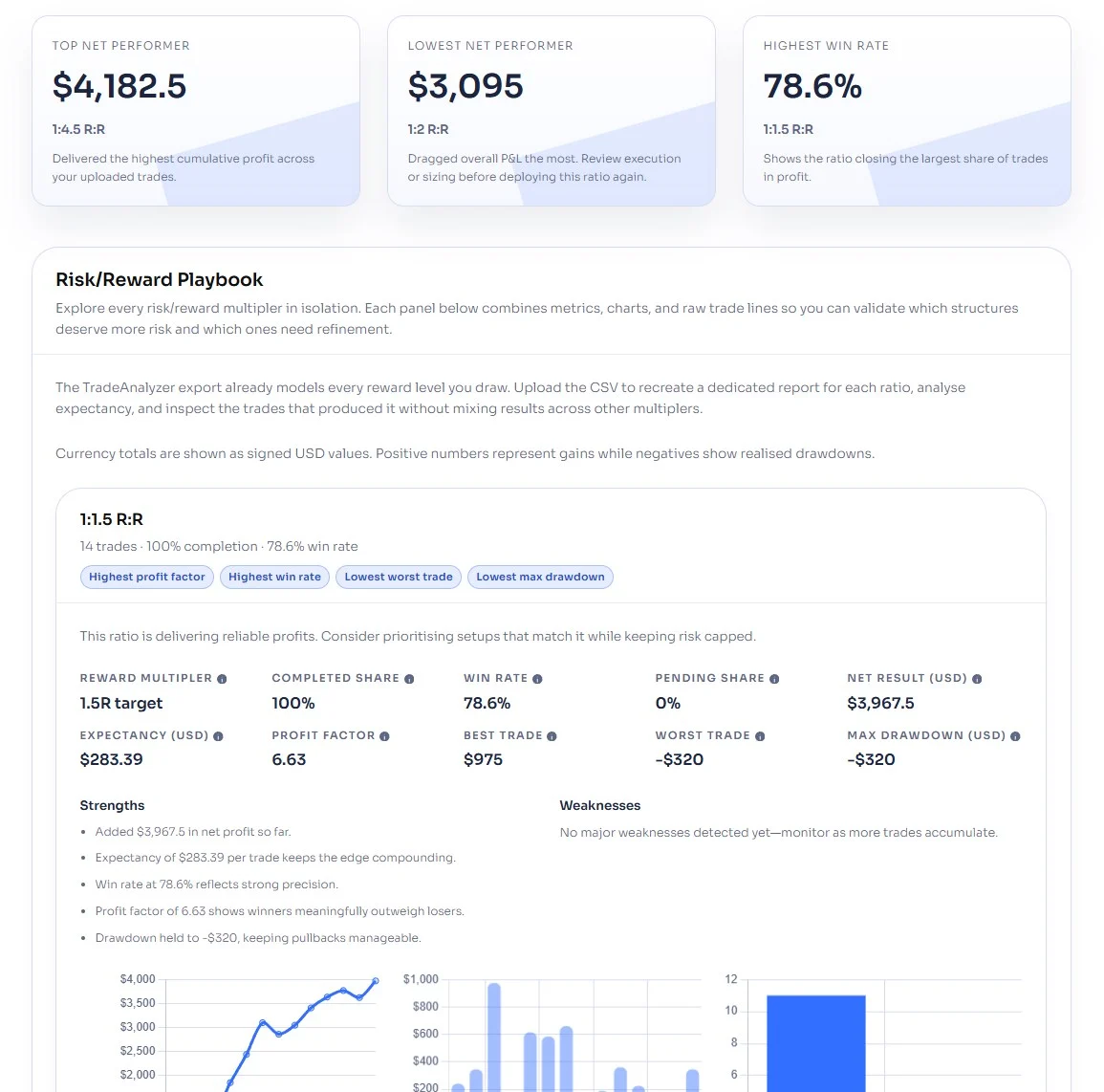
The dashboard can show how each reward multiple performed, so the review moves beyond one marked chart.
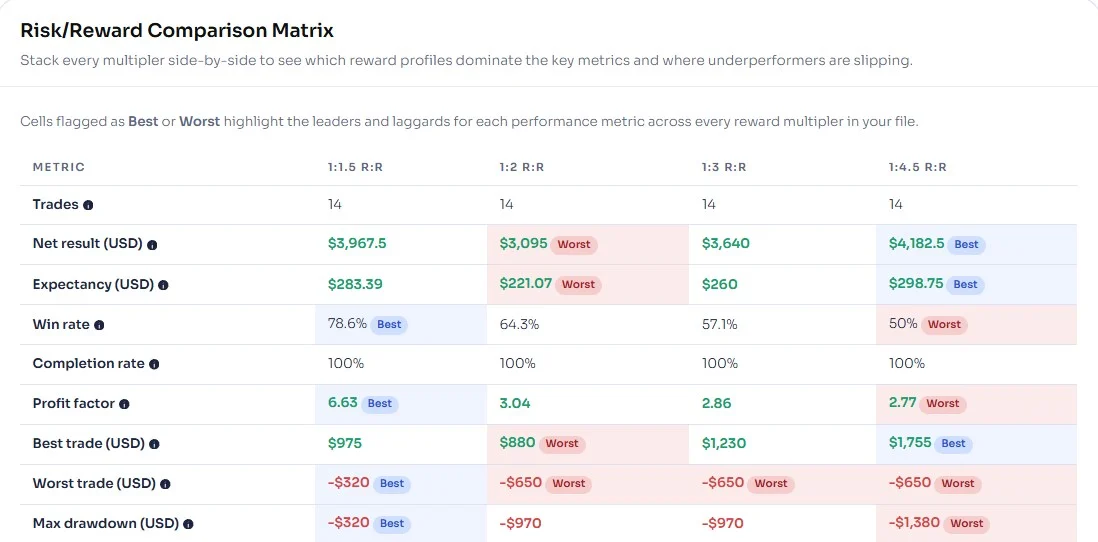
The report compares reward multiples across the same trade batch. It helps show whether a target is working consistently or only looks good because of a few outliers.
Mark the trade idea, let the indicator evaluate future bars, then export the batch when the review is ready.
Trade Analyzer PRO does not submit live trades. It gives you a clean way to study whether the idea would have reached your targets.
Place entry and stop with middle mouse or the configured key combination.
The indicator checks bars after the anchor point for target and stop touches.
Click a drawing to remove it, or use Clear when the chart needs a fresh batch.
Use Report to save the CSV, then upload it to the web report when you want deeper analytics.
The product page links to an interactive Trade Analyzer report for CSV upload, filters, scorecards, comparison tables, and outcome charts.
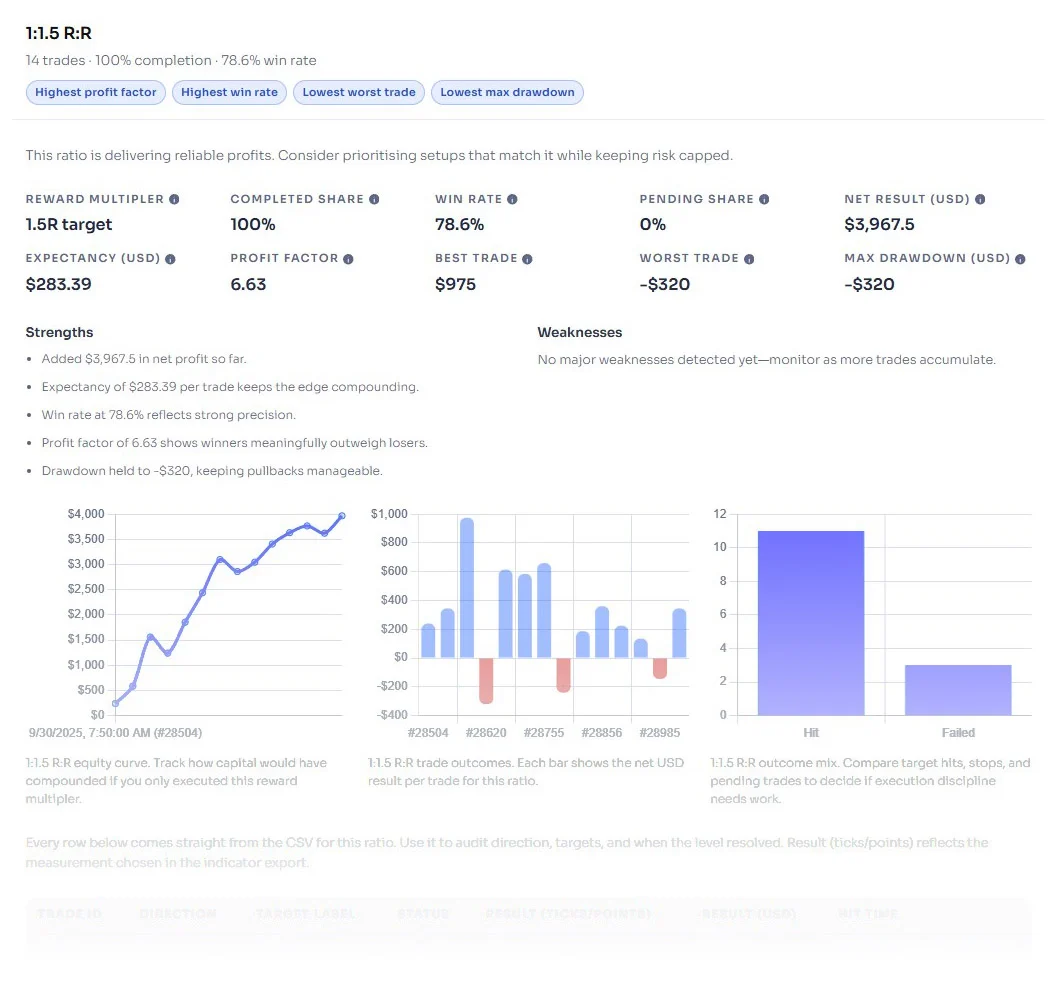
Use the web page to turn the exported CSV into a summary of reward multiples, drawdown, outcome distribution, and performance scorecards.
The first video shows the chart workflow. The second shows the CSV-to-web-report review.
Draw trades inside NinjaTrader with entry, stop, and target levels.
Upload the CSV and compare the reward multiples in the web report.
The useful question is not whether one trade looked good. It is which target behavior repeats.
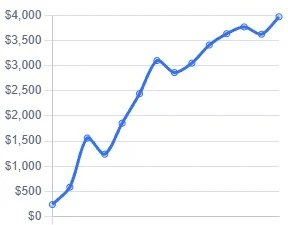
Use the curve view to compare growth, variance, and drawdown instead of judging a target from one trade.
Outcome bars show how wins, losses, and flat results distribute across trade IDs for each reward multiple.
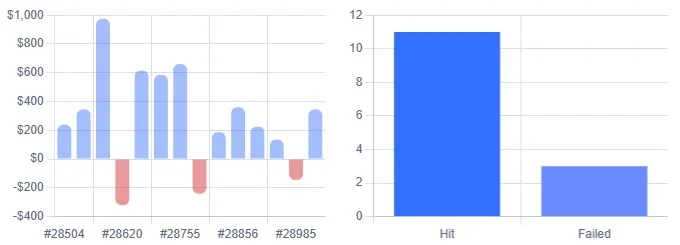
Compare target multiples against profit factor, expectancy, win rate, and drawdown.
Spot trades where small winners keep getting followed by full-risk stopouts.
Use the data to refine ATM templates, target selection, and coaching notes.
Built for traders who review chart ideas and want more than a screenshot folder.
Mark historical ideas on the chart, export the results, and study whether the target structure still makes sense.
Check whether a playbook depends on tiny partials and full stopouts before scaling risk.
Compare how common target multiples behave before changing a live execution template.
Use the CSV and dashboard to discuss trade outcomes with a clean record instead of loose memory.
These controls change the daily review workflow, not just the look of the drawing.
R/R Key CombinationUse middle mouse only, or require a modifier key plus middle mouse.
First Click Sets EntryStart the marker from entry or from stop, depending on how you think through setups.
Display ModeShow ticks, currency, or both on the chart drawing.
Amount of ContractsUse contract amount for currency reporting in the labels.
Show Target #1-#4Control how many reward levels should be tested and shown.
R Multiple #1-#4Set the target multiples you actually care about reviewing.
The logic is simple enough to trust: mark the risk, then evaluate bars after the anchor point.
For long trades, targets are hit when price reaches or exceeds the target price. The stop is hit when price trades at or below the stop.
Short trades use the opposite logic. If one bar touches both stop and target, the result is marked ambiguous.
The product is useful because it keeps the chart, CSV, and dashboard connected.
When bar data cannot prove whether the stop or target came first, the indicator marks the outcome as ambiguous.
Each row includes the fields needed for later analysis, including trade ID, target type, multiple, result, status, and hit time.
Upload the exported CSV to inspect performance by reward multiple instead of building a spreadsheet from scratch.
Start with the trial, then keep the license that fits your review workflow.
Test Trade Analyzer PRO with your own NinjaTrader setup before choosing a plan.
Use the indicator, CSV export, and web report for one year of trade review.
Chart marking, target checks, CSV export, and the web report page.
Pay once and keep Trade Analyzer for your review routine.
Lifetime support, updates, CSV export, and the web report page.
Start Free Trial - No Credit Card Required. The trial is available once per user.
Short answers for the buying questions that usually come up first.
Yes. It is built as a NinjaTrader 8 indicator and runs on charts.
No. It is a review and analysis tool. You mark trade ideas; it does not submit orders.
Yes. Mark trades on historical chart areas, let the indicator evaluate the later bars, and export the report.
The Report button writes CSV files to a TradeAnalyzerReports folder under Documents.
Yes. Click a marked trade area, line, or level to remove that trade. Use Clear when you want to remove the saved markers.
The tool marks that outcome ambiguous, because bar data alone cannot prove the hit order.
Start with the 7-day trial, mark your next review batch, and export the results instead of rebuilding the trade record by hand.
Articles
Product feedback
an you believe i was struggling for the long time to record and see how much i made or lost and where i was going wrong, if you want to know exactly where you are going wrong in trading you need this 100%
didn’t realize how many small mistakes I was repeating until I started using Trade Analyzer. It made it very clear which setups were actually working for me and which ones I just thought were good. Simple, but really eye-opening.
very very good
Great tool, really. Thank you for such a good idea and perfect realization. works amazing and main thing - improves results.
Prop rules destroy you if you take tiny wins and big stops. Trade Analyzer visually slapped me in the face - I saw how many of my trades were 0.2R or 0.3R winners followed by -1R losers. Once you SEE that in bright red and green on your chart… you change fast. I now only take trades where the structure naturally supports at least 1R. huge performance jump !Amazing and actually unique piece of software for low price.
I’ve been trying to become consistent for TopStep.
After one week using Trade Analyzer, the pattern was stupidly clear:
My longs hit 2R at a MUCH higher rate than my shorts.
So now I size bigger in longs and half-size shorts.
I export my trades every week, indicator makes it easy to analyze. Honestly, feels like cheating (the good kind).
Not joking - I actually enjoy marking trades now. Seeing the green ladder light up target by target is addictive The fact it records exact bar/time when a target gets hit is SO helpful for reviewing pace of follow-through. Also the “Clear All” button is a lifesaver because I tend to mark way too many trades.
I’ve been using Trade Analyzer for 3 weeks and it’s honestly the first time my journaling feels real.
Middle-click entry, middle-click stop, and boom - the whole 0.5R/1R/2R/3R ladder gets tracked without me doing math.
Had a question about the export panel and support walked me through the report generator in like 4 minutes.
A chart-to-report workflow for reviewing setups, target multiples, hit timing, and stop behavior.