MANAGED TRADING+ FREE INDICATORS+ TRADE COPYING+ AUTOMATED TRADING+ ENTRY SIGNAL INDICATORS+ TRADE INDICATORS+ QUALITY OF LIFE ADD-ONS+ NINJATRADER SOLUTIONS+ MANAGED TRADING+ FREE INDICATORS+ TRADE COPYING+ AUTOMATED TRADING+ ENTRY SIGNAL INDICATORS+ TRADE INDICATORS+ QUALITY OF LIFE ADD-ONS+ NINJATRADER SOLUTIONS+
Free Indicators Pack

NinjaTrader 8 automated strategy

Reversal Strategy

Reversal Strategy for NinjaTrader 8 with MAS pre-made template sets, bi-weekly updates, trade logs, support, and remote help on request.

Choose access See details

Templates included

Remote support on request

Bi-weekly updates

Strategy

Reversal Strategy

(87 customer reviews)

From: $70 / week

Reversal Strategy is the MAS strategy for traders who want automation around reversal-style trades, validation, stale setup control, and more.

Read More

Built for NinjaTrader 8 Pre-made template sets included Bi-weekly set updates Trade log for session review
01

A reversal strategy package

Reversal Strategy is the MAS strategy for traders who want automation around reversal-style areas, validation, stale setup control, and set updates.

What it is about

Reversal areas with a time limit

Reversal Strategy is built around pivot-style reversal areas and confirmation. The important user-facing point is the discipline: setups are validated, managed, and not left active forever.

Reversal-style automation package Stale setup control before entries stay active too long Bi-weekly template updates and support resources
Reversal areaThe package is organized around reversal-style opportunities, not momentum runs or session-open structure.
ValidationThe loaded set controls how the strategy filters and prepares the setup.
Keep-alive controlConfirmed setups are not meant to sit around indefinitely if the market moves on.
Update cycleBi-weekly set refreshes help keep the package current during active access.
02

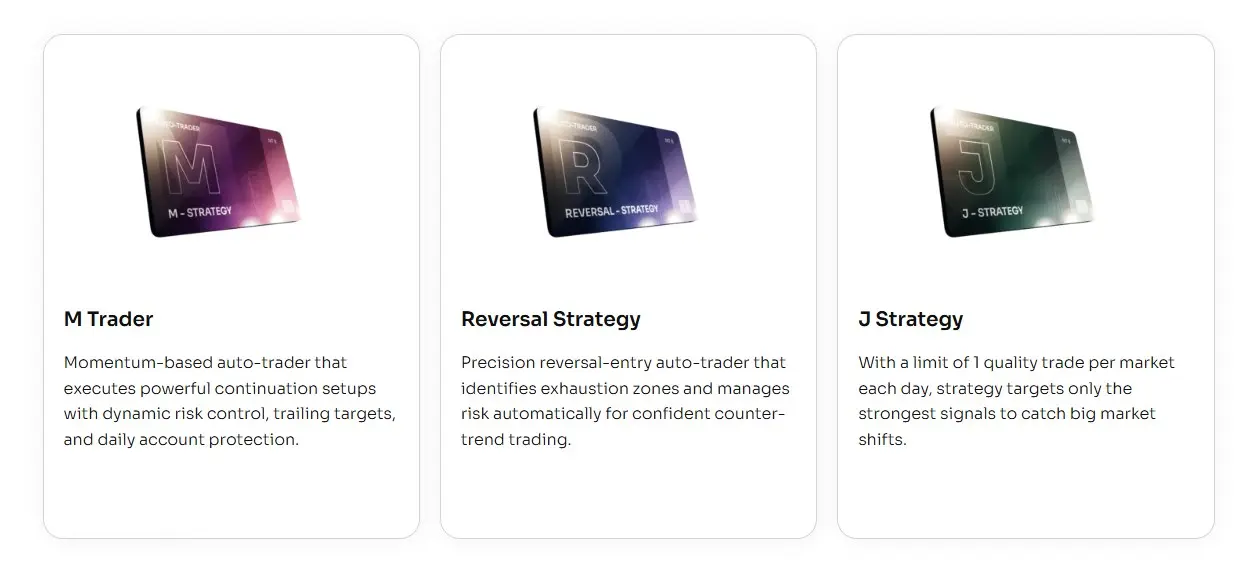
How Reversal Strategy differs from the other strategies

All three strategies use MAS template sets. Reversal Strategy is the one built around reversal areas and whether a setup is still fresh enough to use.

M Trader

Momentum package

More focused on momentum-style movement, active management, reports, and update notes.

J Strategy

Session structure

More focused on the opening-session workflow, staged testing, and one-trade-per-template review.

Reversal Strategy

Reversal areas

Best fit when you want a reversal-focused package with setup validation, stale setup control, and set updates.

03

Start with MAS template sets

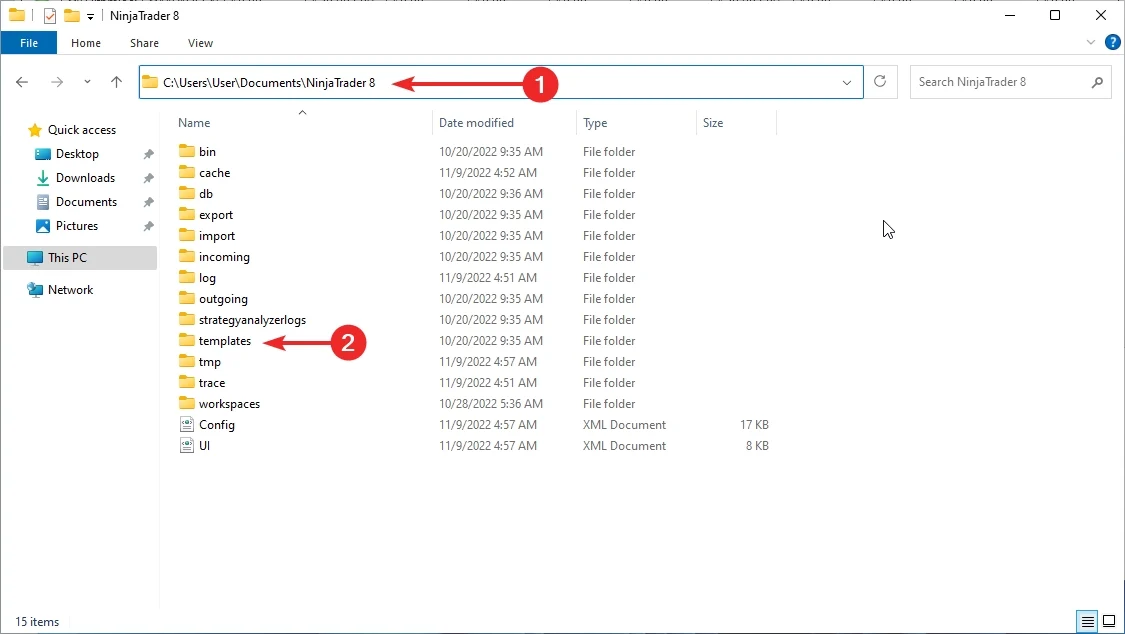
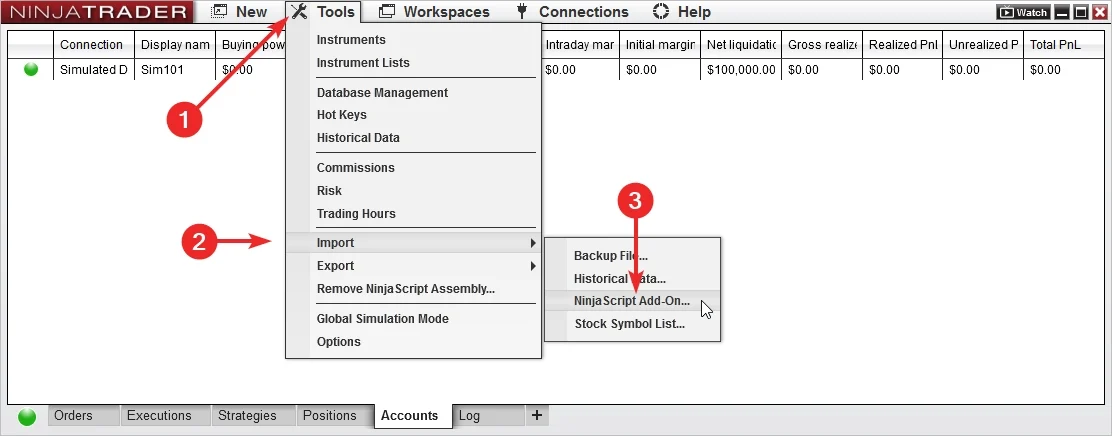
Start by importing the add-on and loading a MAS template set in NinjaTrader 8.

Import the add-on

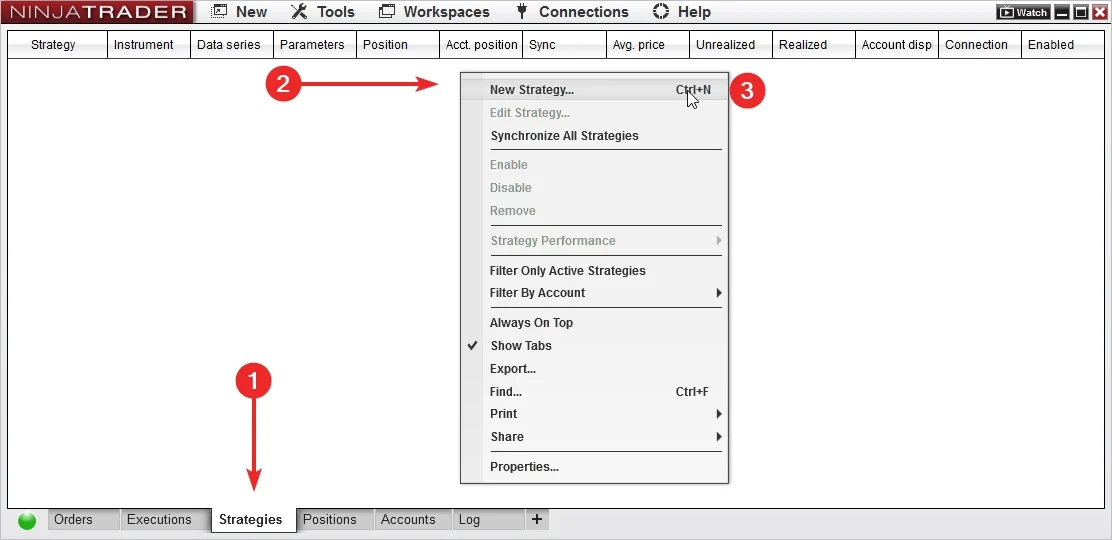
Add Reversal Strategy to NinjaTrader 8, confirm it appears in the platform, and keep the first session focused on installation.

Load a ready set

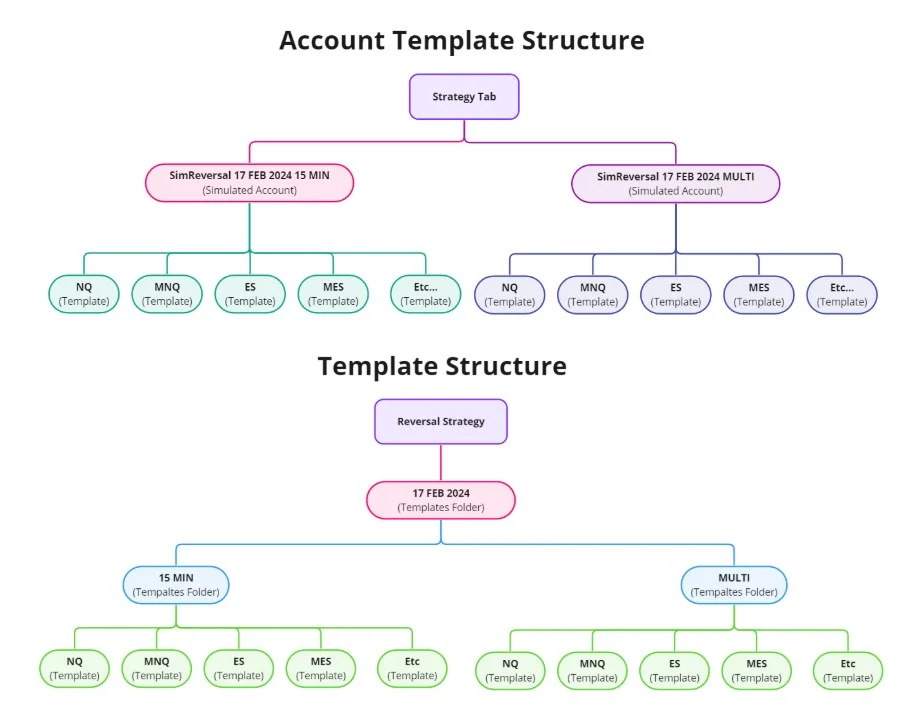
Use MAS pre-made template sets as the starting point. Test sets on separate accounts before choosing what to run live.

04

Import, load, test, review

Import the latest files, load a template set, test it, then review the output.

Workflow

Template set workflow

Use the same order each time so set testing stays clean and support questions are easier to answer.

1
Import

Install the add-on and the latest MAS template set package.

2
Load set

Select a MAS pre-made template set in NinjaTrader 8.

3
Test account

Run the set in a test account or test environment.

4
Review

Check logs and behavior before changing sets.

05

What the template sets handle

Template sets keep the setup consistent while the strategy runs inside NinjaTrader 8.

Ready setup values

  • Template sets

    Start from MAS maintained sets instead of building the setup yourself.

  • Consistent testing

    Run each set on its own test account so results and notes stay easy to compare.

Automated execution

  • Platform based

    The strategy runs inside NinjaTrader 8 after you load the add-on and template set.

  • Repeatable steps

    Automation handles the execution sequence after the selected set is loaded.

Review and updates

  • Trade log

    Use recorded session behavior for review and support questions.

  • Bi-weekly updates

    MAS refreshes the template sets every two weeks.

01

Pre-made template sets are included with access.

02

Template set updates are delivered bi-weekly.

03

Support and remote help are available on request.

06

Test each template set first

Use a test account or test environment before live use. Test sets separately, then choose what belongs on the main account.

Test one set per account

Load a set, let it run long enough to understand behavior, then review the log before changing anything.

Import the latest add-on and template set package. Load a MAS template set in NinjaTrader 8. Run the set in a test account or test environment. Review the trade log before moving templates or sets to the main account. Remember that past examples do not guarantee future results.
07

Template package included

Start with a maintained strategy package and included template sets.

Install

Add it to NinjaTrader 8

Import the strategy, confirm it appears in the platform, and keep the first session focused on a clean install.

Load

Use a MAS set

Load a pre-made template set from the package before you begin testing.

Review

Read the session output

Use logs and order history to understand what happened before changing sets or extending access.

08

Keep template sets current

MAS refreshes template sets bi-weekly, so the routine is import, load, test, and review.

Download and import the latest update package. Load the template set you want to test. Run different sets on separate test accounts when comparing them. Review the log before changing sets.
Update rhythm

Bi-weekly set refresh

MAS updates template sets every two weeks. Keep notes on which set you tested and when.

09

Less setup work

Access includes the strategy add-on, template sets, updates, and support resources.

Sets do the setup work

Start from MAS pre-made template sets instead of spending the first session rebuilding the setup.

  • Faster start

    Import, load a set, and begin testing inside NinjaTrader 8.

  • Cleaner notes

    Track which set you tested instead of changing many variables at once.

Automation handles execution steps

The strategy takes over the repetitive trading sequence after the add-on and template set are loaded.

  • Repeatable workflow

    Use the same import, load, test, and review process for each set.

  • Clearer support

    Recorded behavior makes installation and template-set questions easier to diagnose.

10

Templates, updates, and support

Access includes MAS pre-made template sets, bi-weekly updates, automated strategy support, and remote support on request.

Templates

Pre-made template sets

Use the included sets as the starting point for organized testing.

Updates

Bi-weekly updates

MAS refreshes the template sets every two weeks during active access.

Help

Remote support on request

When installation or template-set loading needs a second look, remote support is available on request.

11

Choose your access

Start with the common plans. Open the full list for quarterly, six-month, or annual access.

Included with access

Strategy access, pre-made template sets, bi-weekly updates, and support

Choose a license term, import the add-on, load a set, and test it before live use.

Weekly access

Weekly Plan

$70 / week
  • For first checks

    Use for a short test before choosing a longer term.

  • Includes

    Strategy access, pre-made template sets, bi-weekly updates, support, and remote support on request.

Lifetime access

Lifetime Plan

$1,990 / once
  • No recurring license

    Use when you want long-term access.

  • Includes

    Strategy access, pre-made template sets, bi-weekly updates, support, and remote support on request.

12

Questions before checkout

Short answers about template sets, testing, support, and access.

What platform is it for?

Reversal Strategy is built for NinjaTrader 8.

Is Reversal Strategy automated?

Yes. It can place and manage trades inside NinjaTrader 8 after the add-on and template set are loaded.

Are template sets included?

Yes. Reversal Strategy includes MAS pre-made template sets for NinjaTrader 8.

Do I need to build templates myself?

No. Start with the included sets and test them in your own environment.

How often are template sets updated?

MAS updates Reversal Strategy template sets bi-weekly.

Should I test it first?

Yes. Load each set on a test account or test environment, review the log, then choose what belongs on the main account.

Can a set include several templates?

Yes. Test the set first, then keep the templates you want to run on the main account.

Can it trade more than once per day?

Yes. Reversal Strategy is a regular automated strategy and can take multiple trades during a day depending on the loaded set and market behavior.

Does it keep trade records?

Yes. The strategy can keep a trade log for session review and troubleshooting.

Can I get setup help?

Yes. Remote support is available on request for installation and template-set loading questions.

Does it guarantee profit?

No. Automated trading carries risk. No strategy, template, report, or example can promise future results.

Start with Reversal Strategy template sets

Choose access, import the add-on, load the MAS template sets, and test the setup in NinjaTrader 8 before live use.

Articles

Reversal Strategy for NinjaTrader 8 — Full Setup, Testing & Risk Guide

Step-by-step guide to install, configure, and test the Reversal Strategy in NinjaTrader 8. Includes risk controls, PnL limits, and troubleshooting tips.

How to Test and Use Templates for Automated Trading (NinjaTrader 8)

Learn how to effectively test and use templates for automated trading using NinjaTrader 8. Evaluate performance and use templates wisely. Free strategies available.

NinjaTrader 8 Automated Strategy Not Working? The Definitive Fix Guide

Is your NinjaTrader 8 strategy not placing trades or won’t enable? Follow this checklist to fix data series, template, session, and license issues.

How to Add a Strategy in NinjaTrader 8 (Control Center & Chart Methods)

Learn two methods to add and enable strategies in NinjaTrader 8 — via Control Center and chart. Step-by-step with screenshots and troubleshooting.

How to Manually Import Strategy Templates Into NinjaTrader 8?

Step-by-step instructions to manually import strategy templates into NinjaTrader 8. Includes best practices, file format tips, and troubleshooting help.

How to Install an Automated Trading Strategy in NinjaTrader 8

This step-by-step tutorial walks you through installing an automated strategy in NinjaTrader 8. Whether you’re importing your first file or troubleshooting, you’ll find practical tips for a smooth setup.

Product feedback

Reviews

4.2 87 reviews
  1. Rodney Gent Verified owner
    4/5

    wouldn’t recommend this to someone brand new to trading. The strategy works but you need to understand what a real reversal looks like and when markets are just chopping. I ran it all day at first and got chopped up. That was on me. After cutting out low-volume hours it improved, but I still think beginners might blame the strategy instead of their setup.

  2. Penny Verified owner
    5/5

    .Gonna be honest this strategy annoyed me at first. Like genuinely. I kept thinking it was missing obvious reversals and I was sitting there watching price turn without it doing anything. I almost stopped using it. The problem was I was treating it like a scalper and it’s not that. I had it running all day, through lunch, through low volume, even during news once which was stupid. After a few weeks (and a few emails) I realized it only really makes sense when structure is clean. Once I stopped interfering and stopped changing settings every red trade it started to behave more logically. Still not perfect but way better than my manual mess.

  3. Mr David Brown Verified owner
    4/5

    I’ve been running the Reversal Strategy for about a month. First week was rough, mostly because I didn’t understand how strict the logic is. I expected more trades and thought something was wrong. After slowing down and actually reading the settings, I realized it’s designed to wait for proper structure, not just any pullback. Once I limited it to specific hours and stopped changing parameters every day, the behavior became predictable. It doesn’t win every trade but losses are controlled and it doesn’t spiral.

  4. Usman Chaudhry Verified owner
    4/5

    Used it on a small prop eval with strict hours and one contract. It didn’t overtrade and respected the stops. That alone saved me from myself. Not flashy but it did its job Orders go in clean, stops are where they should be, no weird behavior. That already puts it above a lot of other bots I’ve tried.

  5. well pleased Verified owner
    5/5

    I just extended my license to a full 1-year term, and honestly thank you for the 30% discount on that - big help. After running the strategy for a while, I can say it’s been performing really well overall. The structure, the logic, and the way the trades are executed all make sense once you see it in action day after day.

    One thing I’d tell new users though: don’t assume every template set behaves the same. That’s something I learned the hard way. Some sets absolutely crush it in trending weeks, while others do better when the market is choppier or slower. It’s not a “plug everything in and walk away” kind of system. You really need to test, switch between sets when needed, and understand which ones match the current market conditions.

    Once you do that, the strategy becomes very consistent and way easier to manage. With the right set running, results are smooth and controlled, and I feel a lot more confident trading with it now than when I first started.

    Overall, super happy with the upgrade and performance - just make sure you’re choosing the right template set for the environment you’re trading in.

  6. Rod Vass Verified owner
    5/5

    I loaded ONLY the 10-Minute Set for NQ on a single evaluation account (they tell you 1 set per account for a reason), and holy hell… the discipline is unreal.
    No overtrading, no double signals, nothing weird.
    The break-even move triggered exactly how Apex requires so the trailing drawdown stayed untouched.
    Honestly the 10-MIN set for NQ feels like it was made specifically for evaluations.

  7. Andrew Hyde Verified owner
    4/5

    I’ve blown so many Apex accounts from stupid manual overtrades.
    Reversal Strategy + templates = solved. But Had a couple meh trades during lunch periods

  8. Paul B Verified owner
    5/5

    I’m not very technical, so having preconfigured templates saved my life. Imported them, enabled the strategy, and the bot handled everything, stop windows, break-even, RR ratio, pivot filters.
    It feels like trading with bumpers on a bowling lane… you literally can’t do dumb stuff.

  9. Andrew H Verified owner
    4/5

    Reversal Strategy is definitely an interesting approach to trading. It’s not like other “magic indicators that flood you with arrows on every candle. Instead, it’s a bit more patient, and when a reversal prins u know there’s logic behind it. I’ve been running it on ES and MNQ for two weeks, and while not every trade is perfect, the consistency is there. It also plays nicely with my existing templates and doesn’t slow ddown my platform. I’m giving it 4 stars because it does take time to learn how to fine-tune it for different markets. But if you’re serious about reversals, this is worth exploring.

  10. Harepath Estates Verified owner
    4/5

    I’m not a fan of over-optimized stuff, but Reversal Strategy feels robust. Losers small, winners decent. 3.7

  11. Christopher Mott Verified owner
    4/5

    pretty solid when market is not choppy. works best for me on trending days or when price is overextended

  12. Roy Smith Verified owner
    4/5

    Reversal strategy - is good for certain markets and timeframe. not all of them really. personally i found that not all templates they provide is profitable. so i'm choosing the set i'm sticking with and adjusting it after like 3 days of letting the strategy take trades. this apporch helped me to qualify 10+ apex accounts already. micro version of templates sometime works on my cash account too, just slowly making some buck here and there. not a holy grail but def good tool if you spend time with it and tweak stuff.

  13. Abbie Verified owner
    4/5

    Thank you for the strategy. working only with 5 min timeframe and only nasdaq. works fine

  14. RICHARD STOCKWELL Verified owner
    4/5

    Without comprehensive performance data, it's challenging to gauge this tool's effectiveness over time. It Requires only realtimme testing and templates update. Some tamplates stop working overtime so you are connected to the support and new templates supply. This scheme works but requires some work from your end aswell. If you were looking for fully passive money button - not for you.

  15. Paul Leonard Verified owner
    4/5

    autotrader actually has moments of brilliance but also times when it's just not up to the task, making it a bit unpredictable. Positive at the end and thats great

  16. Miss Randall Verified owner
    5/5

    For those strapped for time tthis tool is a not bad, catching opportunities you might otherwise miss. using it only when im out

  17. Fiona Verified owner
    3/5

    This is an excellent starting point for those new to automated trading, but it's not the endgame

  18. Mr Windsor Verified owner
    4/5

    During high volatility, this auto-trader shines like a beacon. It's incredibly accurate, which has saved me from making costly decisions during chaotic market conditions. However, in calmer markets, it sometimes misses the mark. It's fascinating how well it adapts to turbulence, but I wish it was as consistent in in all market conditions.

  19. Martin Vigor Verified owner
    5/5

    It’s great for price-action traders, but I’d love to see more customization for other styles. wish I’d discovered automation earlier. It’s not perfect, but the consistent updates and support show that the team is committed to improvement.

  20. Ronald House Verified owner
    4/5

    This is by far the best auto-trading strategy I’ve come across for NinjaTrader. It’s simple to set up, yet powerful enough to handle complex market conditions. The profit curve has been steady, which is all I could ask for. While the strategy works well in most market conditions, I noticed that during extremely high volatility, some adjustments to the settings are needed. Thankfully, the support team is very helpful in guiding users through these tweaks.

Reversal Strategy

Quick access

For traders who want automation around reversal-style trades, validation, stale setup control, and more.

$70 / week
Get Weekly License