The NinjaTrader 8 Auto-Login & Auto-Cleaner tools by MASCapital UK simplify and maintain your NinjaTrader environment. The Auto-Login automates credential entry every time NinjaTrader starts, while the Cleaner removes unused or temporary data to keep performance optimal. Follow this guide to download, configure, and safely run both utilities.
Table of Contents 🔗
- NinjaTrader 8 Auto-Login
- NinjaTrader 8 Cleaner
- 1. Auto-Login Installation Process
- 2. NinjaTrader 8 Cleaner Installation Process
- 1. Database Cache Group
- 2. Database & Market Data Group
- 3. General Files Group
- 4. Logs & Temporary Files Group
NinjaTrader 8 Auto-Login 🔗
The NinjaTrader 8 Auto-Login feature streamlines the login process by automatically entering credentials each time the platform starts. It eliminates manual input and allows traders to focus directly on their market activity. By automating login, it saves time and ensures consistent access — particularly valuable in fast-paced trading environments or for users operating multiple accounts.
1. Auto-Login Installation Process 🔗
Step 1: Download & Extract 🔗
- Download the NinjaTrader 8 Auto-Login & Cleaner
.zipfile. - Extract the contents of the downloaded file to your Desktop.
Step 2: Configure Your Auto-Login Credentials 🔗
- Open the extracted folder on your Desktop.
- Locate the
credentials.txtfile inside. - Enter your NinjaTrader login credentials (Apex, LeeLoo, Bulenox, Tradovate, etc.).
- Save the
credentials.txtfile to store your login details securely.
Step 3: Move the Config Files 🔗
- Move the
credentials.txtfile into your Documents folder. This ensures the Auto-Login shortcut can access your credentials correctly.
Step 4: Run the Auto-Login 🔗
- Double-click the NT8 Fast Start shortcut on your Desktop.
- This shortcut runs an automated script that opens
NinjaTrader8.exeand logs you in using your saved credentials.
Preview the Auto-Login in Action 🔗
Troubleshooting 🔗
- If the shortcut doesn’t run, check the Windows tray for an active script instance. Right-click and close it before starting again.
- If credentials aren’t entered automatically, click on the NinjaTrader login window to bring it to focus. The script will resume input immediately.
NinjaTrader 8 Cleaner 🔗
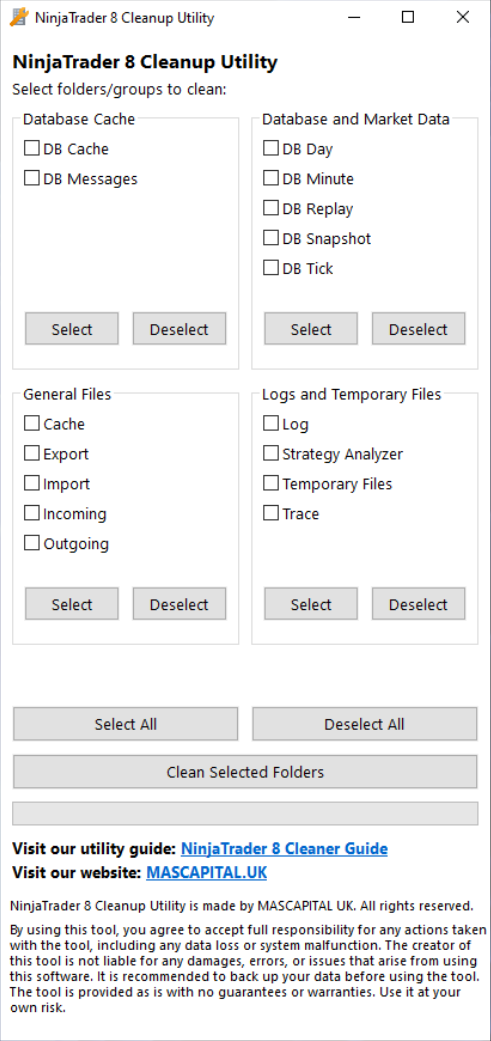
The NinjaTrader 8 Cleaner is designed to maintain optimal platform performance by removing unnecessary or temporary files stored within NinjaTrader directories. It allows users to select specific data types to delete — including cache files, database logs, and historical data — helping reduce clutter, prevent data issues, and improve loading speed. Regular cleaning keeps NinjaTrader stable and responsive, especially for traders who work with large datasets or replay data.
2. NinjaTrader 8 Cleaner Installation Process 🔗
Step 1: Download & Extract 🔗
- Extract the contents of the downloaded
.zipfile to your Desktop.
Step 3: Run the Cleaner 🔗
- Double-click the NinjaTrader 8 Cleaner shortcut on your Desktop.
- The tool will execute a cleaning script that removes all files from your selected categories.
- This process optimizes NinjaTrader by clearing redundant data and refreshing its directory structure.
Cleaning NinjaTrader 8 Directories – Line by Line Explanation 🔗
The Cleaner targets key directories associated with NinjaTrader 8 to enhance performance by removing unnecessary or temporary files. By executing this script, users maintain a clean and efficient environment where charts and data load faster. You can customize which folders are cleaned to preserve important information while removing clutter.
List of NinjaTrader 8 Folders That Can Be Cleaned 🔗
1. Database Cache Group 🔗
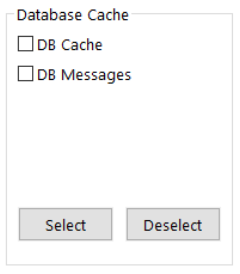
1.1 DB Messages — Cleaning DB Message Files [SAFE]
Clears all files from the messages directory:
%USERPROFILE%\Documents\NinjaTrader 8\db\messages\1.2 DB Cache — Cleaning DB Cache Files [SAFE]
Removes all files from the cache directory:
%USERPROFILE%\Documents\NinjaTrader 8\db\cache\2. Database & Market Data Group 🔗
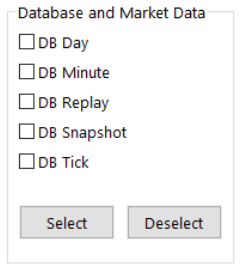
2.2 DB Day — Cleaning Daily Database Files [REMOVE IF REQUIRED]
Removes all files from the day data directory. If you wish to retain day data, disable this option. Otherwise, keep it enabled to clear and refresh all historical daily bars. NinjaTrader will automatically reload this data when restarted.
%USERPROFILE%\Documents\NinjaTrader 8\db\day\2.3 DB Minute — Cleaning Minute Data Files [REMOVE IF REQUIRED]
Removes all files from the minute data directory. This ensures clean and accurate historical minute bars after restart.
%USERPROFILE%\Documents\NinjaTrader 8\db\minute\2.4 DB Replay — Cleaning Replay Data Files [WARNING]
Deletes all Market Replay files. Replay data consumes large disk space; remove only if you don’t plan to use playback.
%USERPROFILE%\Documents\NinjaTrader 8\db\replay\2.5 DB Snapshot — Cleaning Snapshot Files [SAFE]
Clears snapshot data for faster NinjaTrader loading.
%USERPROFILE%\Documents\NinjaTrader 8\db\snapshot\2.6 DB Tick — Cleaning Tick Data Files [REMOVE IF REQUIRED]
Removes tick-level data from the database. Re-enable if you want NinjaTrader to refresh all tick data on restart.
%USERPROFILE%\Documents\NinjaTrader 8\db\tick\3. General Files Group 🔗
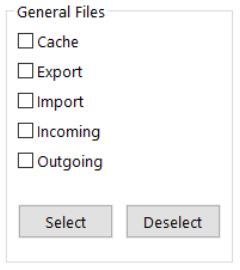
- 3.1 Cache — Cleaning Database Cache Files [SAFE]
%USERPROFILE%\Documents\NinjaTrader 8\db\cache\ - 3.2 Export — Cleaning Export Files [SAFE]
%USERPROFILE%\Documents\NinjaTrader 8\export\ - 3.3 Import — Cleaning Import Files [SAFE]
%USERPROFILE%\Documents\NinjaTrader 8\import\ - 3.4 Incoming — Cleaning Incoming Files [SAFE]
%USERPROFILE%\Documents\NinjaTrader 8\incoming\ - 3.5 Outgoing — Cleaning Outgoing Files [SAFE]
%USERPROFILE%\Documents\NinjaTrader 8\outgoing\
4. Logs & Temporary Files Group 🔗
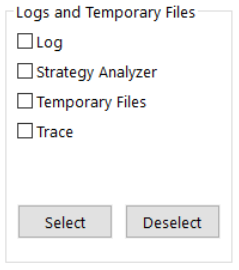
- 4.1 Cleaning Log Files [SAFE]
%USERPROFILE%\Documents\NinjaTrader 8\log\ - 4.2 Cleaning Strategy Analyzer Logs [SAFE]
%USERPROFILE%\Documents\NinjaTrader 8\strategy\logs\ - 4.3 Cleaning Temporary Files [SAFE]
%USERPROFILE%\Documents\NinjaTrader 8\temp\ - 4.4 Cleaning Trace Files [SAFE]
%USERPROFILE%\Documents\NinjaTrader 8\trace\