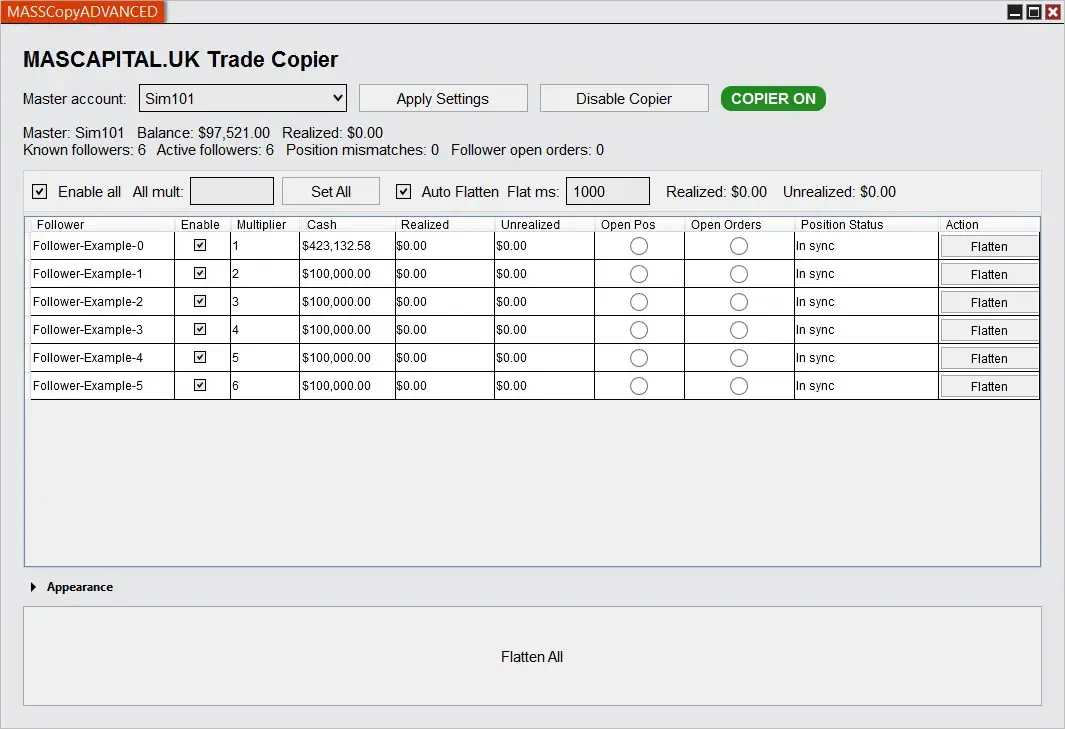
Trade Copier for NinjaTrader 8 has a new version. Before, it worked like an indicator. Now it works as a NinjaTrader 8 add-on.
Important: the master account should always be a NinjaTrader SIM account. In this version, the SIM master workflow is the correct and preferred setup. It gives Trade Copier the cleanest order source and the highest copying accuracy for every trade and order.
This is a better setup for traders who want to copy trades across multiple accounts. You can trade from one SIM master account and copy the orders to selected follower accounts, including funded accounts, evaluation accounts, broker accounts, SIM accounts, and other NinjaTrader-connected accounts.
If you trade with firms or connections such as Apex, TopStep, Bulenox, Tradovate, or similar funded account providers, this update makes the workflow easier to manage from one window.
Table of contents #
- What changed?
- Why it is now an add-on
- How the new workflow works
- How it copies trades across accounts
- Using Trade Copier with funded accounts
- Different size for each follower account
- Live follower account dashboard
- Flatten tools and cleanup
- Old indicator version vs new add-on version
- Useful links
- FAQ
What changed? #
The main change is simple. Trade Copier is now a NinjaTrader 8 add-on.
The older version was used like an indicator. That was okay for a basic setup, but a trade copier is really an account tool. It needs to watch orders, positions, account status, and follower accounts.
The new version opens from the NinjaTrader Control Center as MASSCopyADVANCED. You get one window for the full trade copying workflow.
- Choose the SIM master account.
- Choose which follower accounts should copy trades.
- Set the quantity multiplier for each follower account.
- Turn the copier on or off.
- Watch follower account status.
- Flatten one follower account or all follower accounts if needed.
Why it is now an add-on #
A NinjaTrader trade copier should not depend on one chart. It should work around accounts.
That is why the new version is an add-on. It can sit in the Control Center and watch the SIM master account and follower accounts from one place.
This makes more sense for traders who copy orders to several accounts. You do not need to attach the copier to a chart just to manage account copying. You open the add-on window, set the accounts, and trade from the SIM master account.
How the new workflow works #
The new workflow is easy to follow.
- Open NinjaTrader 8.
- Go to the NinjaTrader Control Center.
- Open MASSCopyADVANCED.
- Select the SIM master account.
- Enable the follower accounts you want to copy.
- Set the multiplier for each follower account.
- Apply the settings.
- Place trades on the SIM master account.
- Watch the follower accounts in the grid.
This is the normal setup for a NinjaTrader 8 trade copier. One SIM account is the source. Other accounts follow it.
How it copies trades across accounts #
When you place an eligible active order on the SIM master account, Trade Copier creates matching orders on the enabled follower accounts.
The copied order uses the same main order details:
- instrument
- buy or sell action
- order type
- time in force
- limit price, if the order uses one
- stop price, if the order uses one
The add-on also keeps a link between the master order and the copied follower orders. This is important. If the master order price changes, the follower order can be updated. If the master order is cancelled or rejected, the copied follower order can be cancelled or cleared from tracking.
This makes the new version useful for traders who need copy trading in NinjaTrader 8 across more than one account.
Using Trade Copier with funded accounts #
Many traders use Trade Copier because they trade more than one funded account or evaluation account.
For example, a trader may want to use one SIM master account and copy the same trade to several follower accounts. This is the recommended setup. The SIM master account gives Trade Copier the most accurate order source, which helps it copy trades as close to perfect as possible. The followers can be connected broker accounts, funded accounts, evaluation accounts, or other accounts available inside NinjaTrader.
This can be useful for traders working with:
- Apex funded accounts
- TopStep accounts
- Bulenox accounts
- Tradovate-connected accounts
- broker accounts
- evaluation accounts
- SIM accounts
You still need to manage risk, account rules, and trade size yourself. Trade Copier helps with execution across accounts. It does not replace your trading plan.
Different size for each follower account #
Not every account should use the same size. One account may need 1 contract. Another account may need 2 contracts. A smaller account may need less exposure.
The new Trade Copier add-on lets each follower account use its own multiplier.
Example:
- Master account order: 1 contract
- Follower A multiplier: 1
- Follower B multiplier: 2
- Follower C multiplier: 3
In that example, the follower accounts copy the same trade idea but with different quantities.
Live follower account dashboard #
The follower grid is the main control area in the new add-on.
It can show useful account information while Trade Copier is running:
- account name
- enabled or disabled state
- quantity multiplier
- cash value
- realized PnL
- unrealized PnL
- open position state
- open order state
- expected position state
- mismatch status
- flatten status
This helps when one follower account is not the same as the SIM master account. You can see the account that needs attention instead of checking every account one by one.
Flatten tools and cleanup #
Trade Copier also includes cleanup tools.
You can flatten one follower account from its row. You can also use the main flatten control when several accounts need cleanup.
Flatten is used to cancel open orders and close open follower positions. This is helpful when the SIM master account is flat but one follower account still has an open position or open order.
- Use row-level Flatten for one follower account.
- Use Flatten All when you need to clean up all follower accounts.
- Use Auto Flatten when you want the copier to clean follower exposure after the SIM master account is flat and has no open orders.
Old indicator version vs new add-on version #
Here is the simple difference.
Old Trade Copier indicator workflow
- Used like a chart indicator.
- Less natural for account-level copying.
- Harder to treat as the main control panel.
New Trade Copier add-on workflow
- Opens from the NinjaTrader Control Center.
- Uses a dedicated MASSCopyADVANCED window.
- Shows master and follower account setup in one place.
- Copies trades across multiple NinjaTrader accounts.
- Supports funded accounts, broker accounts, evaluation accounts, and SIM accounts.
- Uses per-account quantity multipliers.
- Shows follower account status.
- Includes flatten and auto-flatten tools.
- Saves settings and layout choices.
Useful links #
You can use these pages to learn more or start testing Trade Copier:
- Trade Copier for NinjaTrader 8 product page
- Trade Copier setup and safety guide
- Trade Copier update notes
- MASCAPITAL articles
If you are new to Trade Copier, start with the product page and the setup guide. If you used the old indicator version, this new version should feel cleaner because the copier now lives in the Control Center.
FAQ #
What is Trade Copier for NinjaTrader 8?
Trade Copier is a NinjaTrader 8 add-on that copies trades from one SIM master account to selected follower accounts.
Can Trade Copier copy trades across multiple accounts?
Yes. You can enable several follower accounts and copy orders from the SIM master account to those accounts.
Does it work with funded accounts like Apex?
It can work with funded, evaluation, broker, SIM, and other NinjaTrader-connected accounts, as long as the accounts are available inside NinjaTrader. Many traders use this type of workflow with Apex, TopStep, Bulenox, Tradovate, and similar setups.
Is Trade Copier still an indicator?
No. The new version is a NinjaTrader 8 add-on. It opens from the NinjaTrader Control Center as MASSCopyADVANCED.
Should the master account be a SIM account?
Yes. The master account should always be a NinjaTrader SIM account. This is the preferred setup because it gives Trade Copier the cleanest order source and the highest copying accuracy.
Do I still trade from one master account?
Yes. You trade from one SIM master account. The enabled follower accounts copy the eligible orders from that master account.
Can each follower account use a different size?
Yes. Each follower account can use its own quantity multiplier.
What happens if the master order changes?
The add-on keeps a link between the master order and the follower orders. This lets it update or cancel follower orders when the master order changes, cancels, or rejects.
Can Trade Copier flatten follower accounts?
Yes. It has row-level flatten buttons, a main flatten control, and optional auto-flatten after the SIM master account is flat and clean.
Should I test it on SIM first?
Yes. Always test the workflow on SIM first before using it with live, funded, or evaluation accounts.