
MASSCopyADVANCED now has unified opacity controls, dropdowns that stay within the screen, and more space beside the price ladder. Start by adjusting opacity, adding a custom note label and trying the corner-radius options; changes update live.
What's new
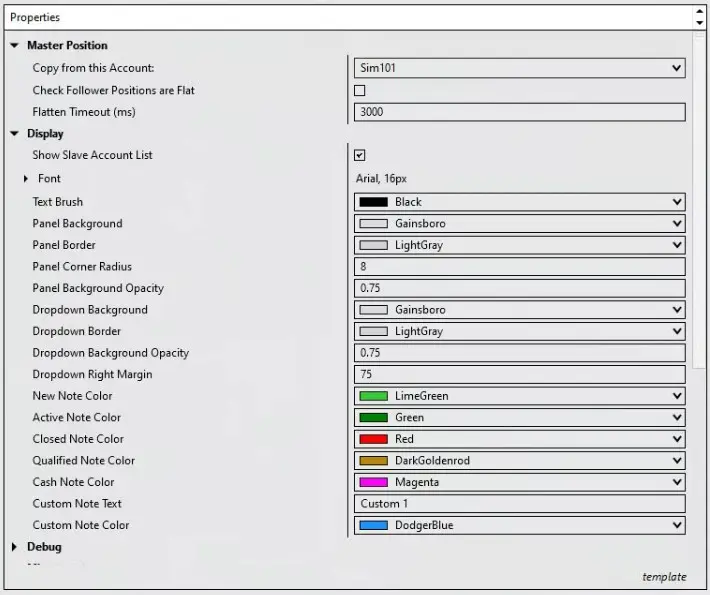
- Colour and opacity: choose a standard NinjaTrader colour, such as
Colors.BlackorColors.Magenta, and one opacity value. The panel and dropdowns share it, without hex codes or hidden alpha fields. - Chart margin: a default 200-pixel margin keeps the panel away from the price ladder and bid/ask or volume data. Adjust the value in the indicator settings for more or less space; the panel realigns with the chosen margin. This is useful when several markets or evaluation accounts share your attention.
- Dropdown layout: popups detect available space and stay visible across laptops, ultrawide monitors and screen changes. Multipliers use a 2-column × 15-row grid for selection without scrolling.
- Popup layering: dropdowns render above the panel rather than beneath drawings or other indicators.
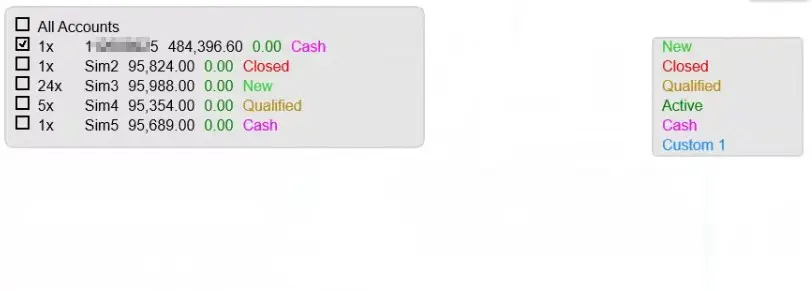
- Notes: Closed, Qualified, Active, Cash, New and custom labels share one dropdown. Type a label such as “Review” or “High Priority” in settings to add it. The label appears immediately, without extra menus or formatting requirements, alongside the existing account states.
- Spacing and shape: dropdowns open with a 5px margin. An adjustable corner radius gives the panel sharp or rounded edges.
- Template storage: brush names and numeric values replace serialised colour data for more reliable workspace transfers.
How it works
Dropdowns rearrange themselves to fit the visible area while the panel stays in position. Expanded lists remain inside the chart boundaries and avoid the price column, including when you switch monitors mid-session.
The multiplier grid lets you scan and compare values without scrolling through a long list. Popups detect the space around them rather than extending off-screen. The 5px opening margin separates the list from the panel, and shared opacity keeps their appearance consistent against the chart background.
The higher z-order keeps popups above the panel and clickable. It addresses the overlap in previous versions, where lists could sit beneath drawings or other indicators.
Templates store clean brush names with numeric values rather than serialised colour data. That makes them easier to import, export or share between workstations.
FAQ
Do I need to reinstall templates after this update?
No. Your existing templates work normally. Only the panel and popup behaviour have changed.
Will opacity settings affect chart performance?
No. The opacity engine is lightweight and uses NinjaTrader's native rendering system.
Can I disable the new right-side spacing?
Yes. Adjust the spacing value in the indicator settings. Set it to 0 for no offset.
Do custom Notes sync across templates?
Yes. Any custom note label added in settings appears in the same unified Notes dropdown.
Is this update compatible with prop-firm accounts?
Yes. The new layout is specifically optimised to avoid blocking price ladders or evaluations.
Resources & support
See the MASSCopyADVANCED product page.