
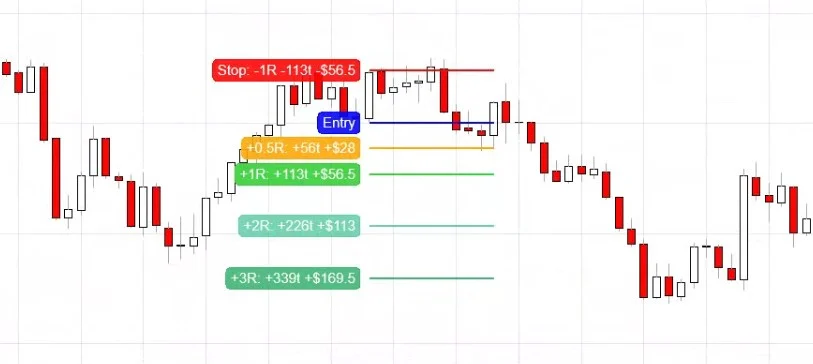
Advanced Risk Ruler v10.0 adds persistent activation shortcuts and controls for label appearance, visibility, wording and units in NinjaTrader 8. You can keep a simple entry-and-stop display or show a full multi-target map with your preferred precision.
To upgrade from version 9.x or earlier, open NinjaTrader 8 → Tools → Import → NinjaScript Add-On. Select AdvancedRiskRuler_v10.zip and confirm replacement of existing files. Restart NinjaTrader, re-add the indicator to the chart and review the reorganised parameters.
What's new
- Persistent activation:
AdvancedRiskRulerActivationCombolets you choose Ctrl + Middle Click, Shift + Middle Click, Alt + Middle Click or Space + Middle Click. The choice survives indicator reloads and platform restarts. - Reorganised parameters: controls are grouped under General, Stop Settings, Entry Settings, Positive/Negative Targets, Ruler Appearance, Text Appearance and Text Content.
- Label styling: background colour, transparency, borders, corner radius and spacing are adjustable. Labels can inherit the colour of their ruler lines.
- Visibility and formatting: choose which label groups appear, set their number precision and separators, and add your preferred multiplier suffix.
- Wording and units: change stop and entry captions, positive and negative target text, tick and currency units, and optional risk-warning text.
The update covers both single-bar risk plotting and multi-target mapping. The appearance settings control the label boxes, while the content settings control the numbers and wording inside them. You can use the same ruler for a minimal chart view or more detailed annotations for reviewing and sharing trade ideas.
How it works
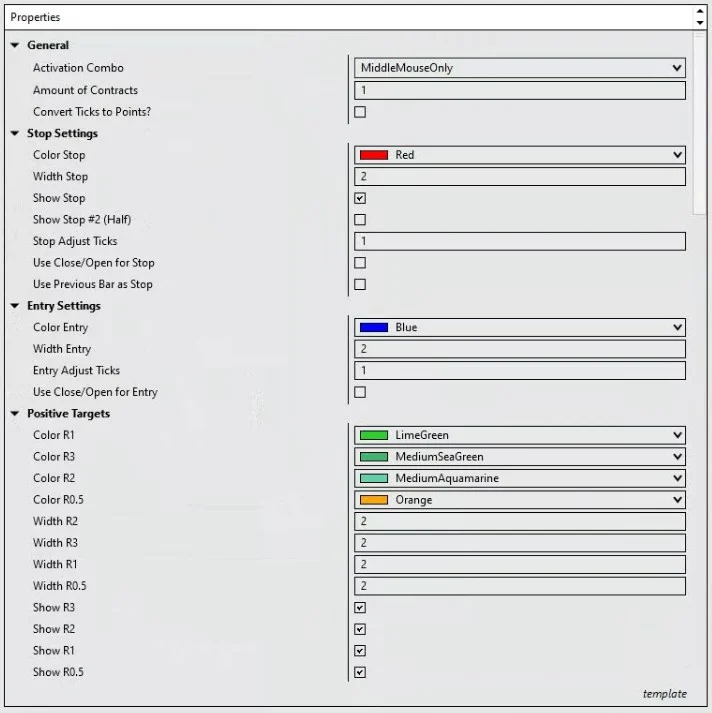
Set AdvancedRiskRulerActivationCombo to the key and mouse combination you prefer: Ctrl, Shift, Alt or Space with middle-click. NinjaTrader's cache and factory pipeline retain the selection across sessions. You do not need to select it again each time you reopen the indicator.
Choose the combination once and save the workspace. The same activation remains available after reloading charts or templates, which helps when you use several add-ons or need to avoid conflicting key bindings.
The parameter categories separate stop and entry settings from target, ruler and text controls. That keeps activation setup distinct from the appearance and content options you may revisit when preparing a different chart or template.
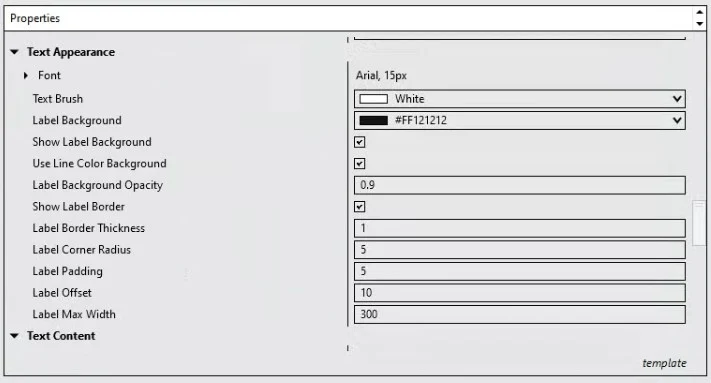
LabelBackgroundBrush, ShowLabelBackground and LabelBackgroundOpacity control annotation-box fill and transparency. Enable UseLineColorForLabelBackground to match each label to its stop, entry or target line. This keeps the line and its readout visually paired.
For a translucent overlay, the existing styling suggestion is LabelBackgroundOpacity = 40–60% with line-colour backgrounds. You can instead use bolder fills where labels need to stand apart from other chart elements.
ShowLabelBorder, LabelBorderThickness and LabelCornerRadius control the outline and shape. Use LabelPadding, LabelOffset and LabelMaxWidth to adjust text spacing, horizontal alignment and width for multi-line setups.
A label can be a subtle translucent accent or a more defined information box. The background controls set how strongly it stands out; the border and corner settings shape the box around it. Padding and width help balance longer readouts against the other elements already on the chart.
For screen-sharing, teaching or publishing analysis screenshots, these controls let you prepare the chart annotations within the indicator. You can keep the risk/reward values visible while adjusting the labels to suit a light or dark chart theme, rather than relying on one fixed label style.
Visibility is separate from styling. ShowEntryLabel, ShowTargetLabels and ShowNegativeTargetLabels show or hide those annotation groups. Keep only the groups needed for the current trade, whether that is a stop/entry view or several reward targets.
RiskRulerLabelFormat selects structured readouts in ticks, points, currency or R-multiples. UseLabelColonSeparator and LabelSeparator control the separation between metrics, for example “R: 2.5 | $250”.
LabelValueDecimals, LabelCurrencyDecimals and MultiplierDecimals set precision to suit the instrument. MultiplierSuffix adds notation such as “xR” or “R-mult”. These controls let you standardise readouts when tick sizes and currencies differ across charts, including futures and CFDs.
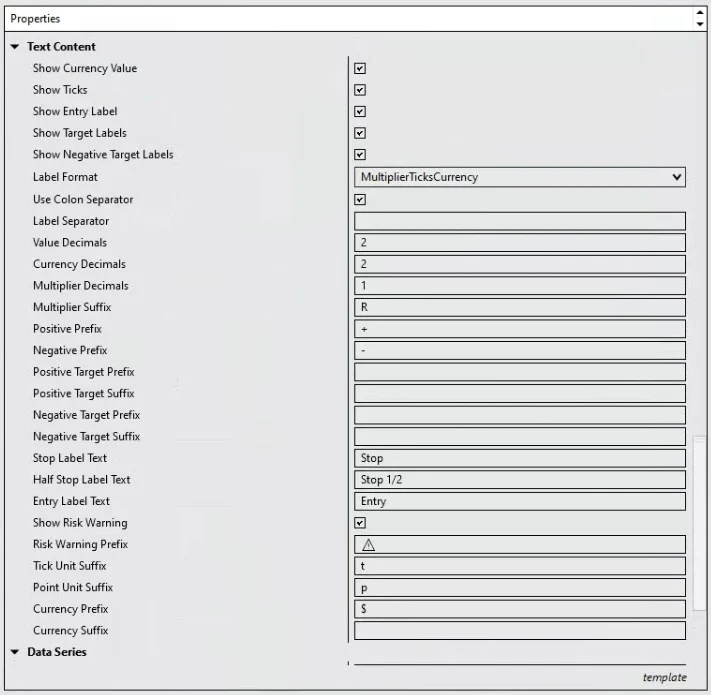
PositiveLabelPrefix, NegativeLabelPrefix and per-target variations change target wording. Examples include “Take Profit +2R” and “Risk −1R”. Rename the other levels with StopLabelText, HalfStopLabelText and EntryLabelText, using captions such as “Emergency Stop”, “Soft Stop” or “Initial Entry”.
For units, use TickUnitSuffix, PointUnitSuffix, CurrencyPrefix and CurrencySuffix. These support conventions such as “$” or “USD” and “ticks” or “pips”. The labels can use the same terminology as your journal, chart reviews or teaching notes.
Optional ShowRiskWarning, RiskWarningPrefix and MaxRiskTicks highlight a stop distance above your chosen threshold. Enable the warning and set the threshold to your own limit; the annotation flags setups that exceed it.
Custom captions and units also help with structured journalling and trade reviews. Stop, entry and target labels can follow the terminology used in your notes, while decimal and suffix settings keep the readouts consistent across instruments. Positive and negative targets can carry different wording without losing the shared visual style.
Version 10.0 preserves previous chart drawings. Refresh templates after updating so the new parameters are initialised, then verify the label options and re-save your templates.
FAQ
Do I need to remove the old version before installing v10?
No, the installer automatically replaces previous files. Just restart NinjaTrader after import.
Will my saved templates and colour preferences remain?
Yes. All pre-existing parameter values are preserved, though we recommend re-saving your templates after verifying new label options.
Can I use custom fonts or units (like pips or EUR)?
Yes. Use the new CurrencyPrefix and CurrencySuffix parameters to adapt the readouts to your preferred denomination.
Does the update affect performance?
Yes. Label rendering and cache management are now significantly more efficient, even with multiple rulers on screen.
Will it work on old NT8 builds?
v10.0 requires NinjaTrader 8.1 or newer to ensure correct label transparency and cache persistence.
Resources & support
Get the update from the Advanced Risk Ruler product page. New users can explore the Free Indicators Pack.