
If an automated strategy in NinjaTrader 8 will not trade or enable, check its template, data history and activation before changing parameters.
What it does
A template defines the instrument and timeframe the strategy needs. Matching those settings lets its indicators and filters initialise and its entry rules run.
Troubleshooting
Historical plots appear but no live orders follow
Historical signals do not trigger immediate live entries. Wait for the setup to occur in real time, with the strategy Enabled and data feed Connected.
The strategy runs with the wrong Data Series
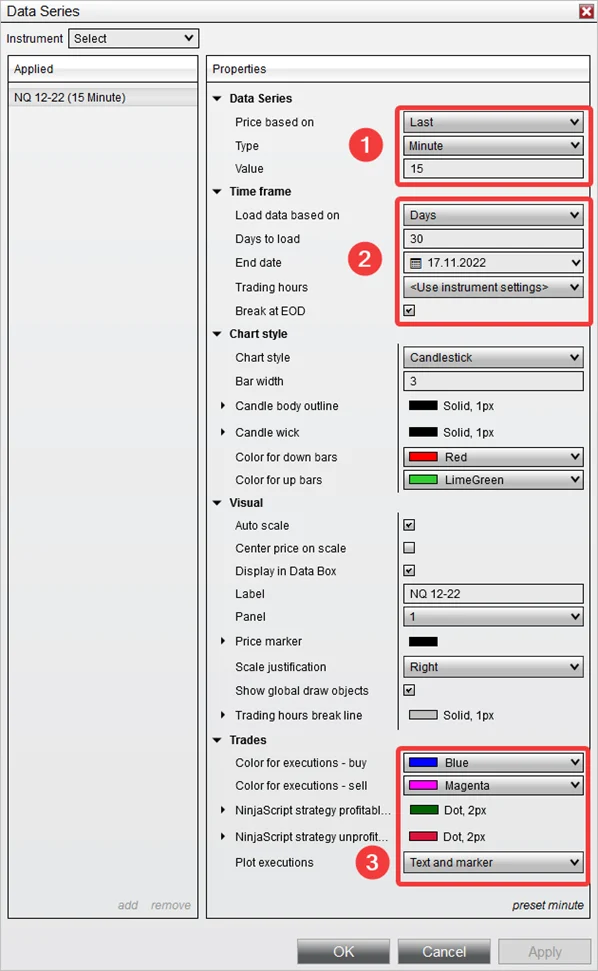
Match the chart or Strategies tab to the template. For the Reversal Automated Trading Strategy:
- Price is based on: Last
- Type: Minute (Reversal uses Minute bars)
- Value: 5–60 (we do not recommend below 5; signals can be unreliable)
- Load data based on: Days
- Days to load: 30 (minimum 10–15 to initialize correctly)
A MNQ 15 MIN BARS (#112) template needs MNQ, Minute bars and Value 15, not a chart set to 5 minutes.
A different instrument can also prevent the expected signals. The template name is the reference for both market and timeframe, whether you run from a chart or the Strategies tab.
The loaded template does not match the market
Read its name, then load the correct instrument/timeframe template from strategy settings. Match Data Series to it exactly.
The strategy has too little history
Set Days to load to at least 15; we recommend 30. Confirm historical data is available for the instrument.
Indicators and filters need history to calculate. Too little data can stop the strategy from initialising or producing entries even when the template itself is correct.
The strategy will not enable or disables immediately
Check Control Center → Log for data, session or licence warnings. Then check:
A session mismatch can prevent signals. Use the template's expected hours rather than assuming RTH and ETH are interchangeable.
- Account: start in Sim and confirm the intended account.
- Trading Hours: use the matching Session template, RTH or ETH.
- Commissions & slippage: set realistic values in Tools → Options → Commissions.
- Activation: resolve licence errors before enabling.
After correcting the cause, work through this sequence:
- Disable the strategy.
- Load the correct template for your instrument/timeframe.
- Check Data Series: Type: Minute, Value per template (≥5 for Reversal), Days to load: 30, Price based on: Last.
- Confirm Trading Hours session matches the template (RTH/ETH).
- Re‑enable the strategy on a Sim account and allow several bars for signals to form.
FAQ
Why are there no trades straight after enabling?
Entries are rule-based. Live trades wait for a signal even when historical trades are already visible.
How many days of data do I need?
At least 15 days; we recommend 30 for indicators and filters.
Can I replace Minute bars with Tick or Range?
Not when the template specifies Minute, as Reversal templates do.
Will the wrong instrument or timeframe break NT8?
No, but it can invalidate strategy logic. Match the template name, such as MNQ 15 MIN.
What should I do about a licence error?
Contact support for activation or reissue and a Machine ID check if needed.
Resources & support
Email team@mascapital.uk if the strategy still will not enable. For installation, see Install an Automated Strategy in NT8.