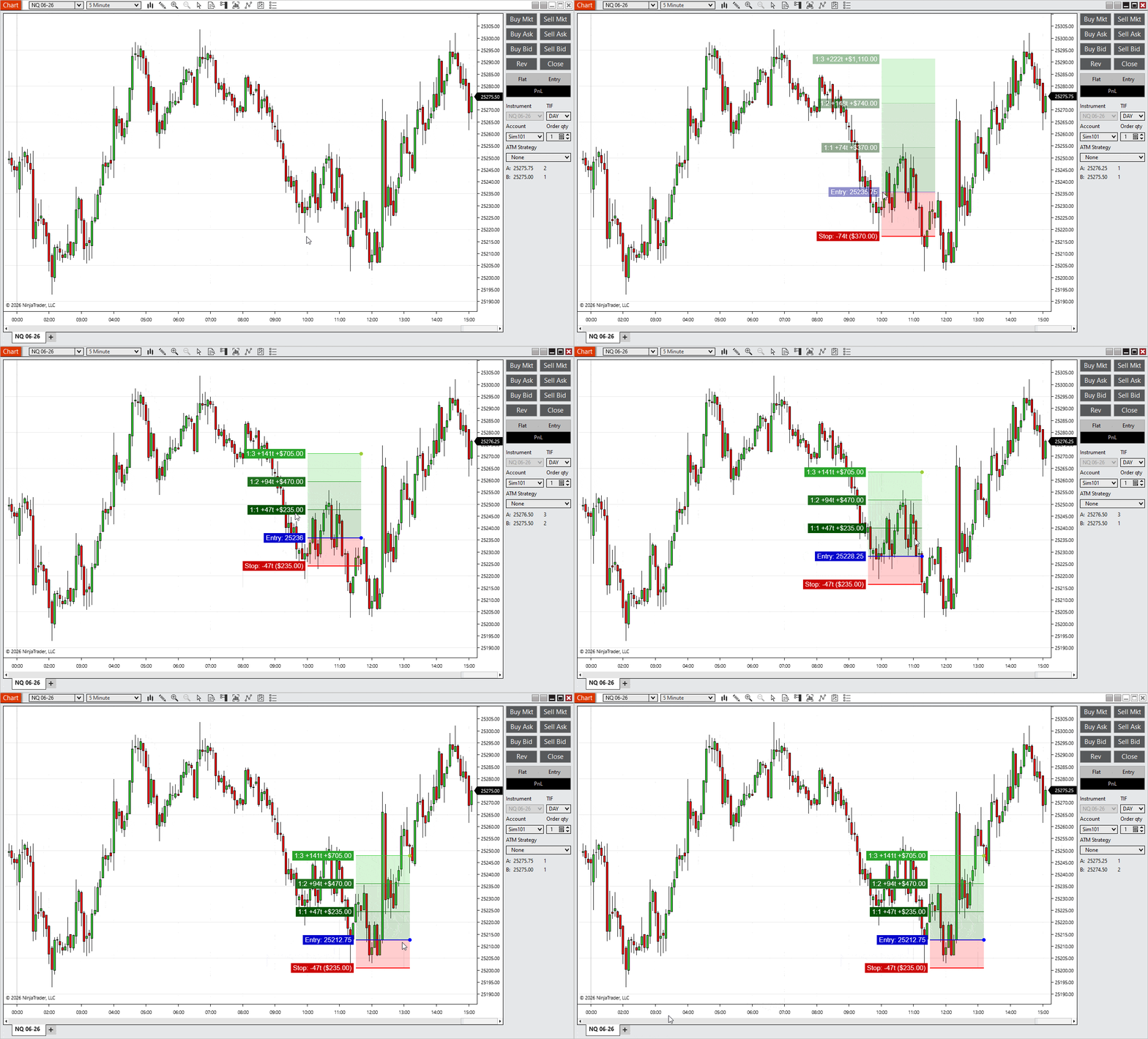
If you already use RiskRewardADV for NinjaTrader 8, the biggest change in version 10 is obvious after the first setup: you are no longer stuck with a static marker. You can place the trade, adjust it on the chart, and keep working without deleting and redrawing everything.
That makes this update more than a cosmetic change. It turns RiskRewardADV from a fast plotting tool into a more practical NinjaTrader 8 risk reward indicator for traders who adjust entries, stops, and targets as the setup develops.
Table of contents 🔗
- What changed in the new RiskRewardADV?
- 1. Drag-and-drop editing for existing markers
- 2. Adjustable ruler width for each setup
- 3. Custom reward targets beyond standard R levels
- 4. Better on-chart hit detection and selection
- 5. Improved trade planning workflow
- Old vs new RiskRewardADV
- What stayed the same
- Why this matters for NinjaTrader traders
- Final verdict
- FAQ
What changed in the new RiskRewardADV? 🔗
The earlier version of RiskRewardADV for NinjaTrader 8 was quick to use, but once a marker was placed, your options were limited. If the entry changed, the stop had to move, or the target no longer matched the chart, the usual answer was to remove the setup and build it again.
Version 10 changes that. The marker can now be edited directly on the chart, which makes the tool much more useful in live trading and active trade planning.
- Adjust the setup instead of redrawing it
- Keep your analysis on the chart without interruption
- Match targets more closely to real market structure
This is especially useful for intraday traders, scalpers, and futures traders who work in fast conditions where price levels change before the trade is even triggered.
The upgrade is simple in theory, but it matters in practice. You spend less time rebuilding the tool and more time refining the trade idea.
1. Drag-and-drop editing for existing markers 🔗
This is the feature most traders will notice first. In version 10, a RiskRewardADV marker does not stop being useful after placement. You can click it and adjust the individual parts directly.
That includes the full marker as well as the key price levels.
- Move the entire setup
- Adjust the entry level
- Move the stop level
- Drag reward targets one by one
That sounds like a small change until you use it in a live session. Breakout entries move. Pullbacks get deeper. Stops tighten before the trigger. With the old workflow, those adjustments created friction. With the new workflow, they are part of the same setup.
If you also use Easy Trade, this fits naturally into a faster execution workflow. Refine the levels first, then execute when the setup is ready.
This is the part of the update that changes how the indicator feels day to day. It is still fast, but it is no longer disposable after the first click.
2. Adjustable ruler width for each setup 🔗
Earlier builds used a fixed ruler width. That worked well enough on a clean chart, but it was less practical when several trade ideas were visible at once or when price action was tight and crowded.
In RiskRewardADV v10, each marker can have its own width, and you can change that width after the setup has already been placed.
- Make one setup compact to save chart space
- Widen another setup for clearer visibility
- Adjust each trade without changing the others
This helps more than it sounds. If you manage multiple setups on one chart, width control keeps the screen readable. If you focus on one setup at a time, a wider marker can make levels easier to track.
It is a practical chart-management feature, not just a visual tweak.
3. Custom reward targets beyond standard R levels 🔗
One of the most useful additions in version 10 is support for a custom reward target. Standard R levels are still useful, but not every trade exits cleanly at 1R, 2R, or 3R.
Sometimes the better target is a prior swing, a liquidity area, or the final part of a position you want to leave open for a larger move. Now the indicator can reflect that directly on the chart.
- Add a custom target on top of standard reward levels
- Drag that target freely into place
- Use structure-based exits instead of only fixed multiples
This is especially useful for traders who scale out, leave a runner, or work with support and resistance rather than fixed R templates alone.
It also pairs well with Risk Reward Indicator if you use one tool for quick projections and another for more active trade management.
This one feature makes RiskRewardADV easier to use across different trading styles, especially when exits are discretionary.
4. Better on-chart hit detection and selection 🔗
This update is less visible at first glance, but it matters during real use. Version 10 improves how the marker is selected on the chart, including the different areas traders interact with most often.
- Cleaner selection of entry, stop, and reward lines
- Dedicated hit areas for labels and the marker body
- Separate handles for width changes and custom targets
In older versions, small elements could be awkward to select, especially on busy charts or when zoomed out. That may sound minor, but repeated friction like that slows down the whole process.
With cleaner hit detection, editing feels more predictable. The tool responds the way you expect it to, which is exactly what you want from a trading utility.
It is not the headline feature, but it supports every other change in the update.
5. Improved trade planning workflow 🔗
When you combine drag-and-drop editing, width control, custom targets, and better hit detection, the biggest improvement is workflow.
Old workflow:
- Place the setup
- Market conditions change
- Delete the marker
- Redraw everything
New workflow:
- Place the setup
- Adjust entry, stop, targets, or width directly on the chart
- Keep refining the same setup as the trade develops
That is the real upgrade. Version 10 removes unnecessary repetition from trade planning and keeps attention on the chart instead of on rebuilding the marker.
It also fits neatly into a broader workflow built around other tools:
- Advanced Trader for position management
- Easy Trade for fast execution
- automated strategy templates for structured trade models
The result is a cleaner and faster workflow that makes more sense in live market conditions.
Old vs new RiskRewardADV 🔗
If you compare the old build with version 10, the difference is not hard to spot.
Old version
- Fast middle-click placement
- Static after creation
- Standard reward levels only
- Delete and redraw when the setup changed
New version
- Fast placement with editable markers
- Draggable entry, stop, and reward lines
- Per-marker width adjustment
- Custom reward target support
- Improved selection and interaction on the chart
The old version was good at getting a plan on the screen quickly. The new version still does that, but it also supports the next part of trading: refining the plan as conditions change.
What stayed the same 🔗
Version 10 adds flexibility, but it does not remove the parts that already worked well in the original version.
- Middle-click placement is still available for fast setup creation
- Live preview still helps before the marker is finalized
- Ticks, currency, or combined display options are still supported
- Colors and visual settings remain customizable
- Background rectangle support is still available
- Hotkey-based interaction still fits fast trading workflows
That matters because good updates should not break muscle memory. RiskRewardADV v10 keeps the core logic familiar while making the indicator more capable.
Why this matters for NinjaTrader traders 🔗
Most traders do not need another indicator that claims to find perfect entries. What they need is a tool that helps them plan risk clearly and adjust that plan without slowing down.
That is where RiskRewardADV for NinjaTrader 8 is stronger in version 10. It cuts friction out of the planning process and gives traders a more flexible way to manage entries, stops, and targets directly on the chart.
- Adjust risk in real time as the setup develops
- Keep the chart cleaner during active sessions
- Align exits with actual structure instead of only fixed multiples
- Stay more consistent from trade idea to execution
For NinjaTrader traders working with instruments like NQ, ES, or CL, that is the part that matters. The market moves quickly. Static tools slow you down. Interactive tools keep up.
It also works naturally alongside other tools in the MASCAPITAL ecosystem:
- Use Risk Reward Indicator for simple projections
- Use Advanced Trader to manage open positions
- Use tools from the MASCAPITAL UK shop to build a more complete NinjaTrader workflow
Final verdict 🔗
RiskRewardADV v10 is a practical upgrade for traders who want a better risk reward indicator for NinjaTrader 8. The old version was fast. The new version is fast and editable.
Drag-and-drop editing is the standout improvement, but the update works because the smaller changes support it: width control, custom target support, and better on-chart selection all make the indicator easier to use in real sessions.
- Faster adjustments during active markets
- More control over how each setup is displayed
- Better support for structure-based exits
- Less time wasted rebuilding the same trade plan
If you already use RiskRewardADV, version 10 should feel more efficient almost immediately. If you are looking for a NinjaTrader 8 risk reward tool that does more than draw a static setup, this is the version worth using.
If you want to see the product page, you can check it here: RiskRewardADV Indicator
FAQ 🔗
Can I edit a RiskRewardADV setup after placing it?
Yes. In version 10, you can drag and adjust entry, stop, and target levels directly on the chart instead of deleting the marker and creating a new one.
Can I use custom targets instead of fixed R levels?
Yes. The indicator now supports a custom reward target that can be placed manually to match chart structure or a discretionary exit plan.
Does RiskRewardADV work for fast markets and intraday trading?
Yes. The update is especially useful for fast-moving conditions where setups need to be adjusted quickly.
Do I need to relearn the tool?
No. The core workflow is still familiar. Version 10 mainly adds more control after the marker has been placed.
Who is this update most useful for?
It is most useful for futures traders, scalpers, and day traders who want a more flexible risk reward tool inside NinjaTrader 8.
Can I use RiskRewardADV with other MASCAPITAL tools?
Yes. It fits well alongside tools like Advanced Trader and Easy Trade as part of a broader trading workflow.