Wait for a signal
Let the indicator point out a possible entry area instead of forcing trades while the chart is still unclear.
NinjaTrader 8 entry signal indicator
M-Trader Indicator
NT8 compatible
14-day free trial
Momentum entry ideas
M-Trader Indicator
From: $0 for 2 weeks
Built for traders who want the setup marked clearly, then want enough filter control to avoid every minor candle push becoming a trade idea.
M-Trader is for spotting a specific momentum shift on the chart, then checking whether that setup fits the context you want to trade.
M-Trader marks moments where the chart may be ready for a planned entry.
Use the available filters to keep the chart focused on the type of trades you want to consider.
Draw an arrow first, then optionally draw a RiskReward tool from your configured template.
This section is about the trading routine around the signal. Use M-Trader as a prompt to slow down and judge the trade properly.
Let the indicator point out a possible entry area instead of forcing trades while the chart is still unclear.
Look at trend, session behavior, nearby levels, and whether the setup still matches your trading plan.
Use the chart plan to see whether the stop and target make sense before committing to the trade.
The arrow is a decision point. You stay responsible for the trade, the order entry, and the risk you choose to take.
The showcase video shows the indicator on a NinjaTrader chart, with signals and trade planning visible in context.
The video shows the main workflow on a live NinjaTrader chart: wait for the setup, read the arrow, then use the risk/reward drawing to judge whether the trade is worth taking.
Use the signal as a prompt to check the market, not as an automatic order command.
Use M-Trader as a chart-side setup scanner. It does not replace trade judgment or order execution.
M-Trader marks the opportunity. You still choose whether the signal fits the session, market, and risk plan.
Add M-Trader Indicator to a NinjaTrader 8 chart and choose long, short, or both directions.
Set the candle-size and trend filters so the chart only marks the setups you want to review.
When the pattern appears, the indicator draws the arrow and can play your selected NinjaTrader sound file.
Use the optional RiskReward drawing to see entry, stop, and target structure directly on the chart.
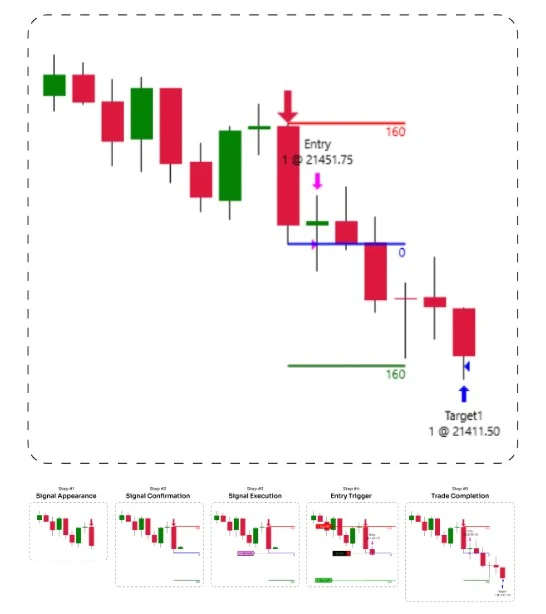
The workflow image shows the intended path: wait for the valid signal, place the order, then manage the stop and target from the plan.
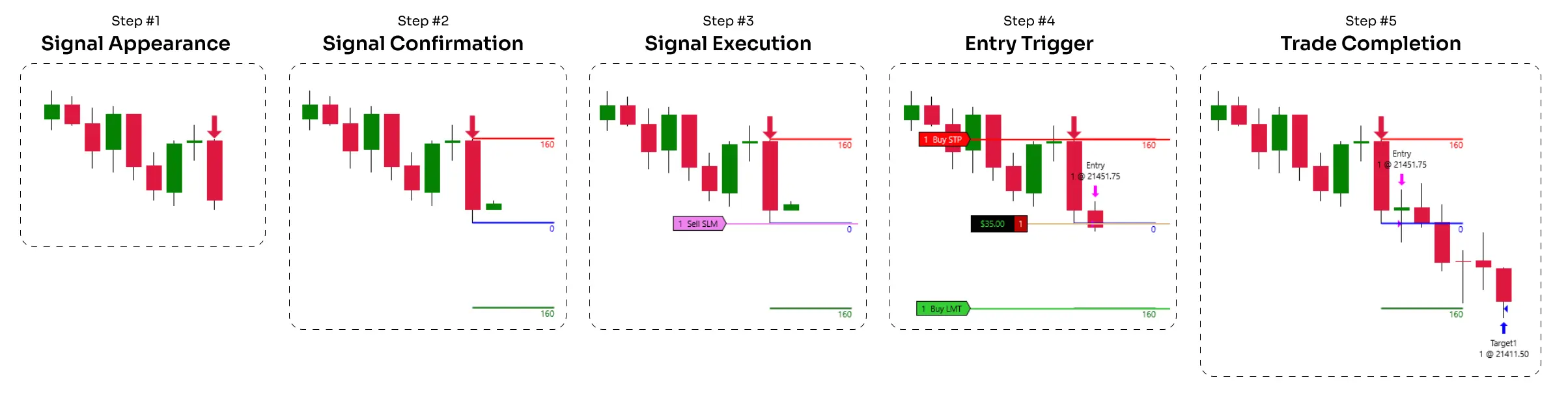
The chart signal gives you a fixed moment to evaluate. The RiskReward object keeps the entry, stop, and target visible while you decide whether the trade is worth taking.
M-Trader helps you find and plan the setup. Trade Analyzer helps you study what happens after the setup.
If you are refining a signal playbook, use M-Trader during the session and Trade Analyzer when you want to compare reward multiples across a batch of trades.
These controls change how strict the signal should be and how the trade plan appears on the chart.
Candle protectionControl how closely the setup must fit before an arrow appears.
Signal sensitivityChoose how selective the indicator should be before it marks a trade idea.
Setup size limitSkip setups that would require more chart room than you want to risk.
Trend directionChoose whether signals should respect the current trend direction before they are shown.
Trend sideRequire price to be on the preferred side of the trend before accepting the setup.
Market sideAdd a wider market-side check when you want fewer, more selective signals.
Long Trades / Short TradesEnable only the directions you trade, or keep both active when the session calls for it.
Risk/reward templateUse your saved NinjaTrader drawing template when the setup is marked.
Alert File / AlertPlay a selected sound file when a valid signal appears on the chart.
Built for discretionary traders who want a repeatable entry model without turning the chart into a wall of signals.
Use the momentum signal when you are waiting for a pullback or correction to shift back into movement.
Let the arrow and alert catch the setup while you keep attention on market context and execution quality.
Tighten or loosen the trend and candle filters until the chart matches the type of setups you actually want to study.
Use the template-based RiskReward drawing when you want the stop and target structure visible right after the signal.
M-Trader is more useful than a basic arrow indicator because the filters and drawing templates keep the setup tied to your trading plan.
The signal is designed around a defined momentum setup instead of marking every direction change.
The trend filters let you decide how much context a setup must pass before it reaches the chart.
The RiskReward drawing turns the signal into a planned setup, not only a visual arrow.
Start with the 14-day trial, then choose monthly, annual, or lifetime access if M-Trader fits your chart workflow.
Use the signal workflow first, then choose a license only if the indicator fits the way you trade.
Best when you want to keep testing the workflow beyond the trial.
Signal arrows, trend filters, alerts, RiskReward drawing, updates, and support.
Best when M-Trader becomes part of your regular NinjaTrader chart setup.
One year of access, updates, support, and the full indicator workflow.
Best when you want long-term access without recurring license decisions.
Lifetime access, updates, support, and the full indicator workflow.
Start Free Trial - No Credit Card Required. The trial is available once per user.
Short answers for the buying questions that usually come up first.
Yes. It is built as a NinjaTrader 8 chart indicator.
No. It marks signals and can draw a RiskReward object. You still decide whether to place the trade.
Yes. The settings include separate Long Trades and Short Trades controls.
Yes. Use the R/R Tool Template Name setting to match your saved NinjaTrader drawing template.
Yes. Enable Alert and choose the alert file from your NinjaTrader sounds folder.
Yes. The page includes a 14-day free trial checkout link.
Start with the 14-day trial, tune the filters, and see whether M-Trader matches the setups you already want to trade.
Articles
Product feedback
Good
It's great for finding ideas on where to open positions. I like it. There are times when I just ignore it because of my own opinion on the current market situation. But overall, it's very helpful.
I started using MIndicator on my main chart, and the known problem for me was learning which signals to pay attention to first. After a few sessions, I packed it into my normal trading routine because it extra helped keep chart checks simple. Looks promising so far already had multiple good trades
At first glance, MTR Indicator looked simple and focused. It works as helpful add-on for reading market movement, and my first impression was good because it did not make the chart feel messy. The main feature works realy well for quick checks, and performance has been consistent in normal use. It feels reliable, though it still needs trader judgment like any indicator. I would recommend it if you want something clear and practical.
Overall, I would keep using it.
switched to MTR - it gives precise entry and exit levels for both stops and targets. My only job now is to place the order exactly where it tells me. Customer support from MAS Capital has been excellent.
switched to MTR - it gives precise entry and exit levels for both stops and targets. My only job now is to place the order exactly where it tells me. Customer support from MAS Capital has been excellent.
Running this on my 4-chart NQ setup and honestly the signal quality is stupid good. The SizeMultiplier filter rejects all the bloated impulse bars that usually blow through my stop. I paired it w/ a 20EMA slope filter and the indicator literally caught a 38-tick continuation after a micro pullback. Zero repaint, exact bar index tagging. Even the OCO-synced RR ladder it drops is pixel-perfect.
THIS THING WORKS!! First week using it and the short arrow during 10:12 EST drop on NQ paid for the whole license. I did mess up at first because I set the entry candle limit too smal and got no signals but the guide helped me fix it. Love the simple green/red arrows and the auto risk box.
M Trader does exactly what it says: detects n-bar momentum setups with ma alignment. Very consistent during morning sessions. Only gripe is it doesn’t check HTF trend (I know that’s not the point but still). No lag, no repaint, good tool overall.
Maybe my settings wrong or maybe my internet laggy, idk. It didn’t give ANY trades during London open on ES. Tried reinstalling twice. Not blaming the devs but it wasn’t for me. Support replied fast tho.
Maybe good for pros but I’m new to futures and it kinda overwhelms me.
The entry line + stop + target templates were everywhere
and I couldn’t figure out why a short didn’t trigger even tho arrow was there. Later realized price never went below the signal candle low (oops). Still feels hard to use.
I’m a veteran scalper (10+ yrs) and repainting indicators drive me nuts. This one doesn’t. Every arrow stays where it fired, even the losers. Perfect. Running it with MA filter ON + short-only for trend days. One thing: wish the audible alert had volume control, but that’s minor.
Not your average ‘arrow spam’ indicator. M Trader waits for the micro structure shift + MA alignment, which basically matches my own criteria for trend resumption plays. When the large colored arrow pops, I already see delta flipping on my orderflow. Having the risk template auto-draw saves me from mis-typing ATM numbers in fast markets. Chef’s kiss.
Honestly didn’t expect much but this thing catches the small-bar = impulse bar pattern like a sniper.
First week using it on MNQ and it nailed 4 clean shorts during the US open. I messaged support and they walked me through the SizeMultiplier setting because I messed it up (my fault lol). Super low slippage and the RR template it auto-drops is actually useful.
Love it! combines well with my EMA setup, super smooth.
This is exactly what I was looking for in a momentum indicator. It’s cleaer, straightforward, and gives me confidence when taking trades I tested it on different timeframes, and it performs best on NQ intraday charts. signals align nicely with my strategy, and I don’t have to fight with the tool to get results.
Compared to other overpriced indicators, this feels fairly priced and practical. After weeks of use, I can confidently say it’s worth it
Good value--MTR Indicator plus my EMA stack is a solid combo.Story took ~ 10 trades today using MTR Indicator as a filter, 8 winners. I’m impressed.
Works good when using nasdaq. Other markets dont got enough volatility for me so it dont really work well there. But alltogether mtrader indicator is pretty good and help me see the trades better. Sometimes it takes a bit to get used to how it shows the signals, but once you get it, its easier to make decisions. For me it’s one of the better tools I tried for trading, especially on the nasdaq
I like to do my trade myself . so i started to use M-Trader indicator, it just simply give you the signal to enter the market, so if i am around i will enter the market, it works like a dream and i really have not found anything the same before.
Let the indicator point out a possible entry area. Use M-Trader as a chart-side trade scanner.