
M Trader is a price-action indicator for NinjaTrader 8. It marks long and short ideas and draws an on-chart Risk/Reward tool.
What it does
Signals identify momentum-correction entries. Moving-average slope, price position and market-bias filters restrict which ideas appear. Sound alerts and drawing templates are optional.
Start with NQ, 5-minute time-based candles. Initialisation needs roughly 256 bars: ~1 trading day on faster timeframes, more history on slower ones.
Setup
- Download the M Trader indicator
.zipand keep it intact. - NT8 → Control Center → Tools → Import → NinjaScript Add-On… → select the
.zip. - Confirm replacement prompts for files/templates.
- Restart NinjaTrader 8.
- Open your chart → Indicators (Ctrl+I) → add MTRIndicator → OK.
How it works
Recent price action is checked against moving-average context. Bearish weakness produces short ideas; bullish strength produces long ideas. An arrow appears before the Risk/Reward projection.
Keeping MA filters on restricts signals to the selected trend conditions. Turning them off allows more ideas, including those the conservative setup would exclude.
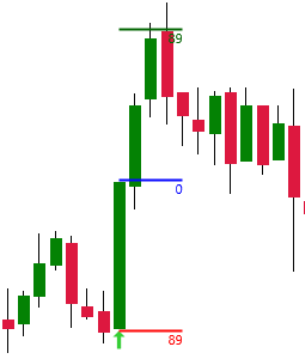
Use R/R Ratio = 1:1 as a baseline.
Early signal
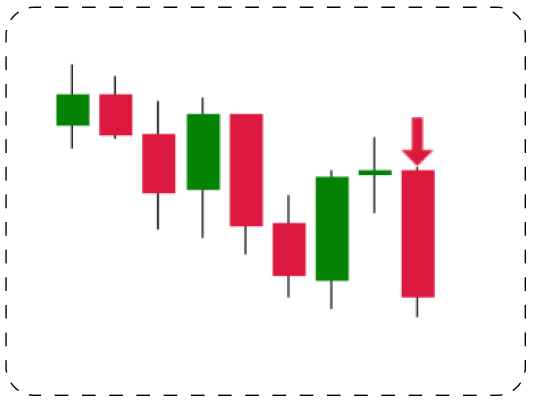
Enable Alert for a sound when the early arrow prints.
Confirmation
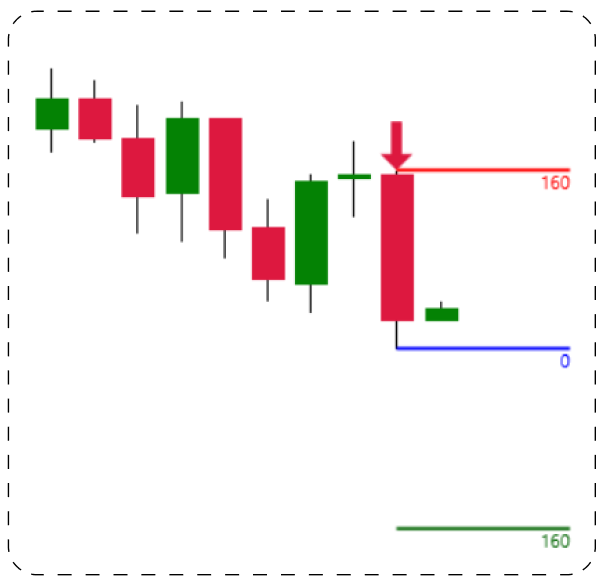
If entry levels do not appear, the setup was filtered out. Wait for another signal.
The R/R tool draws on the next bar after the arrow, at the saved entry level. An early arrow alone is not a confirmed entry plan.
Execution plan
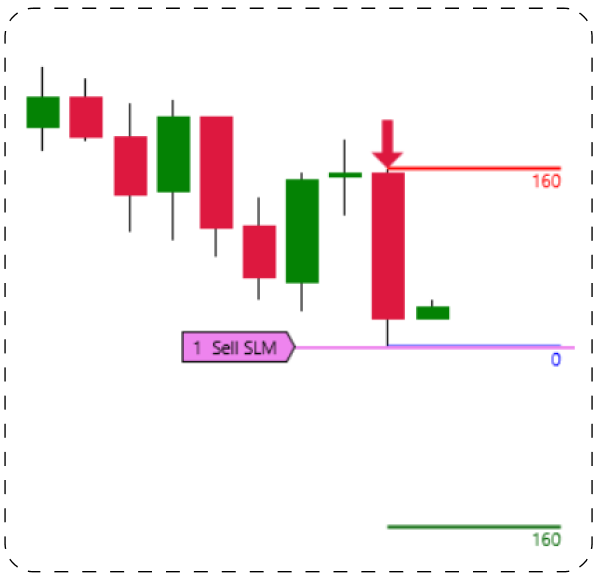
Place a limit order at the entry line in the signal direction. Attach your stops/targets or use an ATM.
Entry trigger
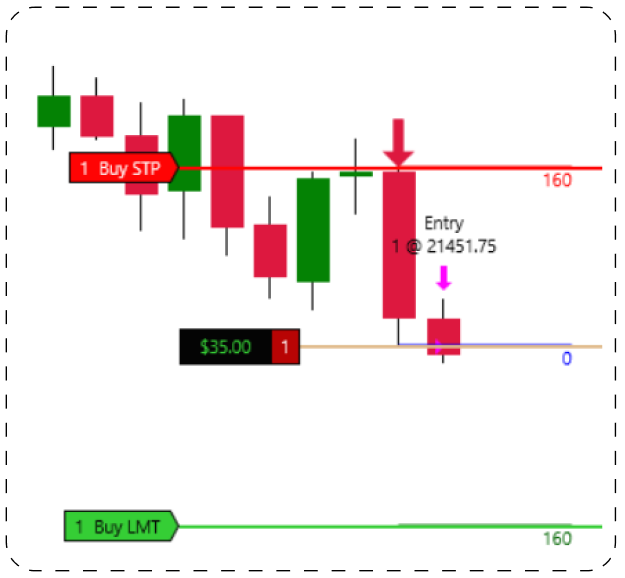
Once filled, manage the trade by the printed R/R tool or your ATM logic.
Completion
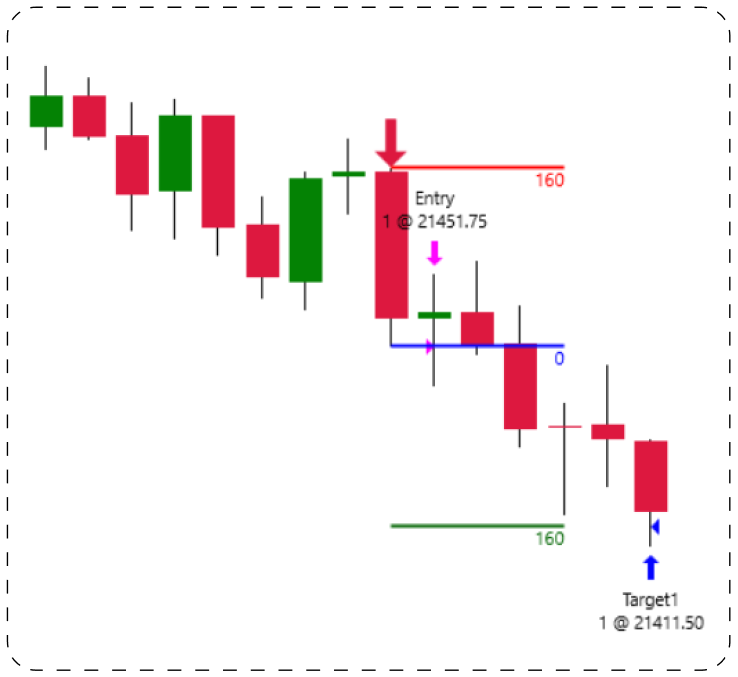
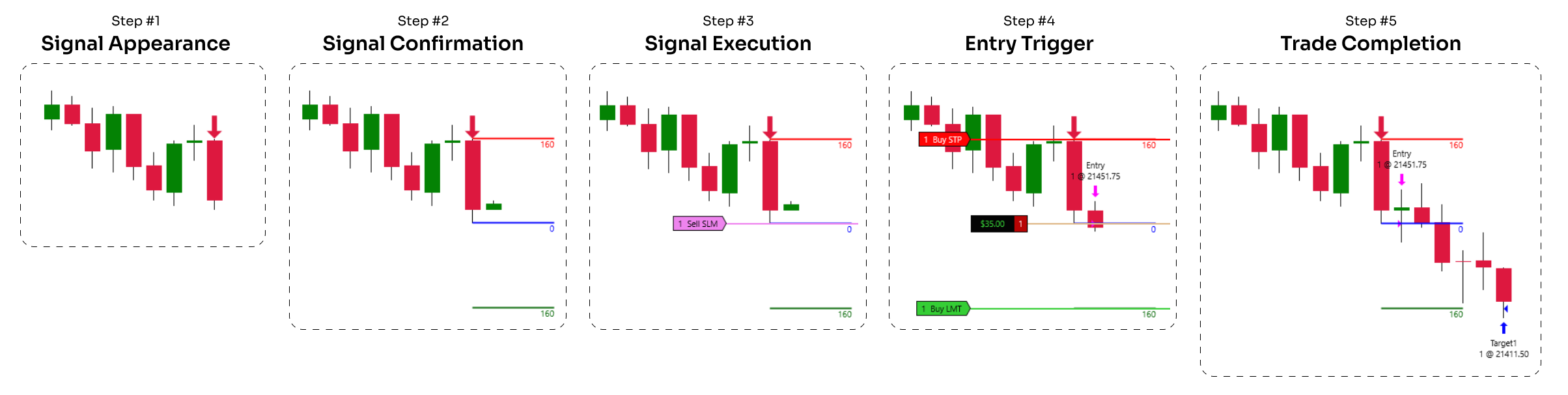
Review the outcome when the trade reaches its stop or target.
- Prefer time-based charts for cleaner signals.
- Keep MA filters on for conservative trading; turn off for more opportunities.
- Cancel the limit order if the unfilled signal already reaches its 1:1 target.
R/R style
Style the drawing itself, then save its template and point the indicator to that name. Editing only the drawing does not complete the template setup described below.
- Double-click an R/R drawing on the chart → customize.
- Save as a drawing template, e.g.,
MTRTemplate. - Update the indicator’s R/R Tool Template Name to match.
- Press F5 to refresh.
Arrow style
- Double-click an arrow → customize (size, color, etc.).
- Save as
MTRTemplateArrowUpandMTRTemplateArrowDown. - Press F5 to refresh.
- Baseline (conservative): NQ 5-min, MA Direction = ON, MA Side = ON, Market Side = ON, Size Multiplier = 0.55, R/R = 1.
- Expansion (moderate): turn Market Side OFF to allow counter-swings; keep MA(20) slope/side ON.
- Exploratory (aggressive): MA filters OFF, slightly increase Size Multiplier (e.g., 0.65) to admit more signals; test first on Sim.
Another approach uses a higher timeframe for direction and a lower one for entries. Keep the analysis consistent across both.
The higher-timeframe signal may never pull back to its own entry point. A lower-timeframe signal can provide a separate entry in the same direction.
Entering on an early arrow does not wait for confirmation or plotted entry levels. The limit-order approach waits for the signal entry price.
Some traders adjust a limit entry slightly above or below the signal line. Other indicators or market-structure analysis can also be considered alongside M Trader signals.
Parameters
R/R Tool
- R/R Ratio: default
1.0; examples for trend legs are 1.5 or 2.0. - R/R Tool Template Name: default
MTRTemplate. Controls drawing colours and fonts.

Signal Filters & Behavior
- Momentum Filter: default on. Avoids signals during extreme price bursts.
- Candle Balance: default medium. Compares bar sizes; lower settings give fewer, cleaner signals.
- Entry Size Limit: default moderate. Excludes setups with oversized candles.
- Trend Alignment (short-term): requires agreement with moving-average slope.
- Trend Side (short-term): checks price position against the trend line.
- Market Bias (long-term): requires broader directional agreement.
- Trade Side Selection: enables long and short setups independently.
Short-term alignment checks slope, while short-term side checks where price sits relative to the trend line. Market Bias adds the broader directional check.
Alerts
Alert sounds on an early arrow. Alert File defaults to Alert1.wav. Put custom files in C:\Program Files\NinjaTrader 8\sounds and set the filename.
Troubleshooting
No signals appear
- Load enough data (≥ 256 bars). On higher TFs, set Days to load generously.
- Use time-based bars. Non-time bars (Renko/Range) are not the primary design.
- Check MA filters — if too restrictive, disable one or more to test.
- Open Control Center → Log for licensing messages.
For Machine ID or licence messages, contact registered vendor MASCapital at team@mascapital.uk.
Arrows print but no R/R
- R/R draws on the next bar after the arrow, at the saved entry level.
- Confirm Long/Short Trades are enabled in parameters.
- Ensure R/R Tool Template Name exists (or simply use
MTRTemplate).
Alert sound not playing
- Set Alert = ON and verify Alert File name.
- Place the file in
…\NinjaTrader 8\sounds.
FAQ
Does it work on other markets and timeframes?
Yes. Time-based bars are recommended; start with NQ 5-minute.
Can I customise the look?
Yes. Save MTRTemplate for R/R and MTRTemplateArrowUp/Down for arrows. Match the names in parameters.
How much history should I load?
At least 256 bars. On slower timeframes, increase Days to load so the indicator has enough history to initialise.
How might I manage partial exits?
One approach scales out 60–80% at 1:1 and keeps a small runner.
Resources & support
Easy Trade one-click entry places limit/stop orders from the chart.
Get M Trader Indicator • Explore our Free Indicators Pack • Advanced R/R visuals: Risk/Reward (Pro)