

t's incredibly effective at identifying trend reversals! The accuracy of the signals really impressive
But, the customer support was lacking, with slow response times and limited assistance provided. Overall, quite disappointed with the support experience, but highly suprised with the add-on
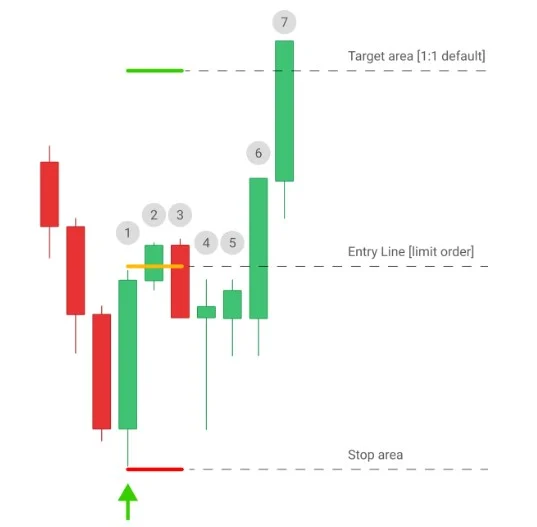
See the reversal setup before you place the order.
Reversal Signal Indicator marks a possible reversal entry on your NinjaTrader 8 chart and can draw the stop and target levels. You place the order.
NinjaTrader 8 · Entry, stop and target · 14-day trial
Same features, different terms.
- Billed monthly
- Renews monthly
- Lower upfront cost
- Cancel anytime
- Unlimited Machine ID changes
- Support and remote assistance
- Updates
- Billed yearly
- Renews yearly
- Lower cost than monthly
- Cancel anytime
- Unlimited Machine ID changes
- Support and remote assistance
- Updates
- One payment
- No renewal
- Lifetime access
- Unlimited Machine ID changes
- Support and remote assistance
- Updates
- New feature requests
Prices in USD. The trial runs for 14 days.
A setup you can check in seconds.
A possible entry, marked
An arrow appears when a reversal setup is confirmed.
Stop and target on the chart
When enabled, the trade plan shows the levels to use before you place the order.
You place the order
The indicator does not trade. You size the position and send the order.
Fewer weak setups
The confirmation rule and trend filter keep unconfirmed turning points off the chart.
From arrow to your order.
Load the indicator
Add it to a NinjaTrader 8 chart.
Wait for the arrow
A turning point must be confirmed before the signal appears.
Read the levels
The plan shows where the stop and target sit for that setup.
Place your order
Size the trade in NinjaTrader and send the order yourself.
What a signal shows you.
One arrow, then the levels for the plan.
- Arrow
- A confirmed turning point on the chart.
- Entry
- Where the setup triggered.
- Stop
- The other side of the turning point.
- Target
- Reward levels from the setup.
- Confirmation
- The signal waits for confirmation.
- Trend filter
- With the trend, against it, or off
The indicator marks the plan; you place the order.
What traders say about the signal.
Product feedback
Reversal Signal Indicator · customer reviews
-
GregH Verified owner
-
Suzanne Appleby Verified owner
Disappointed with the overall experience. Not as effevtice as i've expected
-
Robert Crowe Verified owner
Clear and effective. This addON revolutionized my trading approach. Definitely worth the investment.
-
Paul Hickmott Verified owner
I found the Reversal Indicator to be quite underwhelming in terms of performance. The signals were often delayed or outright incorrect, leading to some losses in my trading account.
Despite following the recommended usage guidelines, I couldn't achieve profitable results. Not impressed at all. Maybe it's because i'm novice in the market (trading for just 1 month). I don't know...
-
Jonathan Dodds Verified owner
Using the Reversal Indicator for a while now , as it become an essential part of my trading toolkit,
providing valuable insights into market dynamics. The accuracy of the signals is impressive,
and I've experienced a noticeable - increase in my profitability. -
Phil Bradshaw Verified owner
Exceeded my expectations in every way! Auto-entry would be nice. Like a button or something :)
Need a hand with the settings?
Send us the timeframe and turning-point settings you use. We will check the settings with you.
Before you add it.
What does it mark?
A possible reversal entry: an arrow on the chart and, if enabled, stop and target levels.
Does it place the order?
No. You place the order yourself; the indicator only marks the setup and levels.
Where do the stop and target come from?
From the turning point that triggered the setup.
What do the direction modes do?
Choose with-trend, counter-trend, or no filter.
Can I change the alert sound?
Yes. Pick a file from the NinjaTrader sounds folder and turn the alert on.
Does it work on other platforms?
No. It is built for NinjaTrader 8.
Is the trial really free?
Yes. 14 days with every setting unlocked and no card.
Can I cancel my subscription?
Yes. Cancel from My Account → Subscriptions. The plan stops renewing.
Can I move the license to another machine?
Yes. License transfers are included.
Read the setup, then place the order.
Try every setting for 14 days. No card.