

Much love! This thing is dope, man! It's been hooking me up with some sick trading moves and stacking my cash! Super impressed with how it's been holding it down.
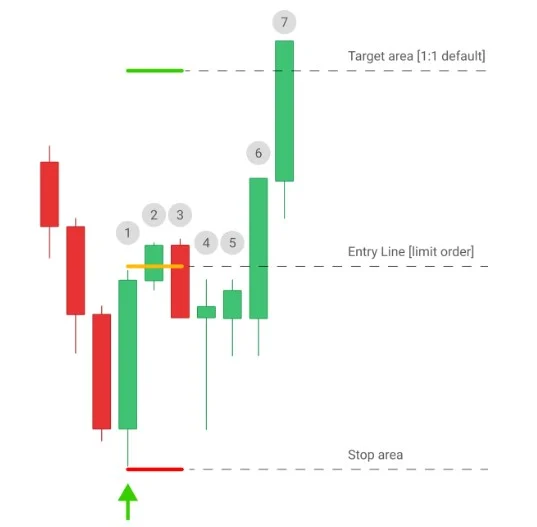
See the reversal setup before you place the order.
Reversal Signal Indicator marks a possible reversal entry on your NinjaTrader 8 chart and can draw the stop and target levels. You place the order.
NinjaTrader 8 · Entry, stop and target · 14-day trial
Same features, different terms.
- Billed monthly
- Renews monthly
- Lower upfront cost
- Cancel anytime
- Unlimited Machine ID changes
- Support and remote assistance
- Updates
- Billed yearly
- Renews yearly
- Lower cost than monthly
- Cancel anytime
- Unlimited Machine ID changes
- Support and remote assistance
- Updates
- One payment
- No renewal
- Lifetime access
- Unlimited Machine ID changes
- Support and remote assistance
- Updates
- New feature requests
Prices in USD. The trial runs for 14 days.
A setup you can check in seconds.
A possible entry, marked
An arrow appears when a reversal setup is confirmed.
Stop and target on the chart
When enabled, the trade plan shows the levels to use before you place the order.
You place the order
The indicator does not trade. You size the position and send the order.
Fewer weak setups
The confirmation rule and trend filter keep unconfirmed turning points off the chart.
From arrow to your order.
Load the indicator
Add it to a NinjaTrader 8 chart.
Wait for the arrow
A turning point must be confirmed before the signal appears.
Read the levels
The plan shows where the stop and target sit for that setup.
Place your order
Size the trade in NinjaTrader and send the order yourself.
What a signal shows you.
One arrow, then the levels for the plan.
- Arrow
- A confirmed turning point on the chart.
- Entry
- Where the setup triggered.
- Stop
- The other side of the turning point.
- Target
- Reward levels from the setup.
- Confirmation
- The signal waits for confirmation.
- Trend filter
- With the trend, against it, or off
The indicator marks the plan; you place the order.
What traders say about the signal.
Product feedback
Reversal Signal Indicator · customer reviews
-
Simon Reid Verified owner
-
Glyn Verified owner
Failed to meet expectations. Add-ons lacked essential features and did not enhance trading performance. Disappointed with the purchase. I knew all the reversal points before Thx.
-
Julie Wright Verified owner
My trades have been lit since I started using this. Cash flow's looking way better now!
-
Lisa Verified owner
2 Words: Is a must-have. Thank you .
-
Robert Sanger Verified owner
FIRST My overall experience with the Reversal Indicator was far from satisfactory. It failed to deliver accurate signals consistently, making it challenging to rely on for trading decisions, but after a 20 min phone talk with the support it changed everything. I found what was my mistake. Thank you! Now it 100% delivers!!!!
-
William Verified owner
50/50
Need a hand with the settings?
Send us the timeframe and turning-point settings you use. We will check the settings with you.
Before you add it.
What does it mark?
A possible reversal entry: an arrow on the chart and, if enabled, stop and target levels.
Does it place the order?
No. You place the order yourself; the indicator only marks the setup and levels.
Where do the stop and target come from?
From the turning point that triggered the setup.
What do the direction modes do?
Choose with-trend, counter-trend, or no filter.
Can I change the alert sound?
Yes. Pick a file from the NinjaTrader sounds folder and turn the alert on.
Does it work on other platforms?
No. It is built for NinjaTrader 8.
Is the trial really free?
Yes. 14 days with every setting unlocked and no card.
Can I cancel my subscription?
Yes. Cancel from My Account → Subscriptions. The plan stops renewing.
Can I move the license to another machine?
Yes. License transfers are included.
Read the setup, then place the order.
Try every setting for 14 days. No card.