Signal sequence
Spot the turn before planning the order
The signal marks the possible reversal area. Treat it as the place to review the setup, not a reason to chase price after it has already moved.
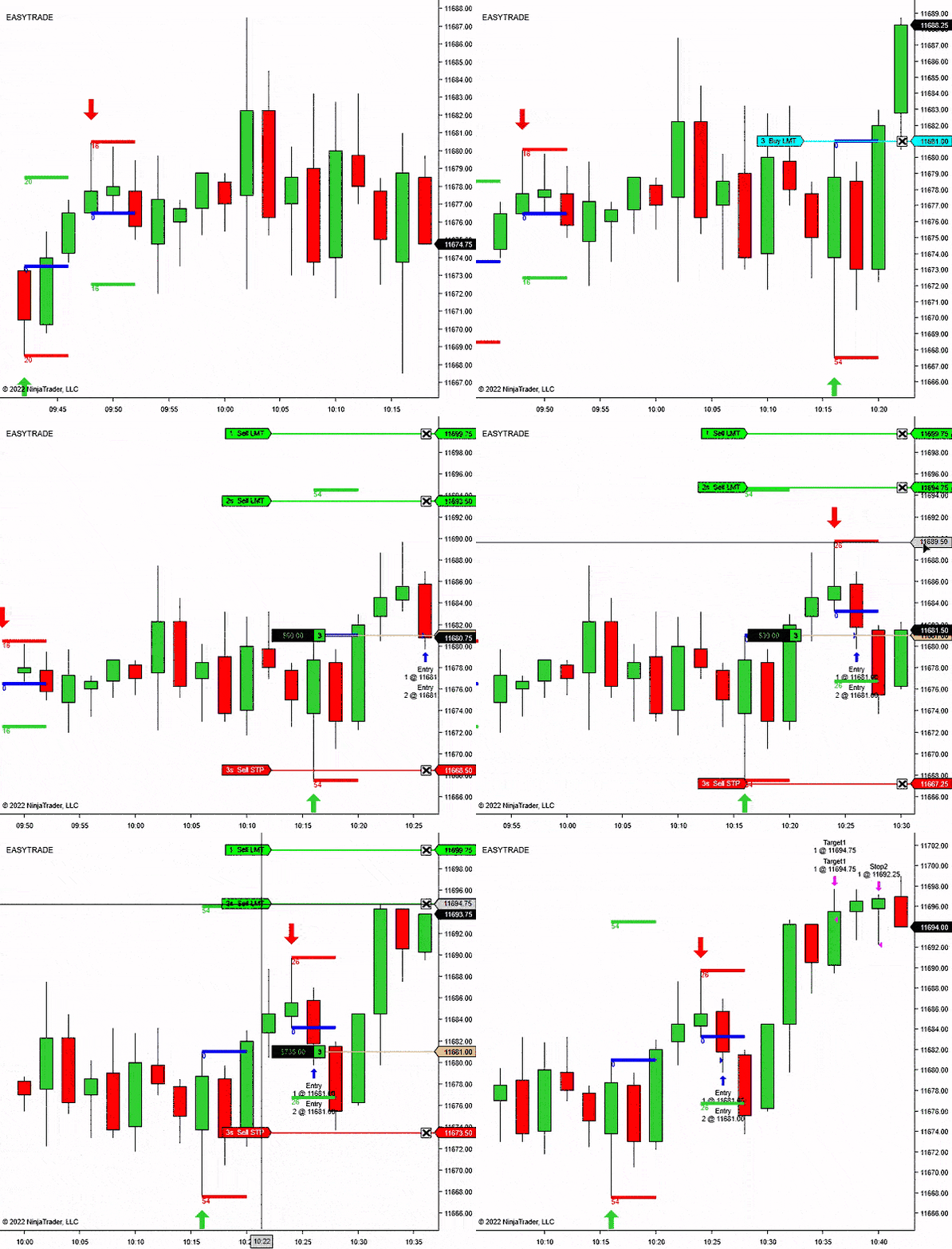
NinjaTrader 8 reversal entry signal indicator
Reversal Signal Indicator
NT8 compatible
14-day free trial
Pivot confirmation
Trade plan drawing
Reversal Signal Indicator
From: $0 for 2 weeks
Built for traders who want reversal areas marked clearly, with enough control to avoid treating every small turn as a trade.
Reversal Signal Indicator is for spotting swing-style turning points, then checking whether the setup confirms while it is still fresh.
The indicator tracks recent swing highs and lows using the selected pivot and lookback settings.
The signal needs to confirm inside your configured window, so old pivots do not stay active forever.
Draw an arrow first, then optionally draw a NinjaTrader RiskReward tool from your configured template.
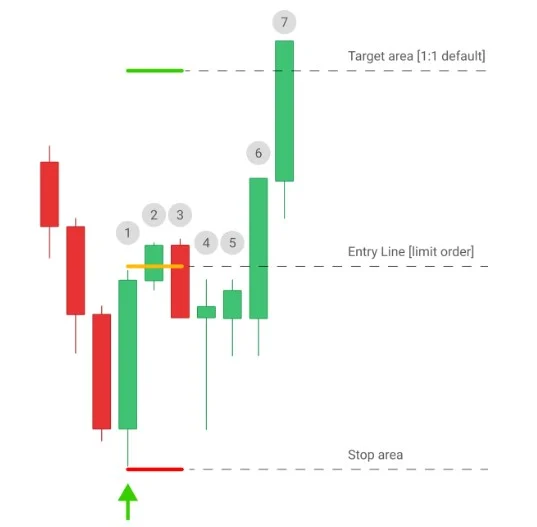
The workflow is simple: wait for the confirmed reversal, set the order where the signal says the pullback should matter, then skip it if price leaves without you.
The signal is meant to define an entry area for a limit order. That matters: if the market reaches the target area before your order fills, the setup is already gone.
Let the pivot and confirmation settings decide whether the turning point is fresh enough to review.
The product logic is built around letting price pull back to the entry instead of forcing a late market order.
The RiskReward drawing gives the estimated stop and target structure while the trade is still only a decision.
If price runs to the target area before the order triggers, the cleaner trade is usually the next confirmed setup.
Choose the chart rules before the session, then let the indicator handle the repetitive signal and planning marks.
Set the recent signal history, pivot behavior, confirmation window, direction filter, and RiskReward template before you begin watching the market.
Use the long signal as a possible turning area after the pivot confirms.
Use the short signal as the start of the plan, then check whether price still offers a clean entry.
Show every signal, use the trend filter, or focus on counter-trend reversal ideas.
Draw the planned entry, stop, and target from your saved NinjaTrader template.
Use Reversal Signal Indicator as a chart-side setup scanner. It does not replace trade judgment or order execution.
The indicator marks the area. You still choose whether the setup fits the market, session, nearby levels, and your risk plan.
Add Reversal Signal Indicator to a NinjaTrader 8 chart and choose how much recent history to mark.
Set pivot density, pivot confirmation, and the signal confirmation period for the market you trade.
When the setup confirms, the indicator draws the arrow and can play your selected alert sound.
Use the optional RiskReward drawing to see entry, stop, and target structure directly on the chart.
Each block pairs the decision with the chart view: signal first, pullback second, order plan third.
The signal marks the possible reversal area. Treat it as the place to review the setup, not a reason to chase price after it has already moved.
Wait for the confirmed mark, place the order at the planned pullback area, and let the market come to you.
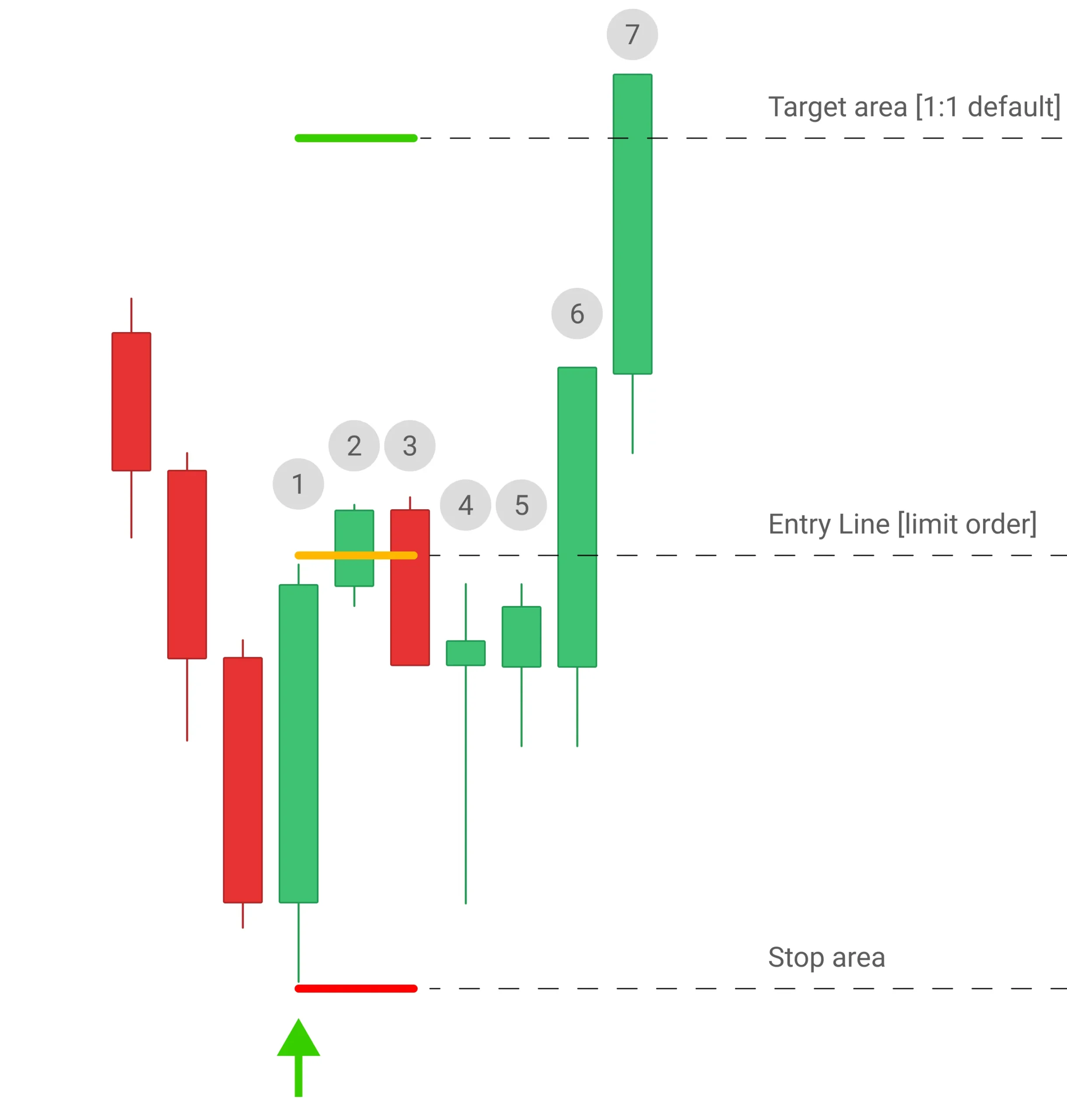
The workflow is intentionally plain: signal, limit order, risk view, decision. If price runs away first, leave the setup alone.
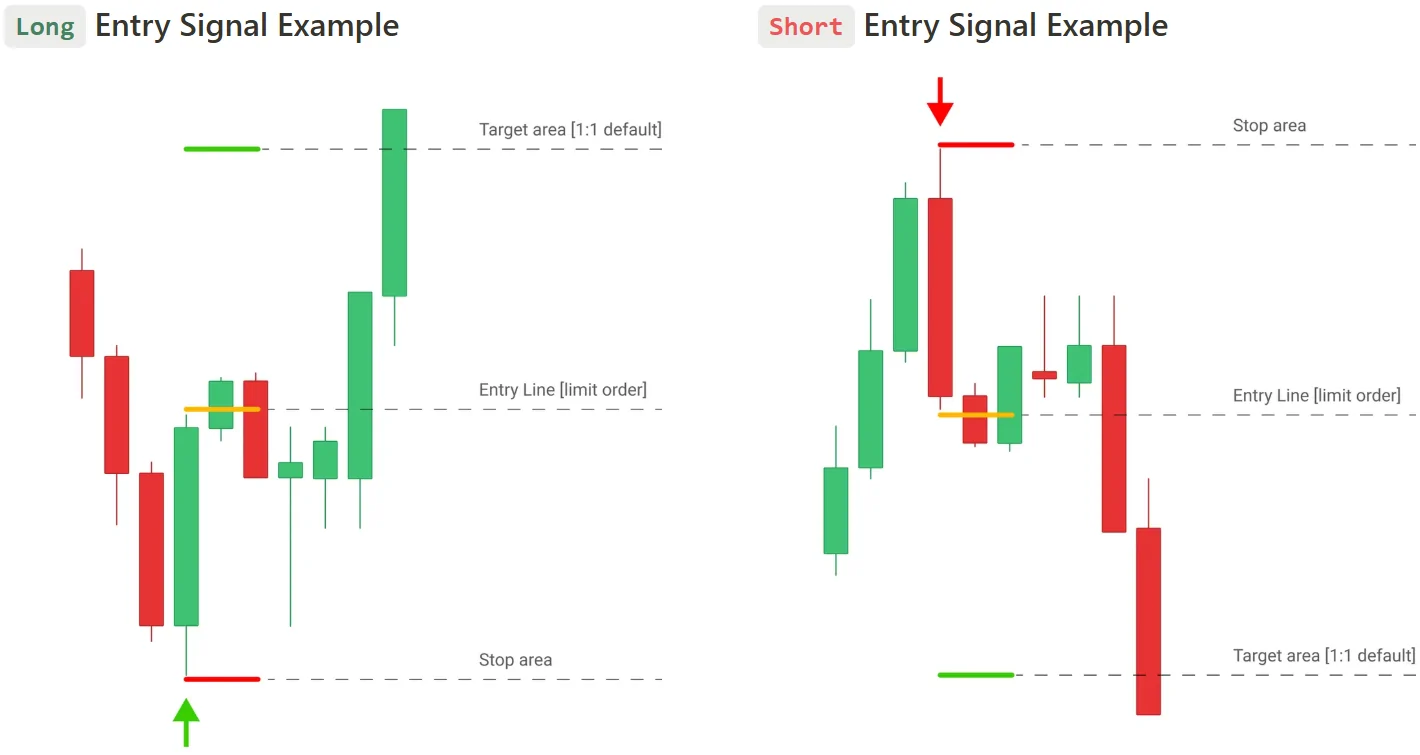
The RiskReward drawing keeps the estimated stop and target visible, so the signal is easier to judge before the order is placed.
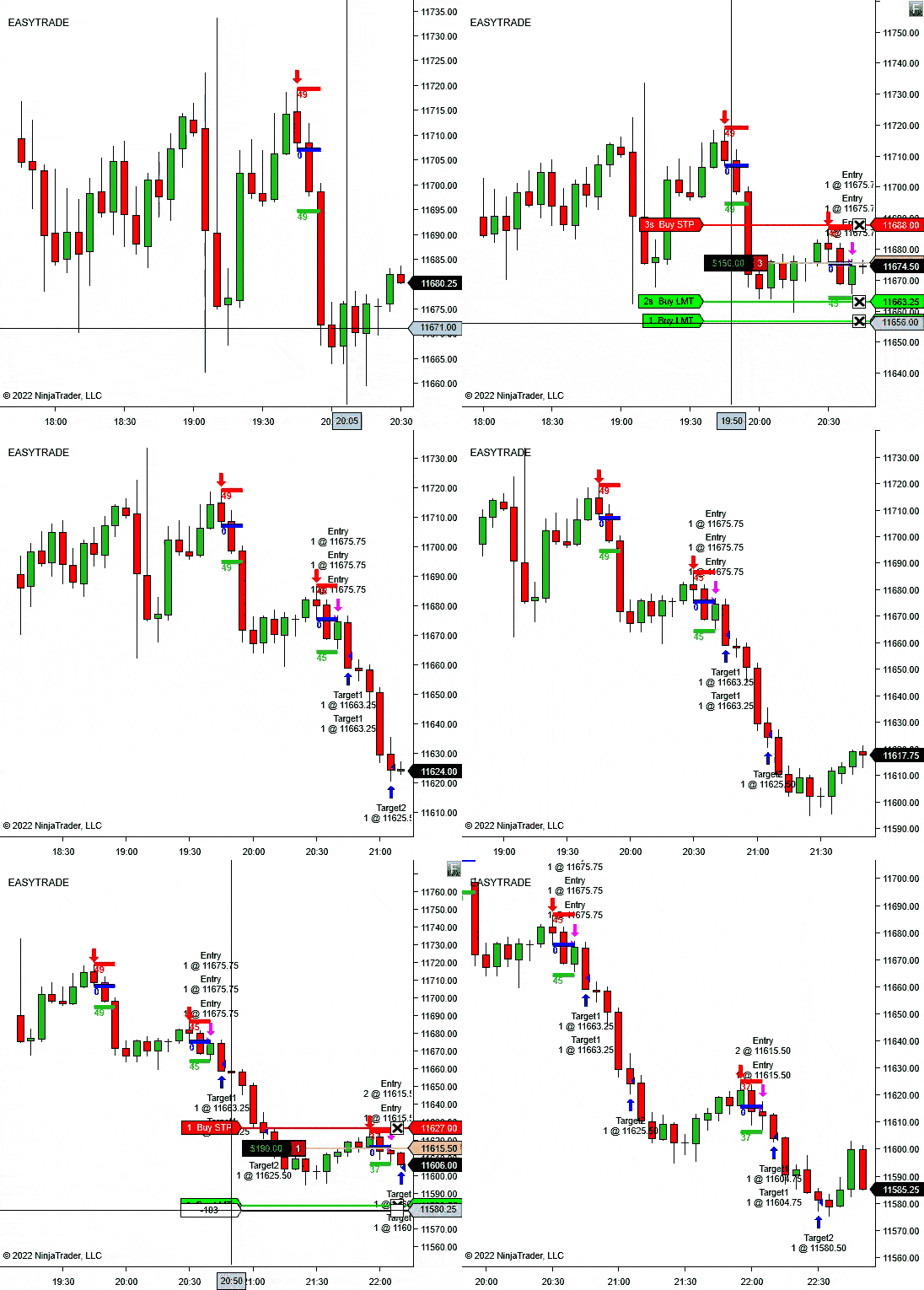
Reversal Signal Indicator helps you find and plan the setup. Trade Analyzer helps you study what happens after the setup.
If you are refining a reversal playbook, use Reversal Signal Indicator during the session and Trade Analyzer when you want to compare reward multiples across a batch of trades.
These controls change how sensitive the reversal model should be and how the trade plan appears on the chart.
Number of CandlesticksControl how much recent chart history the indicator marks.
Pivot DensityChoose how many bars are used to identify the swing-style high or low.
Pivot ConfirmationSet how much price must move in ticks before the setup can qualify.
Signal Confirmation PeriodLimit how long a pivot remains valid if price does not confirm quickly enough.
Trade Direction ModeAllow all signals, use the built-in trend filter, or focus on against-trend reversals.
Draw Risk/Reward?Use your saved NinjaTrader RiskReward template when the setup is marked.
R/R RatioControl the reward ratio used when the indicator draws the plan.
R/R Tool TemplateMatch the drawing to your saved NinjaTrader template and line settings.
Alert File / AlertPlay a selected sound file when a valid reversal signal appears.
Built for discretionary traders who want reversal areas and risk structure marked faster, without turning the chart into a wall of signals.
Use the signal when you are watching for short-term tops, bottoms, pullback turns, or exhaustion areas.
Set the direction mode to follow the trend when you want reversals that resume the broader move.
Use against-trend mode when your strategy is built around fading extended moves with confirmation.
Use the template-based RiskReward drawing when you want the stop and target structure visible right after the signal.
Reversal Signal Indicator is more useful than a raw arrow tool because confirmation, direction mode, and RiskReward drawing keep the setup tied to a trading plan.
The signal is based on pivot behavior and confirmation, not simple candle color.
The trend mode lets you decide whether the chart should show trend-side or counter-trend ideas.
The RiskReward drawing turns the signal into a planned setup instead of leaving you with a plain arrow.
Start with the 14-day trial, then choose monthly, annual, or lifetime access if Reversal Signal Indicator fits your chart workflow.
Use the signal workflow first, then choose a license only if the indicator fits the way you trade.
Best when you want to keep testing the workflow beyond the trial.
Reversal arrows, trend modes, alerts, RiskReward drawing, updates, and support.
Best when reversal signals become part of your regular NinjaTrader chart setup.
One year of access, updates, support, and the full indicator workflow.
Best when you want long-term access without recurring license decisions.
Lifetime access, updates, support, and the full indicator workflow.
Start Free Trial - No Credit Card Required. The trial is available once per user.
Short answers for the buying questions that usually come up first.
Yes. It is built as a NinjaTrader 8 chart indicator.
No. It marks signals and can draw a RiskReward object. You still decide whether to place the trade.
Yes. Trade Direction Mode can allow all signals, use the built-in trend filter, or focus on counter-trend reversals.
Yes. Use the R/R Tool Template Name setting to match your saved NinjaTrader drawing template.
Yes. Enable sound alerts and choose the alert file from your NinjaTrader sounds folder.
Yes. The page includes a 14-day free trial checkout link.
Start with the 14-day trial, tune the pivot settings, and see whether Reversal Signal Indicator matches the setups you already want to trade.
Articles
Product feedback
Buy & keep
comfortable checking reversal zones, especially when I was unsure about entering too early. Worth mentioning, it keeps the chart readable Good job
For me Reversal Signal Indicator is not something I use alone, but it helped with my main action of checking reversal areas before entering. Good tool overall, and I’m keeping it on my chart.
Focused tool. Use it mainly when price is near areas I already care about. I tested it over several days and use it during specific chart checks. My first impression was that its simple and easy to read. It has been useful, the visual signals are clear, and it kind of helps me avoid rushing into trades. It is probly best as confirmation, not a full strategy
Reversal Indicator has been useful for spotting possible turning points without adding too much clutter to my chart. Overall I’m happy with it.
Indicator has been solid for me so far. I’ve tested it on a few timeframes, and the 10 minute setup has given me the best results, especially on Gold and NQ. What I like most is that I can start with the trial option instead of paying everything upfront.
Indicator has been solid for me so far. I’ve tested it on a few timeframes, and the 10 minute setup has given me the best results, especially on Gold and NQ. What I like most is that I can start with the trial option instead of paying everything upfront.
been searching for a reliable way to know when the market was reversing and that’s exactly what this indicator delivers. It not only identifies the reversal, it also marks the exact entry point, stop‑loss, and targets. I don’t need anything else just place the order where it tells me. Great indicator and idea
been searching for a reliable way to know when the market was reversing and that’s exactly what this indicator delivers. It not only identifies the reversal, it also marks the exact entry point, stop‑loss, and targets. I don’t need anything else just place the order where it tells me. Great indicator and idea
Good indicator if you stop expecting it to trade for you.
been trading for a while and I’ll admit this indicator annoyed me at first because I didn’t understand why it wasn’t firing where I thought the reversal was. I kept thinking it was late or skipping good spots. After watching it for a couple weeks I realized it’s actually more picky than I am, which is probably a good thing. It waits for confirmation instead of guessing. Some days it barely prints anything and that messes with your head, but when it does show up it usually lines up with structure. I still ignore plenty of signals, but now I also catch ones I would’ve missed before. Not perfect, but definitely useful.
Reversal arrow + RR ADV ruler = fastest trade planning workflow I’ve ever had + Works well when stacked with EMA8/EMA34 cross strat
Cleanest pivot arrows I’ve used, caught two perfect NQ reversals before coffee.
Good concept but I’m still figuring it out. Thank you.
It works. It’s fast. I made money.
That’s it
5 trades this morning, 3 winners, 1 BE, 1 loss.
Arrows were on point.
Stop/target auto plotting = chef’s kiss.
Only gripe: I wish the arrow color could flash when the pivot is first detected (just a personal preference).
Caught reversals I usually MISS… crazy good!!
I’ve been trading NQ for 4 years and honestly thought I was decent at spotting micro swings… turns out I was blind . The Reversal Indicator picked up 3 clean pivot breaks today I definitely would’ve been late on.
Loved how the risk/reward tool auto-dropped the template so I didn’t have to calculate stops on the fly-especially in fast tape.
Definitely keeping this one.
Still on the fence with this one, Some days it works beautifully, catching tops and bottoms with scary precision. Other days, especially in choppy sideways markets, it feels like it just keeps firing false reversals. I think this tool is best when you already have a sense of which market conditions to avoid and when to turn it on.
is definitely useful, but I wouldn’t call it foolproof. On strong trending days, it can print too many reversal signals that don’t play out. That said, in ranging or slower markets, it’s excellent for spotting short-term turns. I also appreciate that it doesn’t overload my charts with unnecessary data. It took me about a week of testing to figure out which settings work best for my style. Once I did, it became a reliable part of my daily workflow. If you’re patient and understand how to filter signals, it’s a solid tool.
I love how simple it is. catches turns I usually miss
Added a simple volume filter and Indicator “clicked.” Not every mark is gold, but the good ones are very clean… sooo clean. user-friendly, loads fast, and has kept me waiting for better pullbacks. My journal looks calmer.
Find pivot-based reversal setups, wait for confirmation, and execute the trade.