Signal sequence
Spot the turn before planning the order
The signal marks the possible reversal area. Treat it as the place to review the setup, not a reason to chase price after it has already moved.
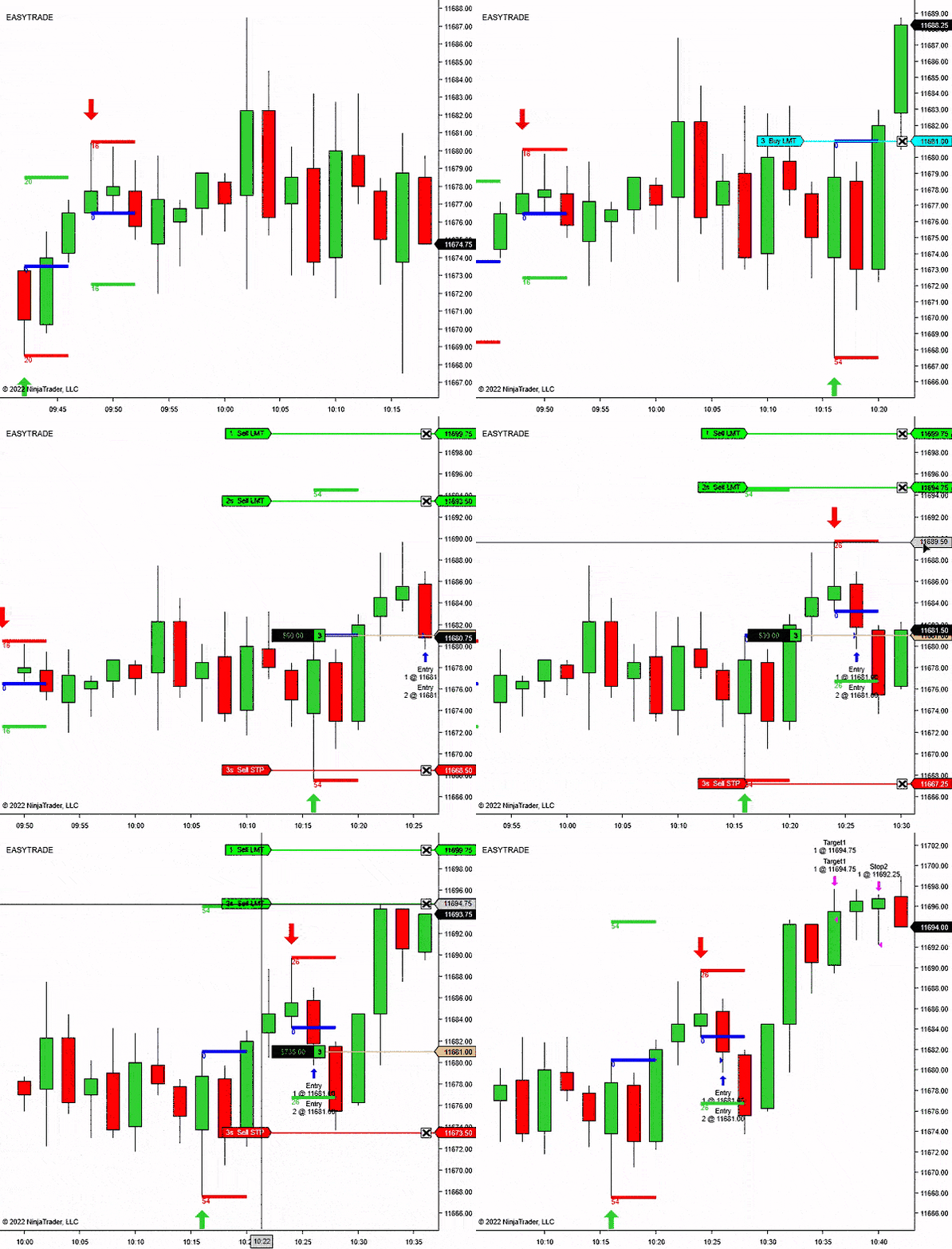
NinjaTrader 8 reversal entry signal indicator
Reversal Signal Indicator
NT8 compatible
14-day free trial
Pivot confirmation
Trade plan drawing
Reversal Signal Indicator
From: $0 for 2 weeks
Built for traders who want reversal areas marked clearly, with enough control to avoid treating every small turn as a trade.
Reversal Signal Indicator is for spotting swing-style turning points, then checking whether the setup confirms while it is still fresh.
The indicator tracks recent swing highs and lows using the selected pivot and lookback settings.
The signal needs to confirm inside your configured window, so old pivots do not stay active forever.
Draw an arrow first, then optionally draw a NinjaTrader RiskReward tool from your configured template.
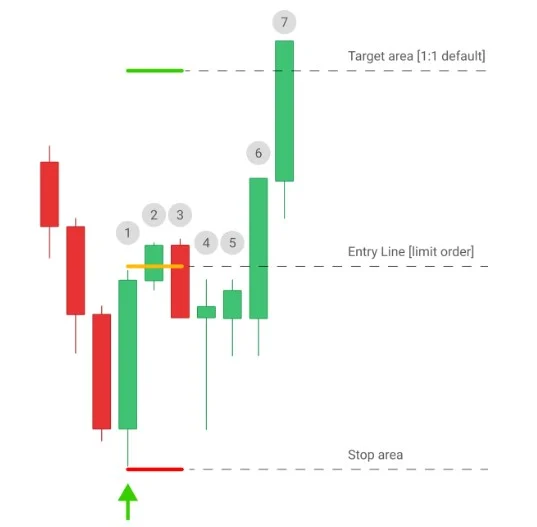
The workflow is simple: wait for the confirmed reversal, set the order where the signal says the pullback should matter, then skip it if price leaves without you.
The signal is meant to define an entry area for a limit order. That matters: if the market reaches the target area before your order fills, the setup is already gone.
Let the pivot and confirmation settings decide whether the turning point is fresh enough to review.
The product logic is built around letting price pull back to the entry instead of forcing a late market order.
The RiskReward drawing gives the estimated stop and target structure while the trade is still only a decision.
If price runs to the target area before the order triggers, the cleaner trade is usually the next confirmed setup.
Choose the chart rules before the session, then let the indicator handle the repetitive signal and planning marks.
Set the recent signal history, pivot behavior, confirmation window, direction filter, and RiskReward template before you begin watching the market.
Use the long signal as a possible turning area after the pivot confirms.
Use the short signal as the start of the plan, then check whether price still offers a clean entry.
Show every signal, use the trend filter, or focus on counter-trend reversal ideas.
Draw the planned entry, stop, and target from your saved NinjaTrader template.
Use Reversal Signal Indicator as a chart-side setup scanner. It does not replace trade judgment or order execution.
The indicator marks the area. You still choose whether the setup fits the market, session, nearby levels, and your risk plan.
Add Reversal Signal Indicator to a NinjaTrader 8 chart and choose how much recent history to mark.
Set pivot density, pivot confirmation, and the signal confirmation period for the market you trade.
When the setup confirms, the indicator draws the arrow and can play your selected alert sound.
Use the optional RiskReward drawing to see entry, stop, and target structure directly on the chart.
Each block pairs the decision with the chart view: signal first, pullback second, order plan third.
The signal marks the possible reversal area. Treat it as the place to review the setup, not a reason to chase price after it has already moved.
Wait for the confirmed mark, place the order at the planned pullback area, and let the market come to you.
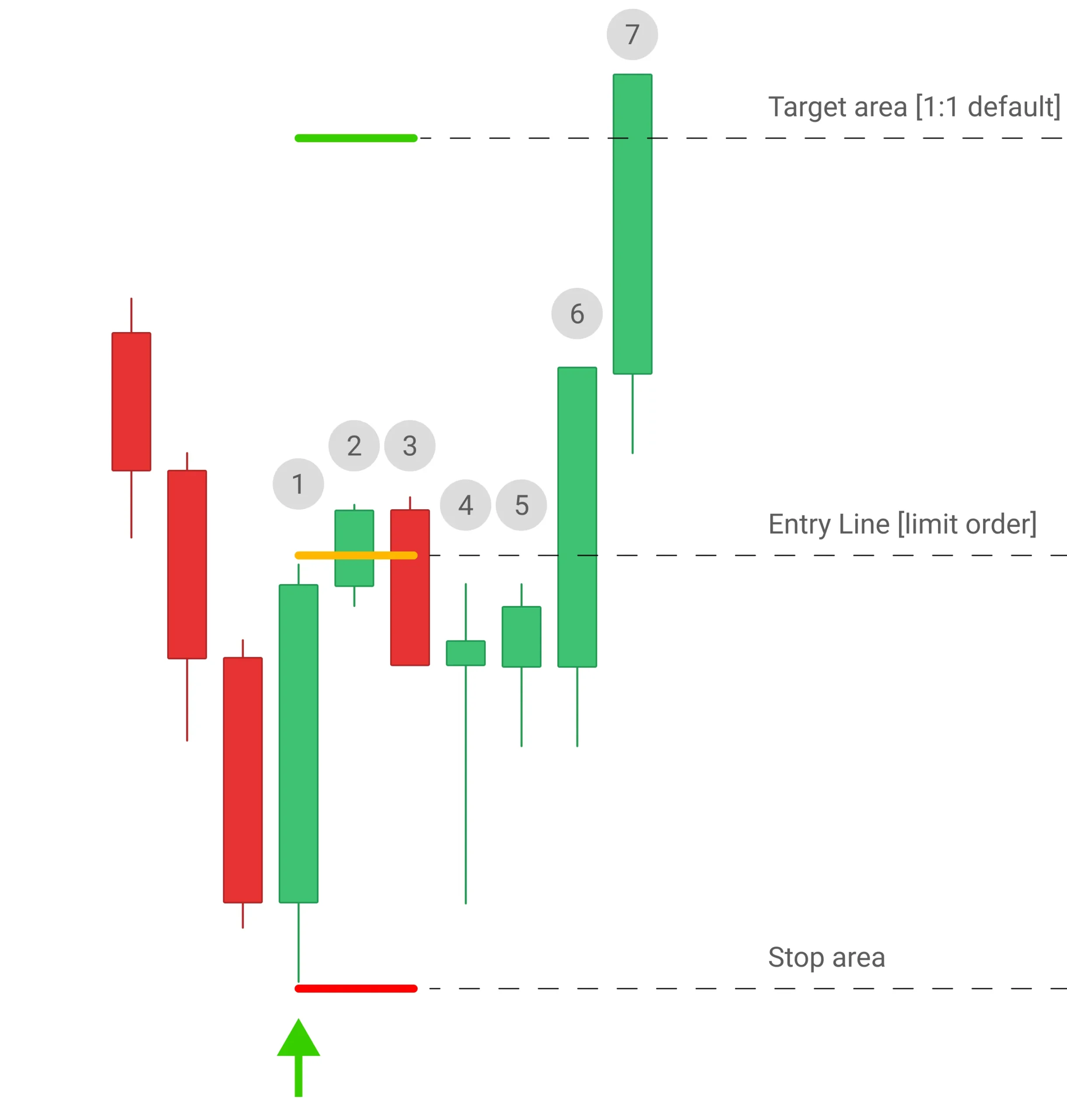
The workflow is intentionally plain: signal, limit order, risk view, decision. If price runs away first, leave the setup alone.
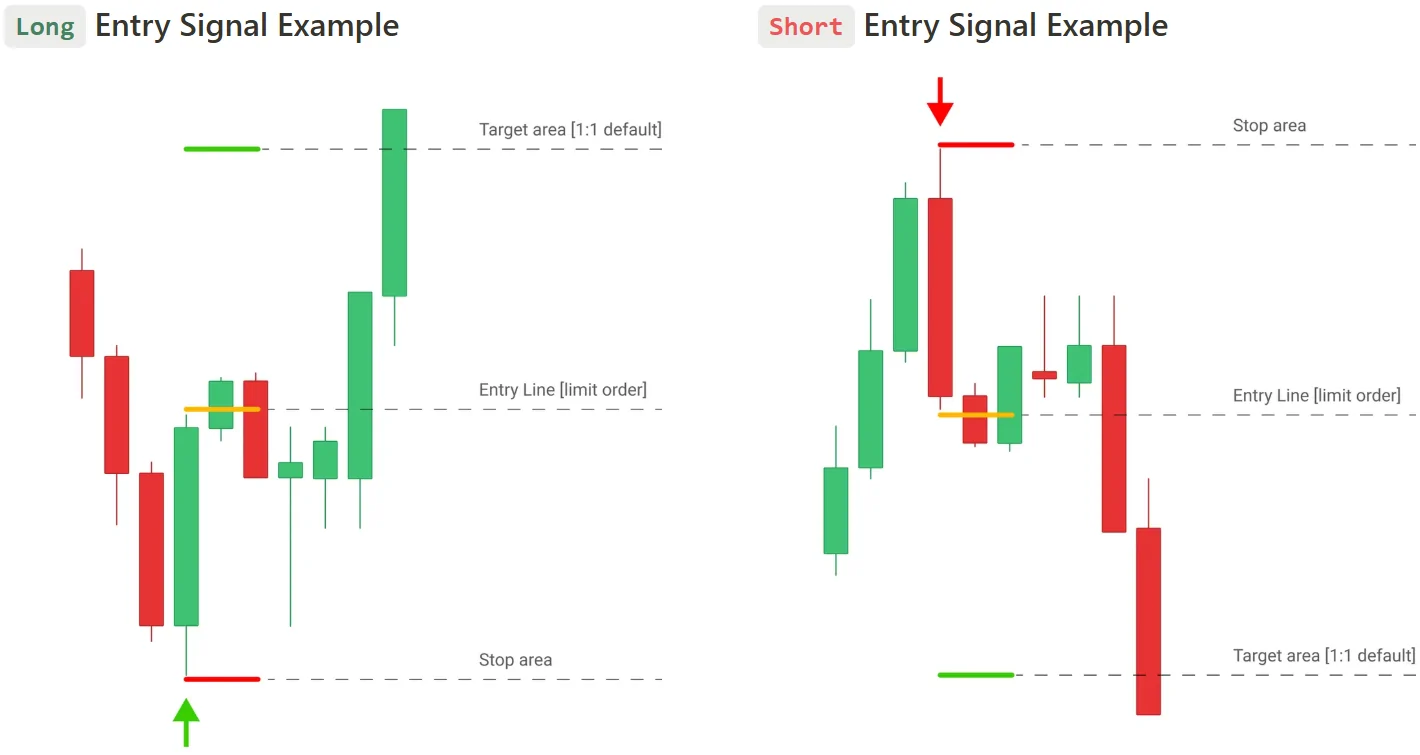
The RiskReward drawing keeps the estimated stop and target visible, so the signal is easier to judge before the order is placed.
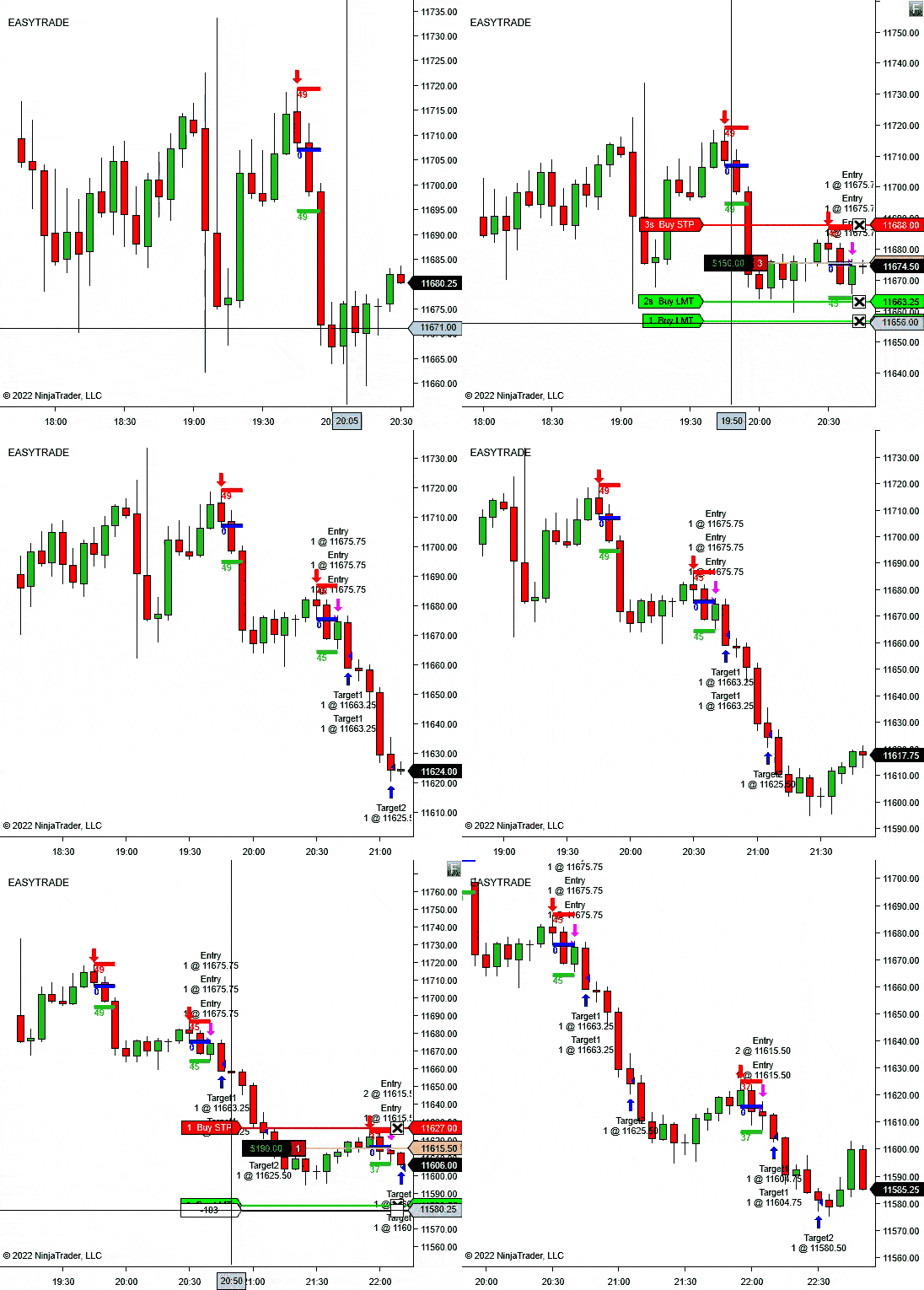
Reversal Signal Indicator helps you find and plan the setup. Trade Analyzer helps you study what happens after the setup.
If you are refining a reversal playbook, use Reversal Signal Indicator during the session and Trade Analyzer when you want to compare reward multiples across a batch of trades.
These controls change how sensitive the reversal model should be and how the trade plan appears on the chart.
Number of CandlesticksControl how much recent chart history the indicator marks.
Pivot DensityChoose how many bars are used to identify the swing-style high or low.
Pivot ConfirmationSet how much price must move in ticks before the setup can qualify.
Signal Confirmation PeriodLimit how long a pivot remains valid if price does not confirm quickly enough.
Trade Direction ModeAllow all signals, use the built-in trend filter, or focus on against-trend reversals.
Draw Risk/Reward?Use your saved NinjaTrader RiskReward template when the setup is marked.
R/R RatioControl the reward ratio used when the indicator draws the plan.
R/R Tool TemplateMatch the drawing to your saved NinjaTrader template and line settings.
Alert File / AlertPlay a selected sound file when a valid reversal signal appears.
Built for discretionary traders who want reversal areas and risk structure marked faster, without turning the chart into a wall of signals.
Use the signal when you are watching for short-term tops, bottoms, pullback turns, or exhaustion areas.
Set the direction mode to follow the trend when you want reversals that resume the broader move.
Use against-trend mode when your strategy is built around fading extended moves with confirmation.
Use the template-based RiskReward drawing when you want the stop and target structure visible right after the signal.
Reversal Signal Indicator is more useful than a raw arrow tool because confirmation, direction mode, and RiskReward drawing keep the setup tied to a trading plan.
The signal is based on pivot behavior and confirmation, not simple candle color.
The trend mode lets you decide whether the chart should show trend-side or counter-trend ideas.
The RiskReward drawing turns the signal into a planned setup instead of leaving you with a plain arrow.
Start with the 14-day trial, then choose monthly, annual, or lifetime access if Reversal Signal Indicator fits your chart workflow.
Use the signal workflow first, then choose a license only if the indicator fits the way you trade.
Best when you want to keep testing the workflow beyond the trial.
Reversal arrows, trend modes, alerts, RiskReward drawing, updates, and support.
Best when reversal signals become part of your regular NinjaTrader chart setup.
One year of access, updates, support, and the full indicator workflow.
Best when you want long-term access without recurring license decisions.
Lifetime access, updates, support, and the full indicator workflow.
Start Free Trial - No Credit Card Required. The trial is available once per user.
Short answers for the buying questions that usually come up first.
Yes. It is built as a NinjaTrader 8 chart indicator.
No. It marks signals and can draw a RiskReward object. You still decide whether to place the trade.
Yes. Trade Direction Mode can allow all signals, use the built-in trend filter, or focus on counter-trend reversals.
Yes. Use the R/R Tool Template Name setting to match your saved NinjaTrader drawing template.
Yes. Enable sound alerts and choose the alert file from your NinjaTrader sounds folder.
Yes. The page includes a 14-day free trial checkout link.
Start with the 14-day trial, tune the pivot settings, and see whether Reversal Signal Indicator matches the setups you already want to trade.
Articles
Product feedback
I spent about a week trying to figure out how to use the Reversal Indicator properly. The signals were okay, but I struggled with market entries. Luckily, Max from the support team was a huge help, guiding me through the process. While I’m not entirely satisfied with the results so far, the customer service is top-notch.
I’ve been using the Reversal Indicator for several months, and I can’t recommend it enough. It’s easy to understand, even for someone like me who is relatively new to trading. The indicator consistently gives accurate signals, which helped me avoid bad trades (impressed with that). The support team is fantastic-quick to resolve any questions. Highly recommend
INndicator is incredibly user-friendly and has made a noticeable difference in my trading results. The signals are clear, and the performance has exceeded my expectations. The support team was great in helping me get started and resolve any issues.
This indicator is so user-friendly, quite impressive to be honest, I'm surprised with the accuracy of the signals and overall idea of the indicator as all I need is put my entry in! And BTW it works perfect with easytrade free addon.
I don't like to write reviews, but in this case i will leave 2 words: IT WORKS
I don't like to write reviews, but in this case i will leave 2 words: IT WORKS
I have over 80% accuracy and it helped to make so many good trades, with showing exactly where to enter the market and when to take the profits. iti s nice
This add-on is seriously top-notch-a total game-changer. Trust me, I've sifted through a bunch of them, and this semi-auto tool stands out as one of the best I've found. It's like finally finding that perfect tool that just clicks with your workflow, making everything smoother and more efficient. I've been so impressed with how intuitive it is to use, and the results speak for themselves-solid performance and reliability. If you're on the lookout for something that really delivers without the hassle, this one's a winner.
Like the alert, you do not have to be sitting on the machine and wait; it will issue the sound alert and you can then go and place your order, Ncie touch.
At first it was a bit confusing to leave the orders and wait fo it to retrace and collect your order, but after sometimes it is becoming normal and helping me to make good trades.
Reversal indicator is built on genius idea and it is really working for me that i dont use auto-trader and i just want to make it by myself, it shows you when to enter and where to leave your stop and target. this is working and making quite a good impact in my PNL.
Dedicated company providing valuable resources. Trustworthy people.
Yo, just copped an indicator from here, and let me tell ya, it's legit impressive. This thing ain't just reliable, it's spot-on accurate. Plus, buying it was a breeze. Their website's slick, checkout was smooth, and bam, I had the indicator in no time. Big shoutout to team for the quality and hassle-free service. Can't wait to check out more of your stuff down the road. These guys are definitely on point with their products and service.
As a newbie to the Reversal Indicator, I dedicated some serious time to grasp its fundamentals and run some virtual trades for about three weeks!!!!!!!!
During my initial week of real trading, I clocked in a handsome 5K gain!!!!!!!!!! Just WOOOWW!
For a solid week, I was totally stumped trying to figure out the market entry game with the Reversal Indicator. It was like trying to crack a safe!
But then Max swoops in like a hero, dropping knowledge bombs left and right, showing me the ropes. Big shoutout to Max for pulling me out of that market madness!
I recently acquired an indicator from them, and I must say, it's been quite a satisfactory experience. Initially, I was a bit apprehensive, as one tends to be when trying out new trading tools. However, after using it for some time, I can confidently say that it's not a scam. In fact, their indicator works exceptionally well, providing me with valuable insights into market movements and helping me make informed trading decisions. It's been a game-changer for my trading strategy, and I couldn't be more pleased with the results.
Much love! This thing is dope, man! It's been hooking me up with some sick trading moves and stacking my cash! Super impressed with how it's been holding it down.
Failed to meet expectations. Add-ons lacked essential features and did not enhance trading performance. Disappointed with the purchase. I knew all the reversal points before Thx.
My trades have been lit since I started using this. Cash flow's looking way better now!
2 Words: Is a must-have. Thank you .
Find pivot-based reversal setups, wait for confirmation, and execute the trade.