Signal sequence
Spot the turn before planning the order
The signal marks the possible reversal area. Treat it as the place to review the setup, not a reason to chase price after it has already moved.
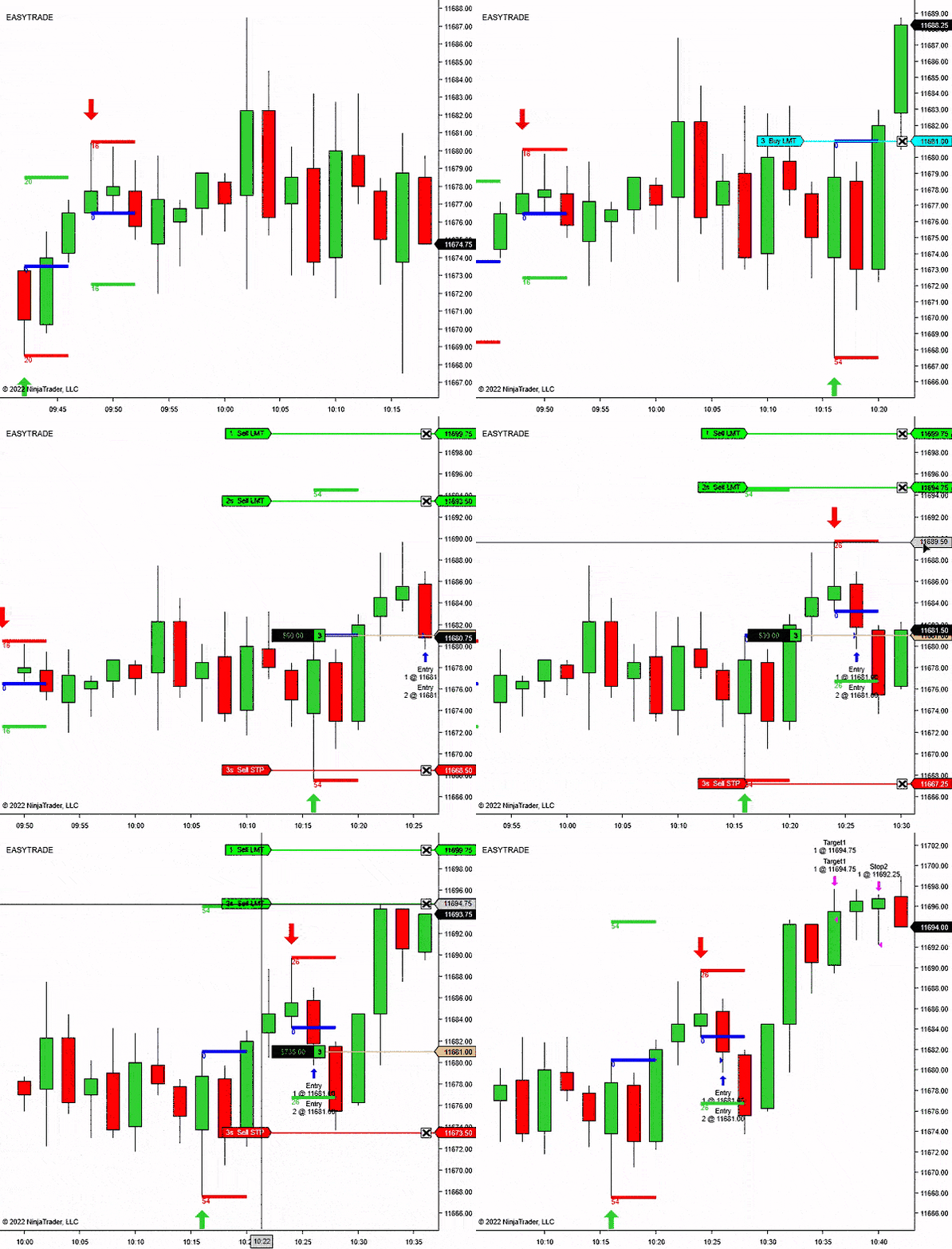
NinjaTrader 8 reversal entry signal indicator
Reversal Signal Indicator
NT8 compatible
14-day free trial
Pivot confirmation
Trade plan drawing
Reversal Signal Indicator
From: $0 for 2 weeks
Built for traders who want reversal areas marked clearly, with enough control to avoid treating every small turn as a trade.
Reversal Signal Indicator is for spotting swing-style turning points, then checking whether the setup confirms while it is still fresh.
The indicator tracks recent swing highs and lows using the selected pivot and lookback settings.
The signal needs to confirm inside your configured window, so old pivots do not stay active forever.
Draw an arrow first, then optionally draw a NinjaTrader RiskReward tool from your configured template.
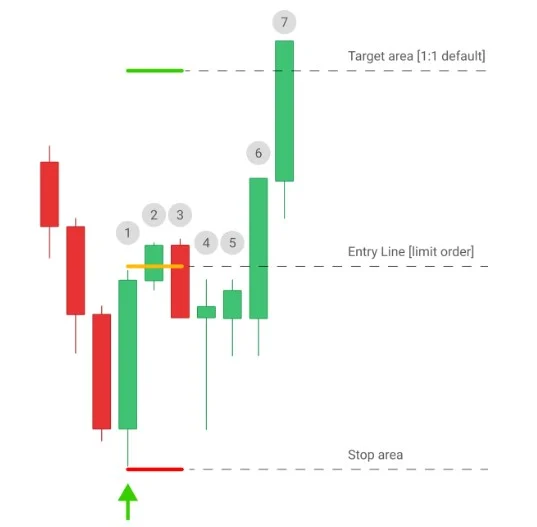
The workflow is simple: wait for the confirmed reversal, set the order where the signal says the pullback should matter, then skip it if price leaves without you.
The signal is meant to define an entry area for a limit order. That matters: if the market reaches the target area before your order fills, the setup is already gone.
Let the pivot and confirmation settings decide whether the turning point is fresh enough to review.
The product logic is built around letting price pull back to the entry instead of forcing a late market order.
The RiskReward drawing gives the estimated stop and target structure while the trade is still only a decision.
If price runs to the target area before the order triggers, the cleaner trade is usually the next confirmed setup.
Choose the chart rules before the session, then let the indicator handle the repetitive signal and planning marks.
Set the recent signal history, pivot behavior, confirmation window, direction filter, and RiskReward template before you begin watching the market.
Use the long signal as a possible turning area after the pivot confirms.
Use the short signal as the start of the plan, then check whether price still offers a clean entry.
Show every signal, use the trend filter, or focus on counter-trend reversal ideas.
Draw the planned entry, stop, and target from your saved NinjaTrader template.
Use Reversal Signal Indicator as a chart-side setup scanner. It does not replace trade judgment or order execution.
The indicator marks the area. You still choose whether the setup fits the market, session, nearby levels, and your risk plan.
Add Reversal Signal Indicator to a NinjaTrader 8 chart and choose how much recent history to mark.
Set pivot density, pivot confirmation, and the signal confirmation period for the market you trade.
When the setup confirms, the indicator draws the arrow and can play your selected alert sound.
Use the optional RiskReward drawing to see entry, stop, and target structure directly on the chart.
Each block pairs the decision with the chart view: signal first, pullback second, order plan third.
The signal marks the possible reversal area. Treat it as the place to review the setup, not a reason to chase price after it has already moved.
Wait for the confirmed mark, place the order at the planned pullback area, and let the market come to you.
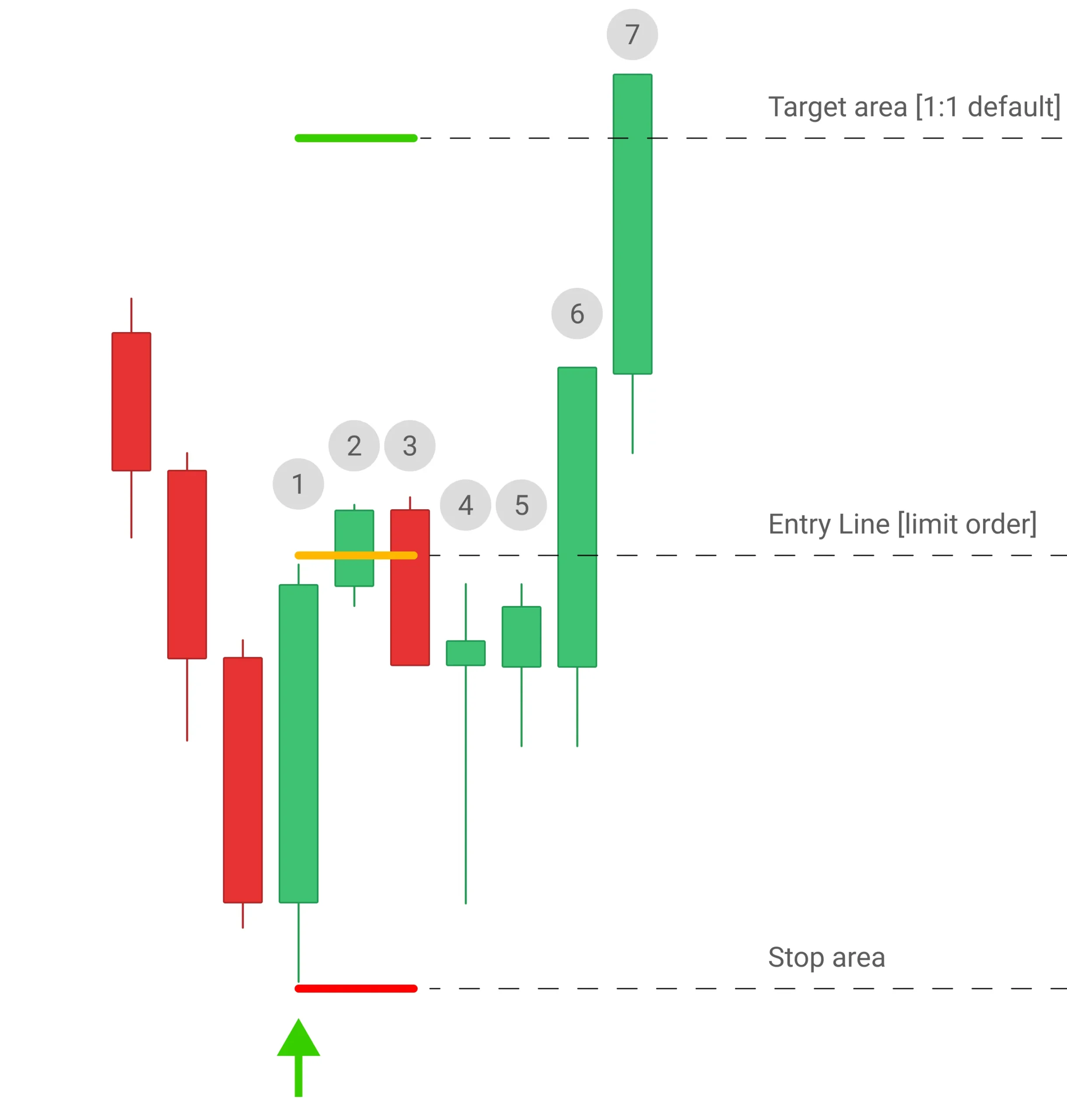
The workflow is intentionally plain: signal, limit order, risk view, decision. If price runs away first, leave the setup alone.
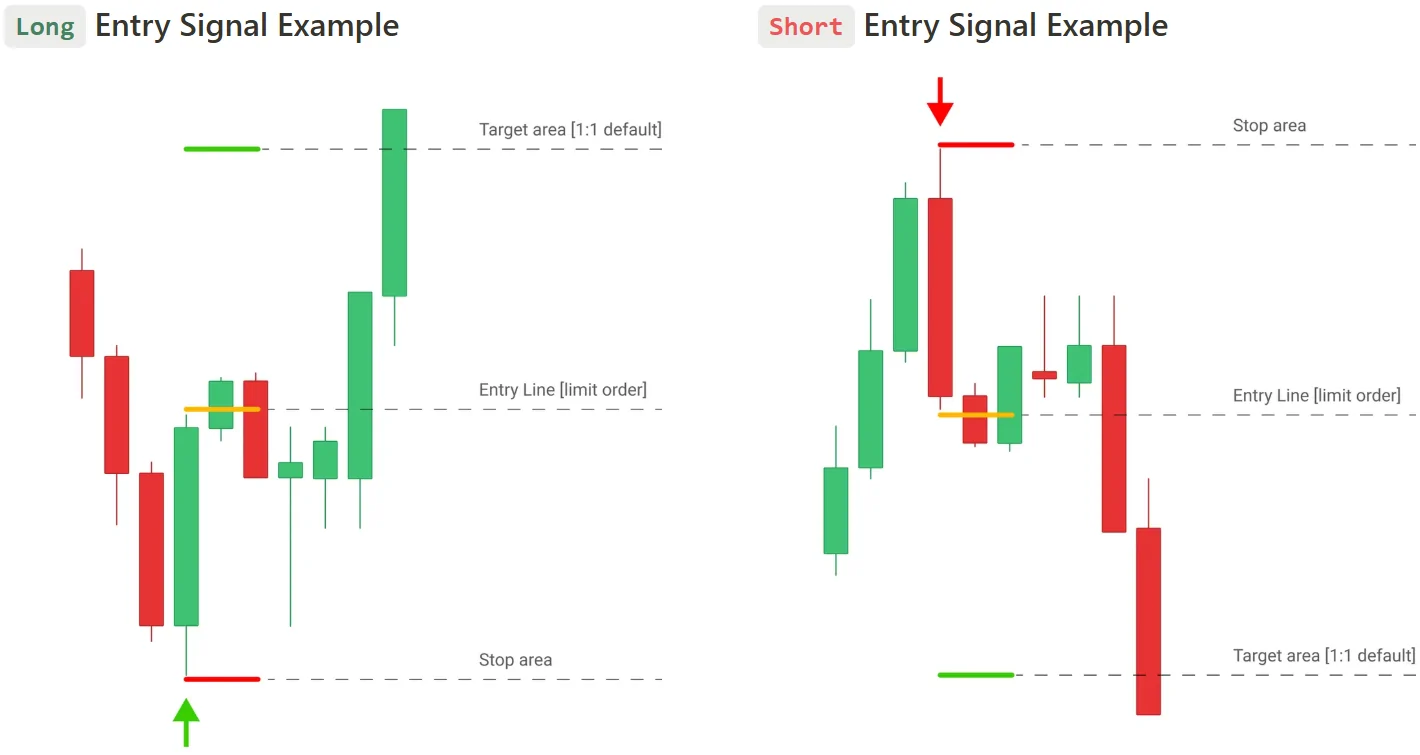
The RiskReward drawing keeps the estimated stop and target visible, so the signal is easier to judge before the order is placed.
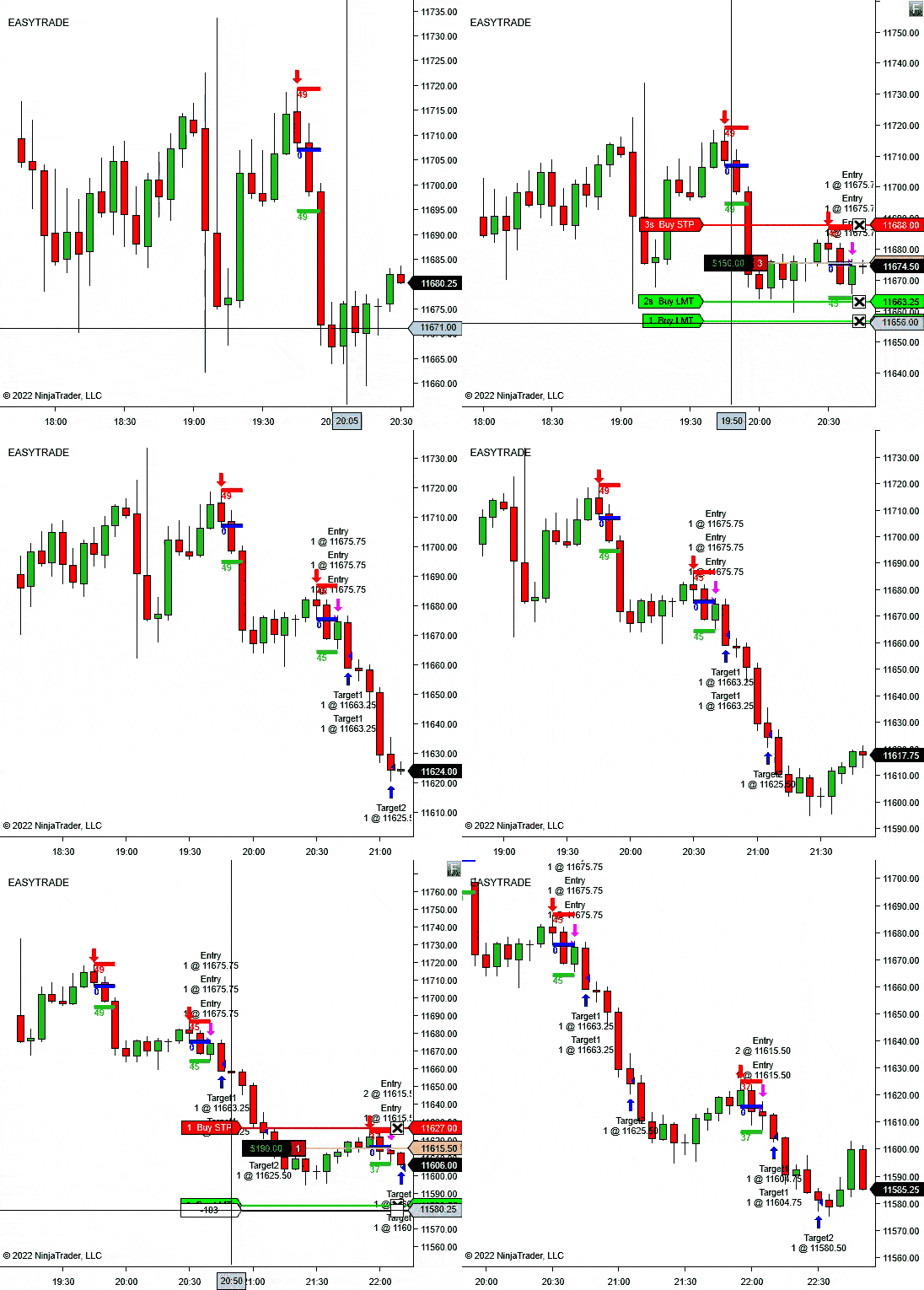
Reversal Signal Indicator helps you find and plan the setup. Trade Analyzer helps you study what happens after the setup.
If you are refining a reversal playbook, use Reversal Signal Indicator during the session and Trade Analyzer when you want to compare reward multiples across a batch of trades.
These controls change how sensitive the reversal model should be and how the trade plan appears on the chart.
Number of CandlesticksControl how much recent chart history the indicator marks.
Pivot DensityChoose how many bars are used to identify the swing-style high or low.
Pivot ConfirmationSet how much price must move in ticks before the setup can qualify.
Signal Confirmation PeriodLimit how long a pivot remains valid if price does not confirm quickly enough.
Trade Direction ModeAllow all signals, use the built-in trend filter, or focus on against-trend reversals.
Draw Risk/Reward?Use your saved NinjaTrader RiskReward template when the setup is marked.
R/R RatioControl the reward ratio used when the indicator draws the plan.
R/R Tool TemplateMatch the drawing to your saved NinjaTrader template and line settings.
Alert File / AlertPlay a selected sound file when a valid reversal signal appears.
Built for discretionary traders who want reversal areas and risk structure marked faster, without turning the chart into a wall of signals.
Use the signal when you are watching for short-term tops, bottoms, pullback turns, or exhaustion areas.
Set the direction mode to follow the trend when you want reversals that resume the broader move.
Use against-trend mode when your strategy is built around fading extended moves with confirmation.
Use the template-based RiskReward drawing when you want the stop and target structure visible right after the signal.
Reversal Signal Indicator is more useful than a raw arrow tool because confirmation, direction mode, and RiskReward drawing keep the setup tied to a trading plan.
The signal is based on pivot behavior and confirmation, not simple candle color.
The trend mode lets you decide whether the chart should show trend-side or counter-trend ideas.
The RiskReward drawing turns the signal into a planned setup instead of leaving you with a plain arrow.
Start with the 14-day trial, then choose monthly, annual, or lifetime access if Reversal Signal Indicator fits your chart workflow.
Use the signal workflow first, then choose a license only if the indicator fits the way you trade.
Best when you want to keep testing the workflow beyond the trial.
Reversal arrows, trend modes, alerts, RiskReward drawing, updates, and support.
Best when reversal signals become part of your regular NinjaTrader chart setup.
One year of access, updates, support, and the full indicator workflow.
Best when you want long-term access without recurring license decisions.
Lifetime access, updates, support, and the full indicator workflow.
Start Free Trial - No Credit Card Required. The trial is available once per user.
Short answers for the buying questions that usually come up first.
Yes. It is built as a NinjaTrader 8 chart indicator.
No. It marks signals and can draw a RiskReward object. You still decide whether to place the trade.
Yes. Trade Direction Mode can allow all signals, use the built-in trend filter, or focus on counter-trend reversals.
Yes. Use the R/R Tool Template Name setting to match your saved NinjaTrader drawing template.
Yes. Enable sound alerts and choose the alert file from your NinjaTrader sounds folder.
Yes. The page includes a 14-day free trial checkout link.
Start with the 14-day trial, tune the pivot settings, and see whether Reversal Signal Indicator matches the setups you already want to trade.
Articles
Product feedback
Bought for NQ, using on ES now too. Reversal Indicator holds up in both. Price felt fair for the utility tbh. Not perfect sideways noon chop still throws meh signals. But during the open is .
Works much better then strategy i think that's mostly due to auto-traders nature. I have finally stareted to see some profits on my funded account. much appriciated for the add-ons, tools and free stuff that you offer
I'm happy. Caught a fat reversal on crude oil yesterday and I’m still buzzing-made my week. Yeah, the delay sucks at first, but once you figure it out, it’s like having X-ray vision for trades.
Took me forever to get it working right-signals wouldn’t even show up til I messed with the chart settings. Now it’s pretty solid on 5-min stuff. Worth it, I guess?
Surprisingly, this is a very lucky indicator. Plus, it has a rather interesting entry strategy (based on the retun of the price to its original point). At first, I was confused that the signal appeared a few candles later, but I adjusted a setting in the parameters that filters out such signals and shows only those that appear on the very next candle after the signal.
This setting is called Signal Confrimation Period-I think it could be useful to someone. Overall, I had a very positive experience using this indicator.
it’s kind of a double-edged sword. On one hand, it’s really good at spotting price corrections and reversal levels – almost too good at times! I’ve had more confidence entering trades since using it. But on the other hand, there have been a few times where the signals didn’t quite match up with what actually happened in the market, and I ended up with some bad trades. The real-time accuracy is a big plus, but you really need to pay attention to the market context too.
It’s definitely not a ‘set it and forget it’ kind of tool – you’ll have to 100% mix it with your own analysis to make it work. But with time, it’s become a useful part of my trading toolkit."
Works. Thats all I wanted
When I first integrated this tool into my NinjaTrader 8 setup, I was blown away by the clarity it brought to my tradin. Focus on price action without indicators is exactly what I needed to capitalize on marke movements. I've managed to catch trends at their infancy due to its precise entry signals. However, there's a learning curve to understanding when these signals are truly actionable. Sometimes, it signals a reversal that doesn't materializze, which can be confusing, especially for new traders. With time, though, you start to see the patterns and when to trust its insihts. It's Its definitely made my trading more profitale, but it's its not without its challenges. Learning to use it effectively has been part of my trading education
I bought this indicator expecting it to transform my trading with, but I've been left somewhat disappointed. While it does highlight potential reversal points, the signals are not as clear or as frequent as I was led to believe. It's Its supposed to provide precise entry signals, but I've found myself second-guessing its recommendations more often than not. Plus, the cost seems steep for what you get, especially when you consider that it doesn't offer much in terms of customization or advanced analysis. It's Its a decent tool but not the game-changer I was hoping for
The only downside is that it sometimes leads to overtrading, Overall, it's its a significant upgrade to my trading toolkit, especially for those focusing on trend reversals.
been using the Market Reversal Indicator for NinjaTrader 8 for a few months, and it's its definitely opened my eyes to potential entry points I would've missed. However, there's a catch; sometimes it's its signals come a bit too late, which can mean missing out on the best part of the move. It's Its based on price action, which is great for real-time accuracy, but I've had to learn when to ignore it's its signals in favor of my own analysis. Still, when it's its on point, it's a powerful tool for increasing trade success
Sometimes it's brilliant, sometimes it's just confusing
When the indicator does work, the signals are clear and well-defind. However, the delay in signal appearance can be a bit frustraiting, especially if you’re used to quicker trade entries. I understand that the delay is meant to provide additional confirmation, but it sometimes feels like I’m missing out on potential opportunites.
Despite these chalenges, the risk/reward ratio settings and the emphasis on waiting for the signal has been helpful. I’d recommend this indicator if you’re willing to put in the effort to make sure everything is set up correctly.
it has a bit of a learning curve, the delay in signals is something to get used to, and I had some trouble getting it to work with non-time-based charts.
This tool has quickly become one of my go-to tools. The installation was a breeze; the step-by-step guide was clear and straightforward. I downloaded the file, imported it into NinjaTrader, and had it running within minutes.
What sets this indicator apart is its precisoin. I've noticed a significnt improvement in my trade accuracy since I started using it. The default risk/reward settings of 1:1 are perfect for my trading strategy, but I love that I can tweak them to fit my needs.
One thing I particulary appreciate is the advice on waiting for the signal to complete before entering a trade. This has helped me avoid many impulsve trades and improved my overall profitability. The delay in the signal actualy gives me confidence that the reversal is solid, rather than jumping on a false signal.
The integration of the Reversal Indicator with other technical analysis tools has also been beneficial. By combining it with my usual indicators, I’ve managed to refine my entry and exit points further. Overall, this indicator has exceedd my expectations, recommend it
Appreciate the tips on managing trade positions and combining signals from different timeframes.
This tool offers a great risk/reward ratio and has a high probability of reaching targets. I’ve found it very useful for identifying potential market turning points. The ability to adjust settings like risk/reward ratio and pivot density is a major plus thank you!
iIndicator works well, but it can be a bit finicky. I had issues with it not showing signals until I ensured I had enough data loaded and used time-based charts. Once configured correctly, it performs as advertised, but the initial setup could use a bit more clarity.
Thank you. I Recouped the cost in just a few trades! The add-on itself might not be foolproof, but the indicator’s signals have been highly accurate, helping avoid costly mistakes. Pairing it with market expertise can really amplify your results. Basic knowledge of market stage, volume and direction is a must I would say.
Indicator works as described, but i found that it’s not as helpful for my specific trading style. I prefer fully-automated strategies, and this requires manual trading guided by the signals. That said, if you’re into manual trading, it’s a solid tool, but it’s not a perfect fit for everyone.
Find pivot-based reversal setups, wait for confirmation, and execute the trade.