Setup was simple, thx
NinjaTrader 8 account copier add-on
Trade Copier
Per-account multipliers
Follower status grid
Flatten controls
MASS Copy ADVANCED
From: $0 for 2 weeks
A control-center add-on for copying, monitor, and cleaning up follower account exposure.
Place the trade on a NinjaTrader SIM account. Trade Copier sends the matching order to the follower accounts you enabled.
Use the SIM account as the control account, then let the copier mirror eligible orders to the accounts that should follow.
Followers can be broker, funded, evaluation, cash, or other NinjaTrader-connected accounts, as long as they are available in the platform.
Trade Copier is built for high accuracy and high error protection while the trader keeps control of the SIM master account.
High accuracy copying for eligible active orders.
Price updates and cancellations stay linked to the SIM master order.
Error protection helps catch stale orders, mismatches, and follower exposure.
Copy to an unlimited number of slave accounts across broker, funded, cash, SIM, and evaluation connections.
The add-on copies eligible SIM master orders, keeps follower order state mapped, and gives the trader a live account grid.
Select the SIM account you want to trade from in the MASSCopyADVANCED window.
Turn followers on or off and set the quantity multiplier for each account.
Follower orders can be updated or cancelled when the matching SIM master order changes.
Set the SIM master, choose followers, scale size, monitor state, and flatten accounts when they need cleanup.
Open MASSCopyADVANCED from the NinjaTrader Control Center and choose the SIM account that drives the copier.
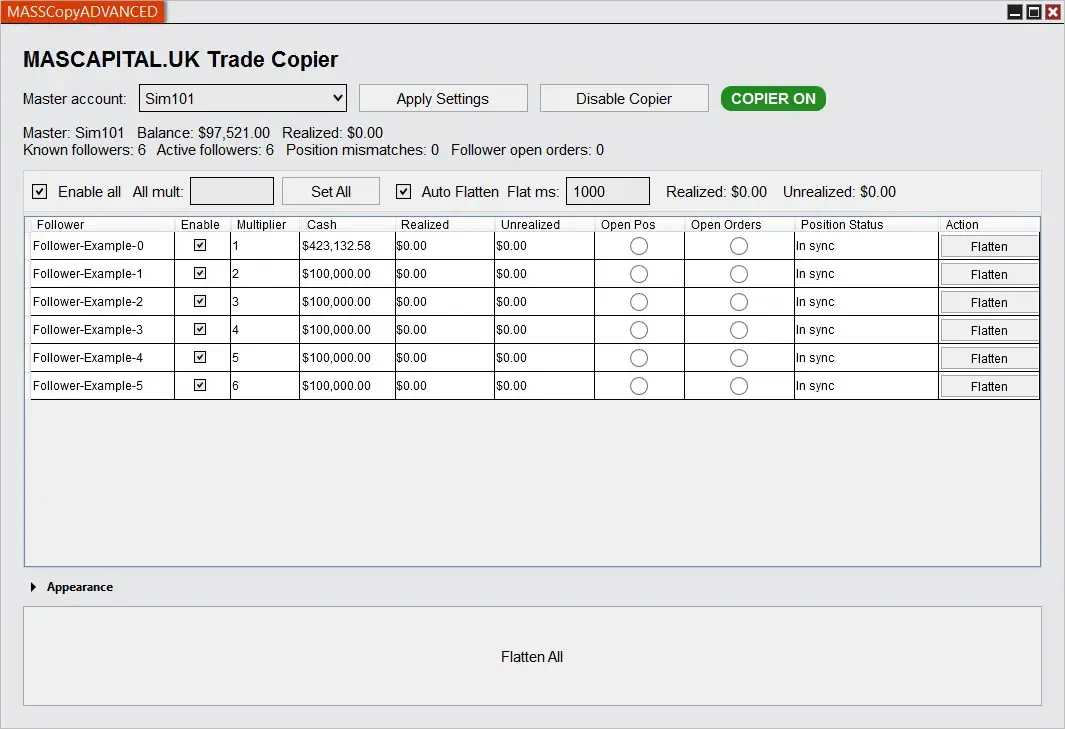
The grid lists available followers, with an on/off state for each one.
Scale copied order quantity per follower instead of forcing every account to use the same size.
The service maps SIM master orders to follower orders so price changes, cancels, and rejected states can be handled cleanly.
Use row-level flatten buttons for a single account, or the main flatten control when the whole set needs cleanup.
Follower status is visible while the copier is running, so the trader can spot the account that is out of line.
Set the accounts once, then trade from SIM while the copier watches account, order, position, and execution events.
The user manages the SIM master. Enabled followers receive matching orders based on their settings.
Launch MASSCopyADVANCED from the NinjaTrader Control Center menu.
Choose the SIM master, enable followers, set multipliers, and apply settings.
Place or manage orders on the SIM account while the service tracks active order state.
Flatten one follower, flatten all, or let auto-flatten clean follower exposure after the SIM master is flat.
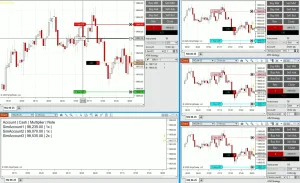
The tutorial video shows the copier window, follower grid, and setup flow inside NinjaTrader.
It keeps copying and account cleanup in one place.
Copy from the SIM account you are managing.
Use different sizing for different follower accounts.
See cash, PnL, position, orders, and mismatch state.
Clean up follower exposure without searching account by account.
Built for traders who need repeatable execution across more than one account.
Trade the SIM master while selected Apex, Bulenox, Tradovate, TopStep, or other NinjaTrader-connected accounts follow.
Use the multiplier field when one follower needs a smaller or larger copy size.
Use flatten controls when a follower account keeps exposure after the SIM master is flat.
These are the controls that change the trader's daily workflow.
Master AccountChoose the SIM account that follower accounts will copy.
Enable FollowersTurn individual followers on or off, or enable all followers at once.
MultiplierSet a quantity multiplier per follower, with a set-all workflow for faster setup.
Auto FlattenFlatten follower exposure after the SIM master stays flat and order-free for the configured interval.
Position ColoringShow flatten button color based on long or short order and position state.
XML SettingsSave copier settings, appearance, follower settings, and column widths in the NinjaTrader user data folder.
The add-on listens to NinjaTrader account events and keeps an internal map between the SIM master and follower orders.
The service copies instrument, action, order type, time in force, limit price, and stop price, then stores the relationship between the SIM master order and each follower order.
When a SIM master order changes price, cancels, or rejects, the mapped follower orders can be updated, cancelled, or cleared from tracking.
It gives you account visibility, not just order submission.
Account name, enabled state, multiplier, cash, realized PnL, unrealized PnL, position state, order state, mismatch state, and flatten state can be shown in one place.
The copier checks actual follower exposure so exit-like orders can be sized around the follower's current position.
Appearance settings cover font sizes, table height, button height, row height, status colors, flatten colors, wide buttons, and saved column widths.
Start with the trial, then choose annual or lifetime access if the copier fits your account setup.
Use Trade Copier for a full trading year.
Master selection, follower grid, multipliers, copied order tracking, flatten controls, and saved settings.
Pay once for one-computer lifetime access.
Master selection, follower grid, multipliers, copied order tracking, flatten controls, and saved settings.
Start Free Trial - No Credit Card Required. The trial is available once per user.
Short answers for the buying questions that usually come up first.
Yes. It is built as a NinjaTrader 8 add-on and opens from the Control Center menu.
Use a NinjaTrader SIM account as the master. Followers can be broker, funded, evaluation, cash, or other NinjaTrader-connected accounts.
Yes. Each follower account can use its own multiplier, and there is a set-all multiplier workflow for faster setup.
The copier keeps maps between SIM master and follower orders, so follower prices can be updated and stale follower orders can be cancelled when the SIM master order is cancelled or rejected.
Yes. It includes row-level flatten buttons, a flatten-all control, and optional auto-flatten after the SIM master is flat and clean.
Yes. License ID changes are included for transfers.
Start with the 14-day trial, then choose annual or lifetime access if it fits your NinjaTrader workflow.
Articles
Product feedback
Setup was simple, thx
Copier offers far more advanced copying options than anything else on the market, and it’s priced significantly lower than competing solutions.
Perfect. Thank you for cheap & reliable tool
I run a 1-tick trailing ATM on NQ during the open, and yeah MASSCopy is 50/50 in that specific environment.
Not the copier’s fault honestly… NT8 itself chokes when trails fire every tick.
The copier replicates initial orders perfectly, but when my ATM starts spamming trail-mods at 9:30 ET, slaves sometimes miss 1–2 of the rapid updates.
Outside those hyper-volatility windows, the tool performs flawlessly.
Good. Thank you
Been stress-testing copier on 11 NQ accounts (mixed Apex/TopStep/Live) and I’m impressed.
Bracket replication is precise - OCO IDs are mapped correctly so when my master’s stop hits, all slaves cancel instantly, no ghost orders left behind.
I purposely ran an aggressive test: limit order modification + trail update within same bar. Copier kept up with every OnOrderUpdate event. Thank you
I’ve tried all trade copiers since NT7 days and this is the first one that checks all boxes:
+ true real-time mirroring
+OCO brackets synced
+ multipliers dynamic
+ slave grouping is SO good
+ clean UI
Coming from other copiers that spam logs and desync brackets every other day, MASSCopyADVANCED feels like using a prop-desk tool.
OCO linking stays intact, modifications on master update slaves instantly, even partial fills synced correctly on NQ.
Copying accuracy is solid tho, entries + exits match nearly perfect.
Trade from master account and copy eligible orders to selected follower accounts.