Vasileios Datsikas
Verified owner
I don't like to write reviews, but in this case i will leave 2 words: IT WORKS
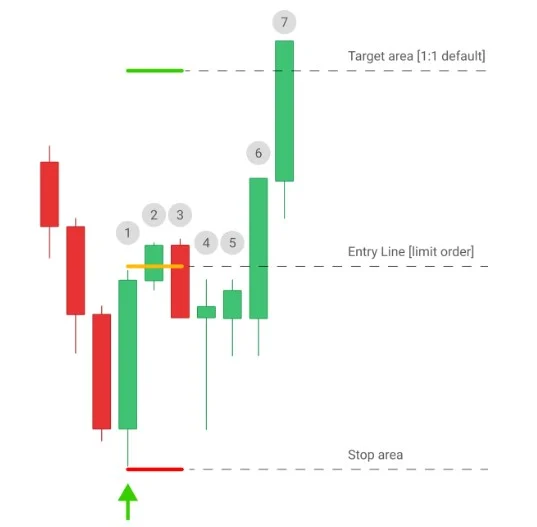
Reversal Signal Indicator marks a possible reversal entry on your NinjaTrader 8 chart and can draw the stop and target levels. You place the order.
NinjaTrader 8 · Entry, stop and target · 14-day trial
Prices in USD. The trial runs for 14 days.
An arrow appears when a reversal setup is confirmed.
When enabled, the trade plan shows the levels to use before you place the order.
The indicator does not trade. You size the position and send the order.
The confirmation rule and trend filter keep unconfirmed turning points off the chart.
Add it to a NinjaTrader 8 chart.
A turning point must be confirmed before the signal appears.
The plan shows where the stop and target sit for that setup.
Size the trade in NinjaTrader and send the order yourself.
One arrow, then the levels for the plan.
The indicator marks the plan; you place the order.
Product feedback
Reversal Signal Indicator · customer reviews
I don't like to write reviews, but in this case i will leave 2 words: IT WORKS
I don't like to write reviews, but in this case i will leave 2 words: IT WORKS
I have over 80% accuracy and it helped to make so many good trades, with showing exactly where to enter the market and when to take the profits. iti s nice
This add-on is seriously top-notch-a total game-changer. Trust me, I've sifted through a bunch of them, and this semi-auto tool stands out as one of the best I've found. It's like finally finding that perfect tool that just clicks with your workflow, making everything smoother and more efficient. I've been so impressed with how intuitive it is to use, and the results speak for themselves-solid performance and reliability. If you're on the lookout for something that really delivers without the hassle, this one's a winner.
Like the alert, you do not have to be sitting on the machine and wait; it will issue the sound alert and you can then go and place your order, Ncie touch.
At first it was a bit confusing to leave the orders and wait fo it to retrace and collect your order, but after sometimes it is becoming normal and helping me to make good trades.
Send us the timeframe and turning-point settings you use. We will check the settings with you.
A possible reversal entry: an arrow on the chart and, if enabled, stop and target levels.
No. You place the order yourself; the indicator only marks the setup and levels.
From the turning point that triggered the setup.
Choose with-trend, counter-trend, or no filter.
Yes. Pick a file from the NinjaTrader sounds folder and turn the alert on.
No. It is built for NinjaTrader 8.
Yes. 14 days with every setting unlocked and no card.
Yes. Cancel from My Account → Subscriptions. The plan stops renewing.
Yes. License transfers are included.
Try every setting for 14 days. No card.