Norman
Verified owner
Lifetime License FTW!
BTW: The Easytrade combined with THIS are the real deal.
Reversal Signal Indicator marks a possible reversal entry on your NinjaTrader 8 chart and can draw the stop and target levels. You place the order.
NinjaTrader 8 · Entry, stop and target · 14-day trial
Prices in USD. The trial runs for 14 days.
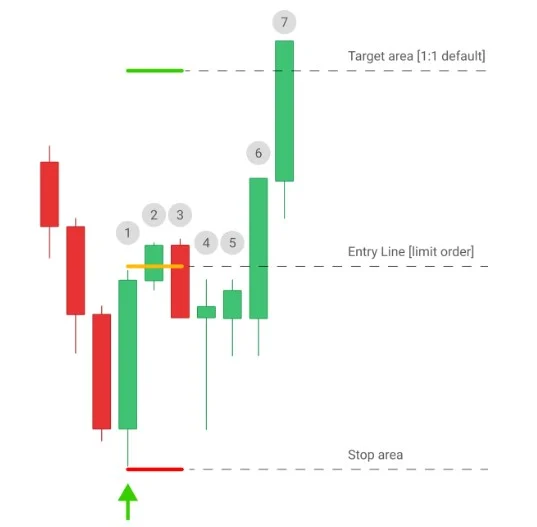
An arrow appears when a reversal setup is confirmed.
When enabled, the trade plan shows the levels to use before you place the order.
The indicator does not trade. You size the position and send the order.
The confirmation rule and trend filter keep unconfirmed turning points off the chart.
Add it to a NinjaTrader 8 chart.
A turning point must be confirmed before the signal appears.
The plan shows where the stop and target sit for that setup.
Size the trade in NinjaTrader and send the order yourself.
One arrow, then the levels for the plan.
The indicator marks the plan; you place the order.
Product feedback
Reversal Signal Indicator · customer reviews
Lifetime License FTW!
BTW: The Easytrade combined with THIS are the real deal.
Thank you for a job well done !Indicator has exceeded my expectations.
So: I was struggling with my entries, but the Reversal Indicator turned it around. It's become an essential part of my trading toolkit.
Learning curve was a bit steep, but support was a lifesaver. Guidance was invaluable in getting me on the right track. Thumbs up! 5:5
Support was a bit slow in responding, but once they got back to me, the issue was resolved efficiently.
as a newbie, I invested time in learning the Reversal Indicator. With Max's guidance, I made significant gains in my first week of live trading.
Max is an excellent mentor!
Took some time to get used to it, but once you understand the strategy, it's a game-changer. Occasionally, pullbacks do turn into major shifts, but it's rare. 4/5
Send us the timeframe and turning-point settings you use. We will check the settings with you.
A possible reversal entry: an arrow on the chart and, if enabled, stop and target levels.
No. You place the order yourself; the indicator only marks the setup and levels.
From the turning point that triggered the setup.
Choose with-trend, counter-trend, or no filter.
Yes. Pick a file from the NinjaTrader sounds folder and turn the alert on.
No. It is built for NinjaTrader 8.
Yes. 14 days with every setting unlocked and no card.
Yes. Cancel from My Account → Subscriptions. The plan stops renewing.
Yes. License transfers are included.
Try every setting for 14 days. No card.