

1. Home
  2. Shop
  3. Indicators
  4. Reversal Signal Indicator
Reversal signals

See the reversal setup before you place the order.

Reversal Signal Indicator marks a possible reversal entry on your NinjaTrader 8 chart and can draw the stop and target levels. You place the order.

NinjaTrader 8 · Entry, stop and target · 14-day trial

Pricing

Same features, different terms.

14-Day Free Trial
Free
Every setting unlocked.
  • 14 days
  • No card
  • Full access
Download free trial
Monthly License
$149 / month $117 −22% Save $32
Month-to-month access.
  • Billed monthly
  • Renews monthly
  • Lower upfront cost
  • Cancel anytime
  • Unlimited Machine ID changes
  • Support and remote assistance
  • Updates
Get monthly
Annual License
$899 / year $729 −19% Save $170
Best value across a year.
  • Billed yearly
  • Renews yearly
  • Lower cost than monthly
  • Cancel anytime
  • Unlimited Machine ID changes
  • Support and remote assistance
  • Updates
Get annual
Lifetime License No renewal
−17% · Save $202
$1,189 / once $987 −17% Save $202
Pay once, keep the indicator.
  • One payment
  • No renewal
  • Lifetime access
  • Unlimited Machine ID changes
  • Support and remote assistance
  • Updates
  • New feature requests
Get lifetime

Prices in USD. The trial runs for 14 days.

What you get

A setup you can check in seconds.

01

A possible entry, marked

An arrow appears when a reversal setup is confirmed.

02

Stop and target on the chart

When enabled, the trade plan shows the levels to use before you place the order.

03

You place the order

The indicator does not trade. You size the position and send the order.

04

Fewer weak setups

The confirmation rule and trend filter keep unconfirmed turning points off the chart.

How it works

From arrow to your order.

1

Load the indicator

Add it to a NinjaTrader 8 chart.

2

Wait for the arrow

A turning point must be confirmed before the signal appears.

3

Read the levels

The plan shows where the stop and target sit for that setup.

4

Place your order

Size the trade in NinjaTrader and send the order yourself.

On the chart

What a signal shows you.

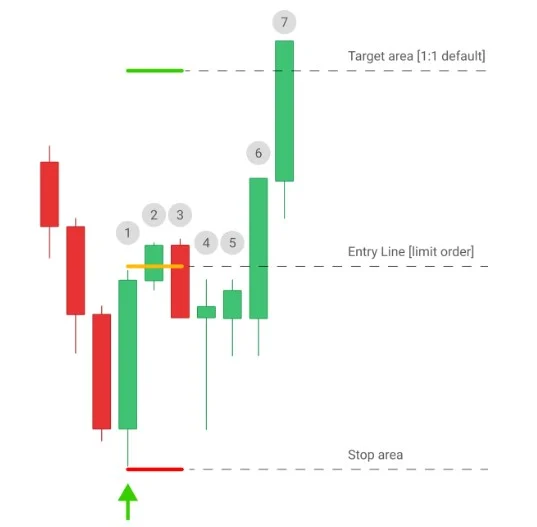
One arrow, then the levels for the plan.

Arrow
A confirmed turning point on the chart.
Entry
Where the setup triggered.
Stop
The other side of the turning point.
Target
Reward levels from the setup.
Confirmation
The signal waits for confirmation.
Trend filter
With the trend, against it, or off

The indicator marks the plan; you place the order.

What traders say about the signal.

Product feedback

Reversal Signal Indicator · customer reviews

4.5 108 reviews
  1. Ali Tucker Verified owner
    5/5

    Hey! I want to express my appreciation for the lifetime license. It has definitely been a worthwhile investment, as I quickly recouped its cost. In my experience, the reversal strategy hasn't been as effective as the indicator. It's advisable to acquire this tool and complement it with your market expertise to avoid costly errors.
  2. Gary West Verified owner
    4/5

    Versatile Across Different Timeframes
    I've used the reversal indicator on various timeframes, and it's proven to be reliable across the board. Whether I'm scalping or swing trading, it adapts well to different trading styles.

  3. AndyM Verified owner
    5/5

    Thiis signal entry add-on for NinjaTrader 8 stands out as one of the finest offerings available . I've scoured the market and haven't come across anything quite like it. Its unique features and effectiveness truly set it apart

  4. Consu REM Verified owner
    5/5

    Well, what can I say, it doesn't work as I expected.

    There is a delay between the appearance of the signal and the trade itself. But as it turned out, this is the way it is designed, because the market entry itself should be carried out immediately after the signal appears and after you put a limit order to enter the market on the entry line.
    Although I expected otherwise, but this tool works surprisingly well.

  5. James Maguire Verified owner
    2/5

    Why are there no detailed videos on this indicator?

    I had to guess what to do with it myself.

  6. ruth corcoran Verified owner
    3/5

    S L O W answer from support!!!

Need a hand with the settings?

Send us the timeframe and turning-point settings you use. We will check the settings with you.

Questions

Before you add it.

What does it mark?

A possible reversal entry: an arrow on the chart and, if enabled, stop and target levels.

Does it place the order?

No. You place the order yourself; the indicator only marks the setup and levels.

Where do the stop and target come from?

From the turning point that triggered the setup.

What do the direction modes do?

Choose with-trend, counter-trend, or no filter.

Can I change the alert sound?

Yes. Pick a file from the NinjaTrader sounds folder and turn the alert on.

Does it work on other platforms?

No. It is built for NinjaTrader 8.

Is the trial really free?

Yes. 14 days with every setting unlocked and no card.

Can I cancel my subscription?

Yes. Cancel from My Account → Subscriptions. The plan stops renewing.

Can I move the license to another machine?

Yes. License transfers are included.

Read the setup, then place the order.

Try every setting for 14 days. No card.