Zoe Watson
Verified owner
Thankyou! Good job
Reversal Signal Indicator marks a possible reversal entry on your NinjaTrader 8 chart and can draw the stop and target levels. You place the order.
NinjaTrader 8 · Entry, stop and target · 14-day trial
Prices in USD. The trial runs for 14 days.
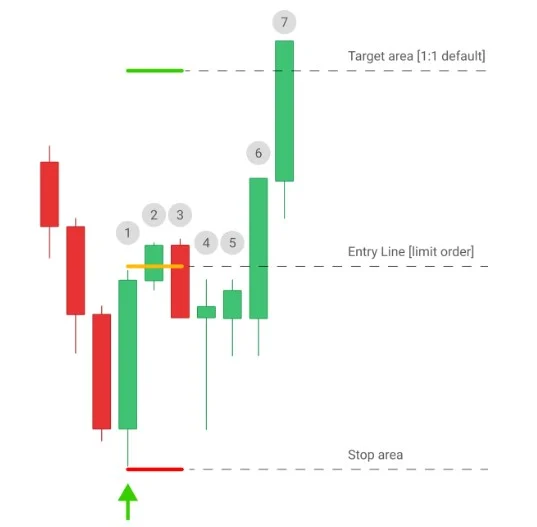
An arrow appears when a reversal setup is confirmed.
When enabled, the trade plan shows the levels to use before you place the order.
The indicator does not trade. You size the position and send the order.
The confirmation rule and trend filter keep unconfirmed turning points off the chart.
Add it to a NinjaTrader 8 chart.
A turning point must be confirmed before the signal appears.
The plan shows where the stop and target sit for that setup.
Size the trade in NinjaTrader and send the order yourself.
One arrow, then the levels for the plan.
The indicator marks the plan; you place the order.
Product feedback
Reversal Signal Indicator · customer reviews
Thankyou! Good job
Being new to the Reversal Indicator, I spent time learning its basics and practicing paper trades for three weeks. Under Max guidance, my first week of live trading resulted in a gain of over 5K. Max clear expertise is a huge asset for newcomers like me, creating an engaging and encouraging learning atmosphere.
a bit hard to get use to it, as it require you to place orders before/on a pullback. sometimes pullback becomes a full market direction change, bt happens rarely
I faced a week-long challenge in deciphering the market entry process using the Reversal Indicator. I extend my gratitude to Victoria, a valuable member of the support team, for her assistance in guiding me through the process
An absolute pleasure to use it!
I engaged with the Reversal Indicator and encountered a minor concern during my initial usage. However, the support team was swift and efficient in resolving the issue. They not only acknowledged the problem but also promptly procured the necessary components and had me back on track in no time. Their exceptional service deserves a top-notch rating of A+.
Send us the timeframe and turning-point settings you use. We will check the settings with you.
A possible reversal entry: an arrow on the chart and, if enabled, stop and target levels.
No. You place the order yourself; the indicator only marks the setup and levels.
From the turning point that triggered the setup.
Choose with-trend, counter-trend, or no filter.
Yes. Pick a file from the NinjaTrader sounds folder and turn the alert on.
No. It is built for NinjaTrader 8.
Yes. 14 days with every setting unlocked and no card.
Yes. Cancel from My Account → Subscriptions. The plan stops renewing.
Yes. License transfers are included.
Try every setting for 14 days. No card.