

1. Home
  2. Shop
  3. Indicators
  4. Reversal Signal Indicator
Reversal signals

See the reversal setup before you place the order.

Reversal Signal Indicator marks a possible reversal entry on your NinjaTrader 8 chart and can draw the stop and target levels. You place the order.

NinjaTrader 8 · Entry, stop and target · 14-day trial

Pricing

Same features, different terms.

14-Day Free Trial
Free
Every setting unlocked.
  • 14 days
  • No card
  • Full access
Download free trial
Monthly License
$149 / month $117 −22% Save $32
Month-to-month access.
  • Billed monthly
  • Renews monthly
  • Lower upfront cost
  • Cancel anytime
  • Unlimited Machine ID changes
  • Support and remote assistance
  • Updates
Get monthly
Annual License
$899 / year $729 −19% Save $170
Best value across a year.
  • Billed yearly
  • Renews yearly
  • Lower cost than monthly
  • Cancel anytime
  • Unlimited Machine ID changes
  • Support and remote assistance
  • Updates
Get annual
Lifetime License No renewal
−17% · Save $202
$1,189 / once $987 −17% Save $202
Pay once, keep the indicator.
  • One payment
  • No renewal
  • Lifetime access
  • Unlimited Machine ID changes
  • Support and remote assistance
  • Updates
  • New feature requests
Get lifetime

Prices in USD. The trial runs for 14 days.

What you get

A setup you can check in seconds.

01

A possible entry, marked

An arrow appears when a reversal setup is confirmed.

02

Stop and target on the chart

When enabled, the trade plan shows the levels to use before you place the order.

03

You place the order

The indicator does not trade. You size the position and send the order.

04

Fewer weak setups

The confirmation rule and trend filter keep unconfirmed turning points off the chart.

How it works

From arrow to your order.

1

Load the indicator

Add it to a NinjaTrader 8 chart.

2

Wait for the arrow

A turning point must be confirmed before the signal appears.

3

Read the levels

The plan shows where the stop and target sit for that setup.

4

Place your order

Size the trade in NinjaTrader and send the order yourself.

On the chart

What a signal shows you.

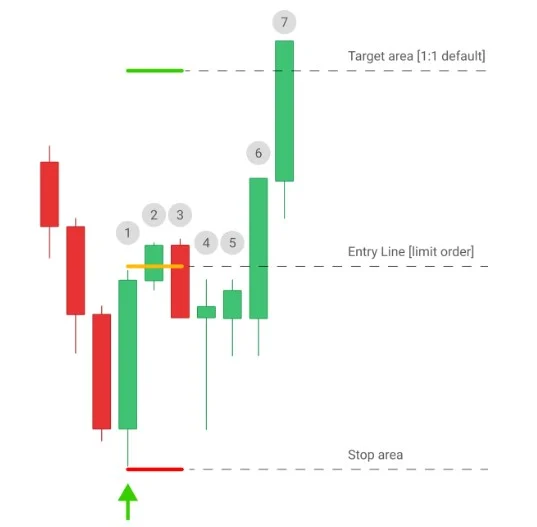
One arrow, then the levels for the plan.

Arrow
A confirmed turning point on the chart.
Entry
Where the setup triggered.
Stop
The other side of the turning point.
Target
Reward levels from the setup.
Confirmation
The signal waits for confirmation.
Trend filter
With the trend, against it, or off

The indicator marks the plan; you place the order.

What traders say about the signal.

Product feedback

Reversal Signal Indicator · customer reviews

4.5 108 reviews
  1. Paul Barrick Verified owner
    4/5

    When the indicator does work, the signals are clear and well-defind. However, the delay in signal appearance can be a bit frustraiting, especially if you’re used to quicker trade entries. I understand that the delay is meant to provide additional confirmation, but it sometimes feels like I’m missing out on potential opportunites.

    Despite these chalenges, the risk/reward ratio settings and the emphasis on waiting for the signal has been helpful. I’d recommend this indicator if you’re willing to put in the effort to make sure everything is set up correctly.
  2. Derek Powell Verified owner
    4/5

    it has a bit of a learning curve, the delay in signals is something to get used to, and I had some trouble getting it to work with non-time-based charts.

  3. Rahul Thankappan Verified owner
    5/5

    This tool has quickly become one of my go-to tools. The installation was a breeze; the step-by-step guide was clear and straightforward. I downloaded the file, imported it into NinjaTrader, and had it running within minutes.

    What sets this indicator apart is its precisoin. I've noticed a significnt improvement in my trade accuracy since I started using it. The default risk/reward settings of 1:1 are perfect for my trading strategy, but I love that I can tweak them to fit my needs.

    One thing I particulary appreciate is the advice on waiting for the signal to complete before entering a trade. This has helped me avoid many impulsve trades and improved my overall profitability. The delay in the signal actualy gives me confidence that the reversal is solid, rather than jumping on a false signal.

    The integration of the Reversal Indicator with other technical analysis tools has also been beneficial. By combining it with my usual indicators, I’ve managed to refine my entry and exit points further. Overall, this indicator has exceedd my expectations, recommend it

  4. Mrs Marjorie Kirby Verified owner
    5/5

    Appreciate the tips on managing trade positions and combining signals from different timeframes.

  5. Kay & Mark Turner Verified owner
    5/5

    This tool offers a great risk/reward ratio and has a high probability of reaching targets. I’ve found it very useful for identifying potential market turning points. The ability to adjust settings like risk/reward ratio and pivot density is a major plus thank you!

  6. Roger Wood woody5670 Verified owner
    3/5

    iIndicator works well, but it can be a bit finicky. I had issues with it not showing signals until I ensured I had enough data loaded and used time-based charts. Once configured correctly, it performs as advertised, but the initial setup could use a bit more clarity.

Need a hand with the settings?

Send us the timeframe and turning-point settings you use. We will check the settings with you.

Questions

Before you add it.

What does it mark?

A possible reversal entry: an arrow on the chart and, if enabled, stop and target levels.

Does it place the order?

No. You place the order yourself; the indicator only marks the setup and levels.

Where do the stop and target come from?

From the turning point that triggered the setup.

What do the direction modes do?

Choose with-trend, counter-trend, or no filter.

Can I change the alert sound?

Yes. Pick a file from the NinjaTrader sounds folder and turn the alert on.

Does it work on other platforms?

No. It is built for NinjaTrader 8.

Is the trial really free?

Yes. 14 days with every setting unlocked and no card.

Can I cancel my subscription?

Yes. Cancel from My Account → Subscriptions. The plan stops renewing.

Can I move the license to another machine?

Yes. License transfers are included.

Read the setup, then place the order.

Try every setting for 14 days. No card.