

Thank you. I Recouped the cost in just a few trades! The add-on itself might not be foolproof, but the indicator’s signals have been highly accurate, helping avoid costly mistakes. Pairing it with market expertise can really amplify your results. Basic knowledge of market stage, volume and direction is a must I would say.
See the reversal setup before you place the order.
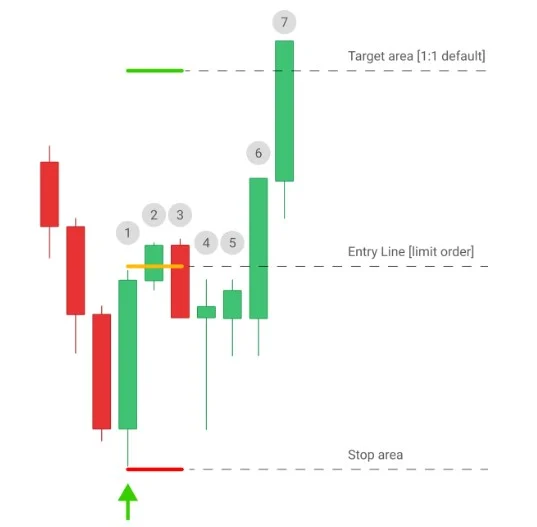
Reversal Signal Indicator marks a possible reversal entry on your NinjaTrader 8 chart and can draw the stop and target levels. You place the order.
NinjaTrader 8 · Entry, stop and target · 14-day trial
Same features, different terms.
- Billed monthly
- Renews monthly
- Lower upfront cost
- Cancel anytime
- Unlimited Machine ID changes
- Support and remote assistance
- Updates
- Billed yearly
- Renews yearly
- Lower cost than monthly
- Cancel anytime
- Unlimited Machine ID changes
- Support and remote assistance
- Updates
- One payment
- No renewal
- Lifetime access
- Unlimited Machine ID changes
- Support and remote assistance
- Updates
- New feature requests
Prices in USD. The trial runs for 14 days.
A setup you can check in seconds.
A possible entry, marked
An arrow appears when a reversal setup is confirmed.
Stop and target on the chart
When enabled, the trade plan shows the levels to use before you place the order.
You place the order
The indicator does not trade. You size the position and send the order.
Fewer weak setups
The confirmation rule and trend filter keep unconfirmed turning points off the chart.
From arrow to your order.
Load the indicator
Add it to a NinjaTrader 8 chart.
Wait for the arrow
A turning point must be confirmed before the signal appears.
Read the levels
The plan shows where the stop and target sit for that setup.
Place your order
Size the trade in NinjaTrader and send the order yourself.
What a signal shows you.
One arrow, then the levels for the plan.
- Arrow
- A confirmed turning point on the chart.
- Entry
- Where the setup triggered.
- Stop
- The other side of the turning point.
- Target
- Reward levels from the setup.
- Confirmation
- The signal waits for confirmation.
- Trend filter
- With the trend, against it, or off
The indicator marks the plan; you place the order.
What traders say about the signal.
Product feedback
Reversal Signal Indicator · customer reviews
-
Giacomo Mauro Perticone Verified owner
-
Jane T Verified owner
Indicator works as described, but i found that it’s not as helpful for my specific trading style. I prefer fully-automated strategies, and this requires manual trading guided by the signals. That said, if you’re into manual trading, it’s a solid tool, but it’s not a perfect fit for everyone.
-
Linda Mawson Verified owner
I spent about a week trying to figure out how to use the Reversal Indicator properly. The signals were okay, but I struggled with market entries. Luckily, Max from the support team was a huge help, guiding me through the process. While I’m not entirely satisfied with the results so far, the customer service is top-notch.
-
George Verified owner
I’ve been using the Reversal Indicator for several months, and I can’t recommend it enough. It’s easy to understand, even for someone like me who is relatively new to trading. The indicator consistently gives accurate signals, which helped me avoid bad trades (impressed with that). The support team is fantastic-quick to resolve any questions. Highly recommend
-
Gay Outhwaite Verified owner
INndicator is incredibly user-friendly and has made a noticeable difference in my trading results. The signals are clear, and the performance has exceeded my expectations. The support team was great in helping me get started and resolve any issues.
-
Martyn Verified owner
This indicator is so user-friendly, quite impressive to be honest, I'm surprised with the accuracy of the signals and overall idea of the indicator as all I need is put my entry in! And BTW it works perfect with easytrade free addon.
Need a hand with the settings?
Send us the timeframe and turning-point settings you use. We will check the settings with you.
Before you add it.
What does it mark?
A possible reversal entry: an arrow on the chart and, if enabled, stop and target levels.
Does it place the order?
No. You place the order yourself; the indicator only marks the setup and levels.
Where do the stop and target come from?
From the turning point that triggered the setup.
What do the direction modes do?
Choose with-trend, counter-trend, or no filter.
Can I change the alert sound?
Yes. Pick a file from the NinjaTrader sounds folder and turn the alert on.
Does it work on other platforms?
No. It is built for NinjaTrader 8.
Is the trial really free?
Yes. 14 days with every setting unlocked and no card.
Can I cancel my subscription?
Yes. Cancel from My Account → Subscriptions. The plan stops renewing.
Can I move the license to another machine?
Yes. License transfers are included.
Read the setup, then place the order.
Try every setting for 14 days. No card.