1. Home
  2. Shop
  3. Auto-Traders
  4. J Strategy Auto-Trader
Low-frequency session strategy

One trade a day, at the session open.

J Strategy is built for low-frequency trading: one trade per template per day, typically at the US session open, aligned with the direction set before the open.

NinjaTrader 8 · One trade per template per day · No trial

Access

Same strategy. Different terms.

Monthly
$349 / month $279 −21% Save $70
A month to judge the entries.
  • Renews monthly
  • Cancel anytime
  • Unlimited Machine ID changes
  • Support and remote assistance
  • Updates
Get monthly
Annual
$1,999 / year $1,579 −22% Save $420
Best value across a year.
  • Renews yearly
  • Cancel anytime
  • Unlimited Machine ID changes
  • Support and remote assistance
  • Updates
Get annual
Lifetime No renewal
−35% · Save $1,211
$3,490 / once $2,279 −35% Save $1,211
Pay once, keep the strategy.
  • One payment
  • No renewal
  • Unlimited Machine ID changes
  • Support and remote assistance
  • Updates
  • New feature requests
Get lifetime
Weekly
$99 / week $89 −11% Save $10
One week of live behaviour.
  • Renews weekly
  • Cancel anytime
  • Unlimited Machine ID changes
  • Support and remote assistance
  • Updates
Get weekly
Quarterly
$899 / 3 months $729 −19% Save $170
A full quarter of sessions.
  • Renews quarterly
  • Cancel anytime
  • Unlimited Machine ID changes
  • Support and remote assistance
  • Updates
Get quarterly
Semi-Annual
$1,399 / 6 months $1,109 −21% Save $290
Six months at a lower rate.
  • Renews every six months
  • Cancel anytime
  • Unlimited Machine ID changes
  • Support and remote assistance
  • Updates
Get six months

Prices in USD. No trial. Every plan includes the strategy, pre-made template sets. Just load the template and enable the strategy.

What you get

The set carries the rules. You choose the account.

01

Session rules are already set

The set defines the opening window, entry, stop and target.

02

One trade per template

The set is designed around one trade per template per day.

03

Size adapts to the stop

A wider stop means fewer contracts.

04

Review every closed trade

The CSV log records each closed trade.

How it works

Four steps to a running strategy.

1

Add the strategy

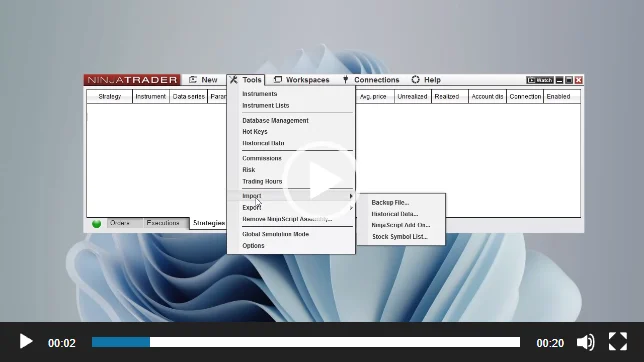
Import it into NinjaTrader 8 and add it to the instrument.

2

Load a template set

Pick the set for the session and instrument you trade.

3

Choose the account

Select the account it may trade.

4

Enable it

Turn it on and watch the first session before scaling.

Inside a set

What the set already fixes.

You load it, then adjust only what your instrument needs.

Session
The opening session window
Entry
One trade per template per day
Stop and target
Set in the template
Size
Falls as the stop widens
Risk caps
Daily loss and target
Log
One CSV line per closed trade

Sets are NinjaTrader chart templates. The strategy does not load them for you.

What traders say after testing.

Product feedback

J Strategy Auto-Trader · customer reviews

4.6 83 reviews
  1. Paul Myers Verified owner
    5/5

    Okay, so here's my take on J Strategy. Overall, it's been pretty solid for me. I've been using it for a few months now, and I've seen some good results. Strat seems to be doing its thing, and I've been able to achieve consistent profits. That being said, there were a few bumps along the way. The setup process was a bit of a headache, and I had some issues getting everything configured the way I wanted. But once I got past that initial hurdle, it's been smooth sailing. So yeah, I'd recommend it – just be prepared to put in a little bit of work upfront. Four stars from me.
  2. Christine Verified owner
    5/5

    I've tried a BUNCH of different trading strategies in the past, but nothing comes close to thisone. Seriously, you guys have created something special here

  3. John Castle Verified owner
    5/5

    J Strategy is si,ply great. plain and simple. The algorithm's ability to adapt to changing market conditions sets it apart from the competition. Plus, the support team is second to none. Couldn't be happier with my decision to invest in this tool.

  4. CVMS Climatic Verified owner
    5/5

    I've just had a chat with a gentleman who provided exceptional customer service. Their work is top-notch, and their dedication to customer satisfaction is outstanding.

  5. Simon Verified owner
    5/5

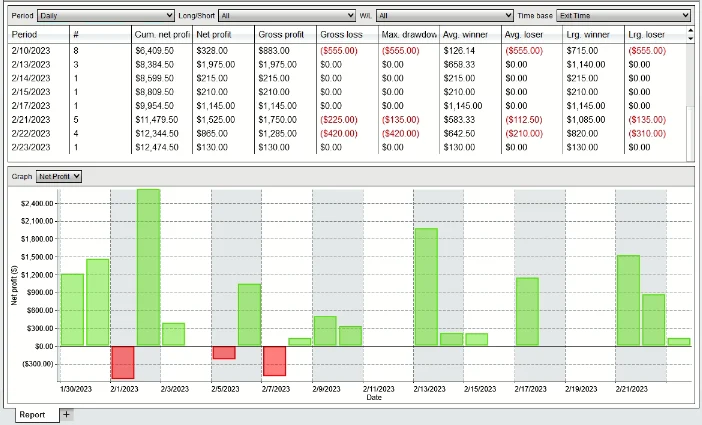
    I just want to start off by saying a huge thank you for extending the test period! I really appreciate it. I took my time testing out the strategy for about three weeks before finally deciding to go for a half-year subscription. And boy, am I glad I did! The results during the test period were fantastic: I managed to rake in +$8445 on the test account in just 10 days, and a solid $4000 on my main account in around 5 days, specifically on one of my Apex accounts. After seeing such promising numbers, I didn't hesitate to purchase the strategy. Let's keep this momentum going! Looking forward to working together!

  6. Mr Ron Lawson Verified owner
    4/5

    I'll agree with the people below on some points. The strategy does produce pretty good results, which is surprising given its simplicity and ease of customization. The automated system trades on several markets simultaneously, which in theory (and as it turned out in practice) allows you to diversify your risks. The result is not always as great as it may seem, because there are weeks when despite everything the strategy is still at a slight minus. But it's worth noting that this drawback is more than covered by the profit when you get a new set of settings and the auto-trader becomes super profitable again. I'm glad I added it to my arsenal. But it only works on a fairly large account.

Need a hand with the settings?

Tell us the instrument and session you trade. We will check the set with you.

Questions

Before you start it.

Which platform does it run on?

NinjaTrader 8.

How many trades per template?

J Strategy is designed around one trade per template per day.

Where do the stop and target come from?

The template sets them. Load the set that fits your instrument.

How is size set?

From the stop distance. A wider stop means fewer contracts.

When does it stop trading?

The template sets a pre-close halt; the default is 60 minutes.

Does the log work in backtest?

No. It records realtime trades only.

What does it not do?

It does not supply data, a broker account or a profit guarantee.

How many accounts does one licence cover?

One account per running instance. Ask us about licence terms.

Can I cancel my subscription?

Yes. Cancel from My Account → Subscriptions. The plan stops renewing.

Can I move the license to another machine?

Yes. License transfers are included.

Load a set and turn it on.

Start with a month and read the log.