1. Home
  2. Shop
  3. Auto-Traders
  4. J Strategy Auto-Trader
Low-frequency session strategy

One trade a day, at the session open.

J Strategy is built for low-frequency trading: one trade per template per day, typically at the US session open, aligned with the direction set before the open.

NinjaTrader 8 · One trade per template per day · No trial

Access

Same strategy. Different terms.

Monthly
$349 / month $279 −21% Save $70
A month to judge the entries.
  • Renews monthly
  • Cancel anytime
  • Unlimited Machine ID changes
  • Support and remote assistance
  • Updates
Get monthly
Annual
$1,999 / year $1,579 −22% Save $420
Best value across a year.
  • Renews yearly
  • Cancel anytime
  • Unlimited Machine ID changes
  • Support and remote assistance
  • Updates
Get annual
Lifetime No renewal
−35% · Save $1,211
$3,490 / once $2,279 −35% Save $1,211
Pay once, keep the strategy.
  • One payment
  • No renewal
  • Unlimited Machine ID changes
  • Support and remote assistance
  • Updates
  • New feature requests
Get lifetime
Weekly
$99 / week $89 −11% Save $10
One week of live behaviour.
  • Renews weekly
  • Cancel anytime
  • Unlimited Machine ID changes
  • Support and remote assistance
  • Updates
Get weekly
Quarterly
$899 / 3 months $729 −19% Save $170
A full quarter of sessions.
  • Renews quarterly
  • Cancel anytime
  • Unlimited Machine ID changes
  • Support and remote assistance
  • Updates
Get quarterly
Semi-Annual
$1,399 / 6 months $1,109 −21% Save $290
Six months at a lower rate.
  • Renews every six months
  • Cancel anytime
  • Unlimited Machine ID changes
  • Support and remote assistance
  • Updates
Get six months

Prices in USD. No trial. Every plan includes the strategy, pre-made template sets. Just load the template and enable the strategy.

What you get

The set carries the rules. You choose the account.

01

Session rules are already set

The set defines the opening window, entry, stop and target.

02

One trade per template

The set is designed around one trade per template per day.

03

Size adapts to the stop

A wider stop means fewer contracts.

04

Review every closed trade

The CSV log records each closed trade.

How it works

Four steps to a running strategy.

1

Add the strategy

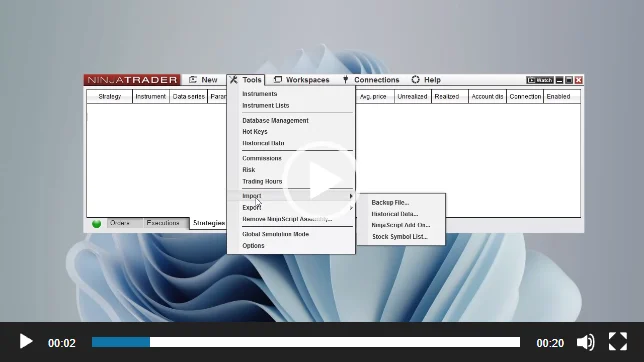
Import it into NinjaTrader 8 and add it to the instrument.

2

Load a template set

Pick the set for the session and instrument you trade.

3

Choose the account

Select the account it may trade.

4

Enable it

Turn it on and watch the first session before scaling.

Inside a set

What the set already fixes.

You load it, then adjust only what your instrument needs.

Session
The opening session window
Entry
One trade per template per day
Stop and target
Set in the template
Size
Falls as the stop widens
Risk caps
Daily loss and target
Log
One CSV line per closed trade

Sets are NinjaTrader chart templates. The strategy does not load them for you.

What traders say after testing.

Product feedback

J Strategy Auto-Trader · customer reviews

4.6 83 reviews
  1. V.Morgan Verified owner
    4/5

    Just okay-expected more!
    J Strategy is just okay in my opinion.. It does what it’s supposed to, but I found the perforamnce a bit underwhelming. I’ve had some profitable trades, but not enough to justify the price. I’ll keep using it for now, but I expected a bit more gains from this add-on.
  2. Nick Parks Verified owner
    5/5

    I've experimented with a lot of trading strategies, but J Strategy is in a league of its own. It has provided consistent results and the level of precision in its algorithm is phenomenal. You can tell the team put a lot of thought into creating this strategy. I’m thrilled with my decision to switch to J Strategy.

  3. Ludwika Mcnamara Verified owner
    5/5

    Definitely recommend giving it a try if you’re looking to diversify your trading strategies. Latest update gave it much more stability Thank you!

  4. Cheryl Verified owner
    4/5

    Strategy is solid and flexible, but I had a few issues with the setup process. The algorithm adapts well to market conditions, and I’ve seen consistent profits, but the configuration wasn’t as smooth as I’d hoped. Customer service was helpful, but there’s room for improvement. Overall, a good strategy once you get it working the way it should as it requires constant tempalte updates to keep the positive curve.

  5. Daniel Verified owner
    4/5

    I’ve been using J Strategy for a bit, and while it does what it claims, I haven’t seen the huge gains that some others have mentioned. The strategy is solid and profitable, but for me, it’s just been decent-nothing extraordinary. The support team is responsive, but I feel the tool needs more refinement to really stand out. It works, but it’s not life-changing. Enough to cover monthly expenses.

  6. Jake Newton Verified owner
    4/5

    strategy is quite interesting, as it works across multiple markets and helps stabilize profit curve. It's an excellent choice for traders looking to diversify their portfolios. recommend giving it a try.

Need a hand with the settings?

Tell us the instrument and session you trade. We will check the set with you.

Questions

Before you start it.

Which platform does it run on?

NinjaTrader 8.

How many trades per template?

J Strategy is designed around one trade per template per day.

Where do the stop and target come from?

The template sets them. Load the set that fits your instrument.

How is size set?

From the stop distance. A wider stop means fewer contracts.

When does it stop trading?

The template sets a pre-close halt; the default is 60 minutes.

Does the log work in backtest?

No. It records realtime trades only.

What does it not do?

It does not supply data, a broker account or a profit guarantee.

How many accounts does one licence cover?

One account per running instance. Ask us about licence terms.

Can I cancel my subscription?

Yes. Cancel from My Account → Subscriptions. The plan stops renewing.

Can I move the license to another machine?

Yes. License transfers are included.

Load a set and turn it on.

Start with a month and read the log.