MANAGED TRADING+ FREE INDICATORS+ TRADE COPYING+ AUTOMATED TRADING+ ENTRY SIGNAL INDICATORS+ TRADE INDICATORS+ QUALITY OF LIFE ADD-ONS+ NINJATRADER SOLUTIONS+ MANAGED TRADING+ FREE INDICATORS+ TRADE COPYING+ AUTOMATED TRADING+ ENTRY SIGNAL INDICATORS+ TRADE INDICATORS+ QUALITY OF LIFE ADD-ONS+ NINJATRADER SOLUTIONS+
Free Indicators Pack

NinjaTrader 8 chart indicator

Advanced Trader

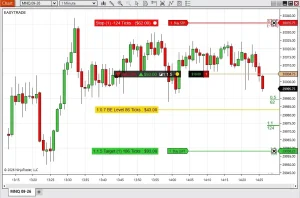
Read live risk, reward, stops, targets, and R/R levels directly on the chart while you manage the position.

Download trial See details

NT8 compatible

14-day trial

Full trade control

14-Day Trial

Advanced Trader

(109 customer reviews)

From: $0 for 2 weeks

A chart-level risk dashboard for open NinjaTrader positions, working stop orders, target orders, and saved R/R ruler levels.

Read More

01

The risk question should not require math

Advanced Trader answers the question open-position traders keep checking: what is my real risk right now?

During the trade

Stops, targets, and size keep moving

When you scale, move a stop, or change a target, the trade can stop matching the plan you had in your head.

On the chart

The position becomes readable

The indicator reads the selected Chart Trader account and turns active orders into practical risk and reward labels.

02

What it does

It watches the active account context and draws the useful parts of the trade where the trader is already looking.

Account

Reads Chart Trader

Advanced Trader uses the selected Chart Trader account for the chart instrument.

Orders

Finds stops and targets

It checks the active position, average entry, working stop orders, target orders, and order quantities by price.

Display

Draws the risk map

The chart shows order boxes, ruler levels, and a position summary with risk, reward, size, and R/R.

03

Core actions

The useful work happens after the position is open, when the trader needs a clean read of exposure.

  • See stop and target order information

    Order info boxes can show order name, contract count, distance from entry, tick or point distance, currency value, and target R/R.

  • Read the whole position in one summary

    The summary box shows total risk, potential reward, position size, average entry price, and the overall R/R ratio.

  • Draw extra R levels from the active stop

    Use fractional and full R levels, including custom values across Level #1 through Level #6.

  • Save the stop reference fast

    Click the SAVE R/R toolbar button or use a function-key hotkey to lock the current stop reference for the ruler.

  • Tune the chart display

    Change fonts, colors, opacity, line widths, line lengths, text visibility, and summary box placement.

04

The chart becomes the risk map

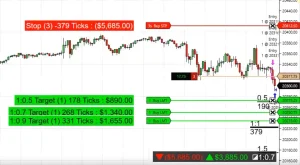
The original chart examples show the order info boxes, R/R ruler, and summary overlays in real NinjaTrader chart context.
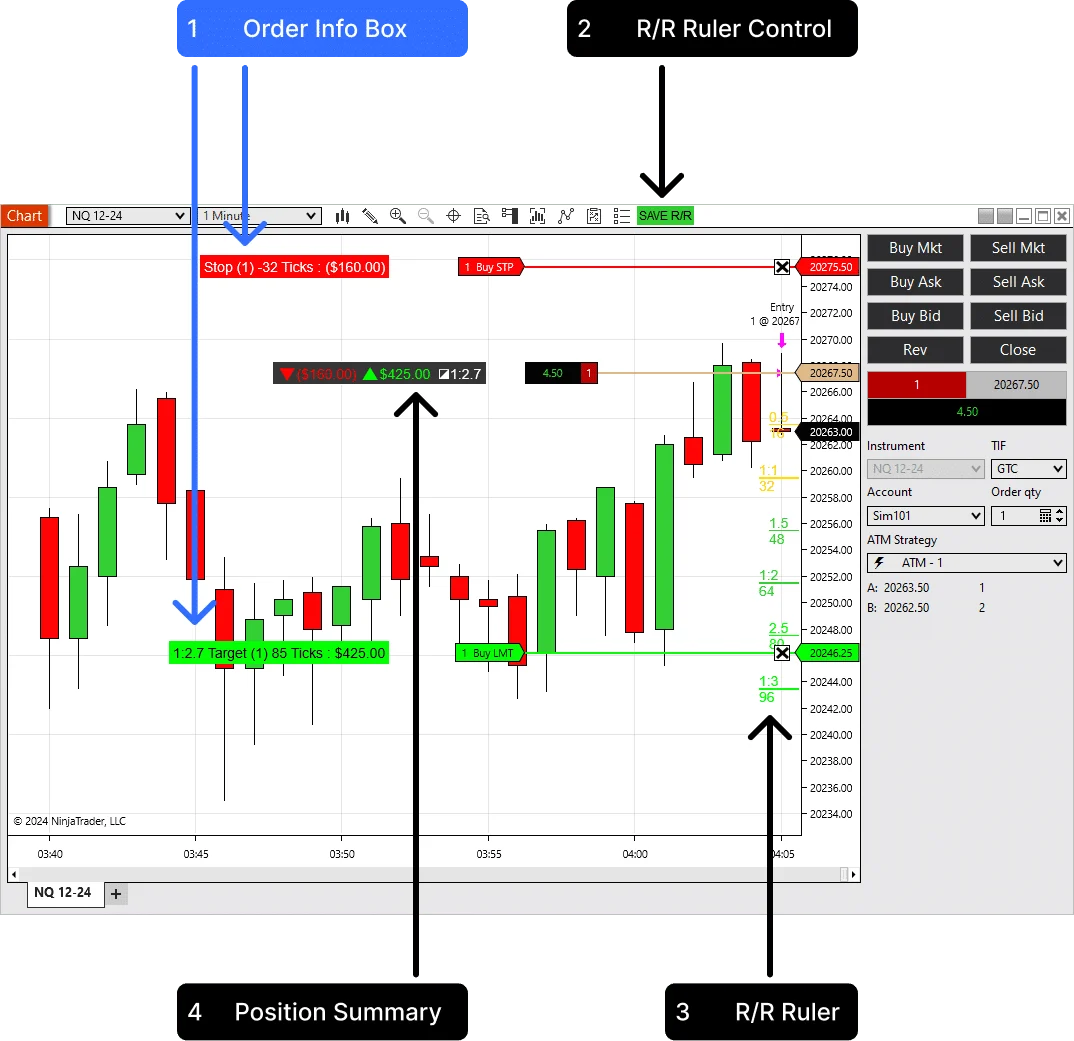
Advanced Trader order info box on NinjaTrader chart
Order info boxes

Stops and targets get numbers traders can use

Show the stop and target order context with ticks, points, currency, contract count, and optional R/R labels.

Saved ruler

Lock the risk view when the stop matters

Save the current stop reference so the R/R levels remain visible while the chart updates or the trade is being reviewed.
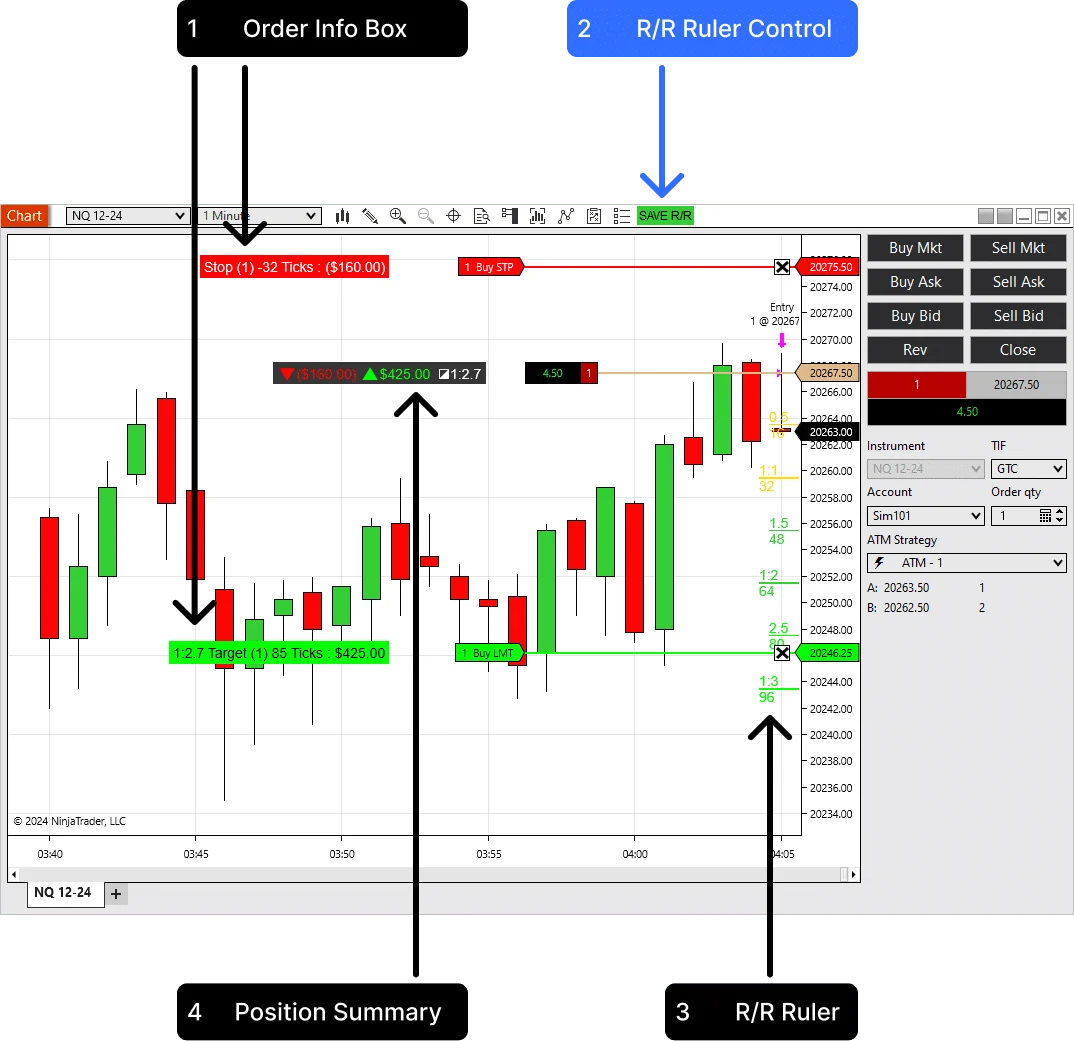
Advanced Trader saved risk reward ruler control
05

Three chart reads traders check first

Small labels, but useful ones: risk, target, full position context, and the R levels tied to the current stop.

Advanced Trader target and stop summary

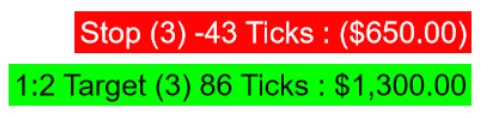
Target & Stop Summary

Track profit and risk for stop and target orders in ticks, points, or currency.

Advanced Trader full position summary

Full Position Summary

See the whole trade: potential loss, target value, position size, and risk-to-reward ratio.
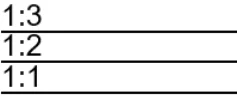
Advanced Trader dynamic risk reward

Dynamic Risk/Reward

Calculate profit levels from the stop order, save the stop reference, and trade without extra drawing tools.

06

How traders use it

Add it to the chart, select the Chart Trader account, then let the indicator track the active position.

Workflow

Built for live management

Advanced Trader does not submit trades. It helps you understand the trade already running on the selected account.

Step 1

Add

Load Advanced Trader on a NinjaTrader 8 chart with Chart Trader enabled.

Step 2

Select

Choose the account you want the chart to read from the Chart Trader account selector.

Step 3

Manage

Place or adjust stops and targets while the indicator recalculates risk and reward values.

Step 4

Save

Use SAVE R/R or the configured hotkey when you want to lock a stop reference for the ruler.

07

Position summary keeps the whole trade in view

The summary is useful when there are multiple orders or when the position has already been adjusted.

Summary box

Total risk, total reward, and overall R/R

Place the summary top-left, top-right, bottom-left, bottom-right, or near the entry line. Choose the outline, opacity, and colors so it stays readable without covering price action.
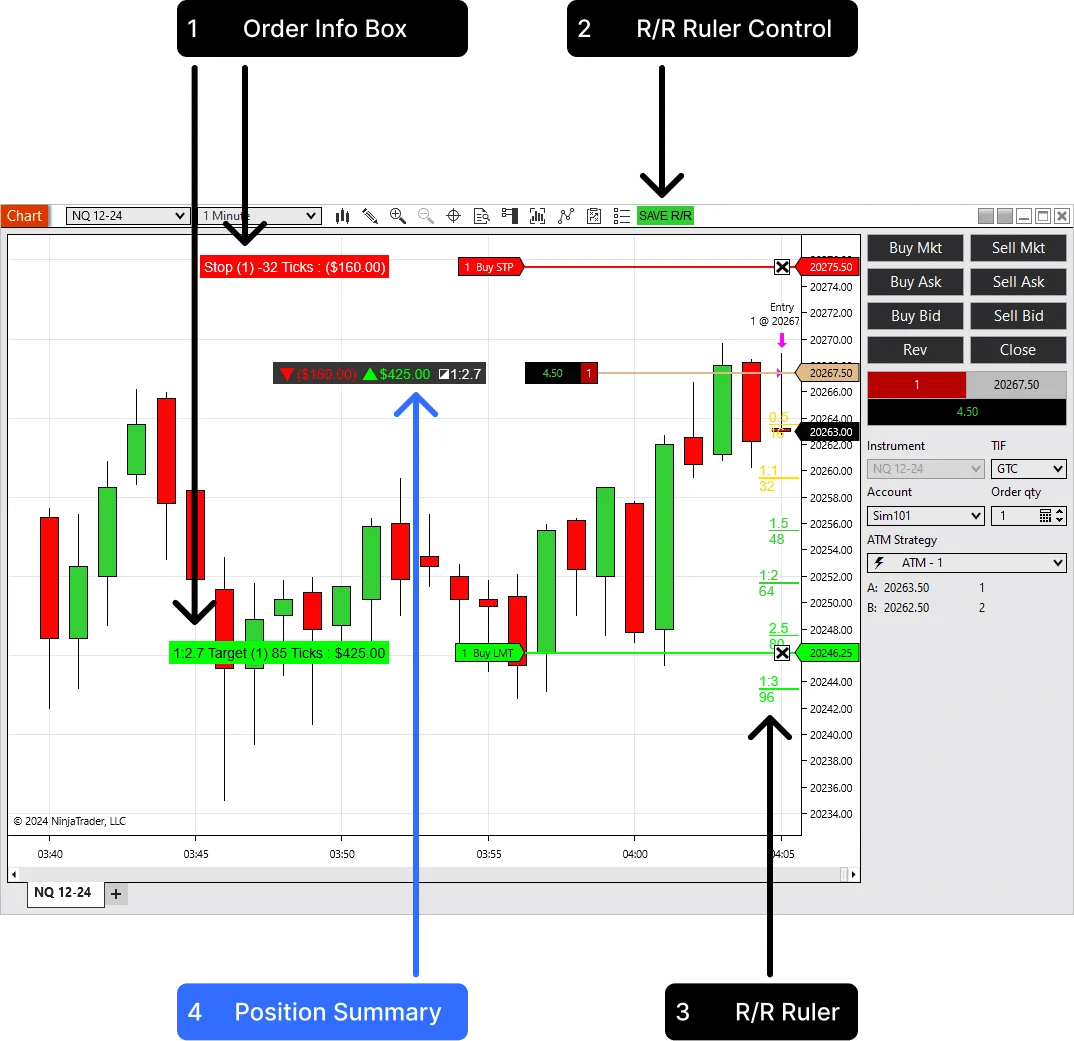
Advanced Trader position summary box
01

Risk and reward are calculated from the active position and working orders.

02

Display values can use ticks, currency, or both.

03

The summary can move away from price action or sit near entry.

08

SAVE R/R gives the ruler a reference point

The indicator adds a chart toolbar control and supports function-key hotkeys for faster sessions.

Toolbar

A real chart control

The SAVE R/R button appears on the active chart tab. Use it when you want to save the current stop reference and keep the planned R levels visible.

Hotkeys

Default F4, with alternatives

Use F2, F3, F4, or F6 through F12. Set the behavior to press once to save, or hold the key to reset the saved view.

09

Watch the chart workflow

The videos show the indicator inside NinjaTrader, including live risk labels and dynamic R/R levels.

Live position

Risk and target values stay on the chart

Use this view while the trade is open, so the stop side and target side are readable without manual calculations.

R/R ruler

R levels follow the active stop distance

The ruler uses the entry-to-stop distance to project fractional and full reward levels directly on the price scale.

10

Risk states that are easy to scan

Advanced Trader is useful because it separates order-level details from the position-level read.

Chart item What it reads What it can show Why it matters
Stop line Working stop orders Ticks, points, currency, quantity The loss is visible before the stop is hit.
Target line Working target orders Potential reward and R/R The exit side is easier to compare against current risk.
R ruler Entry-to-stop distance Fractional and full R levels Targets can be judged from the same risk unit.
Summary Position, stops, targets Total risk, reward, size, entry The whole trade can be checked without rebuilding the math.
11

Best use cases

Built for discretionary traders who care about the actual exposure of the open position.

  • Active day trading

    Keep current stop risk and target reward visible while managing fast intraday trades.

  • Funded account discipline

    See the dollar risk on the chart before a small adjustment turns into a larger-than-planned loss.

  • Scaling in or out

    Use the position summary when average entry, size, stops, and targets are no longer simple mental math.

  • ATM template review

    Use the R levels to think through whether a target structure still matches the way the setup moves.

12

Pair the live view with deeper review

Advanced Trader is for live risk clarity. Trade Analyzer PRO is useful when you want to study target behavior over a batch.

Review workflow

Use live R levels, then test the target logic

If you are refining ATM targets, use Advanced Trader during the session and Trade Analyzer PRO when you want CSV-based reward multiple analytics afterward.
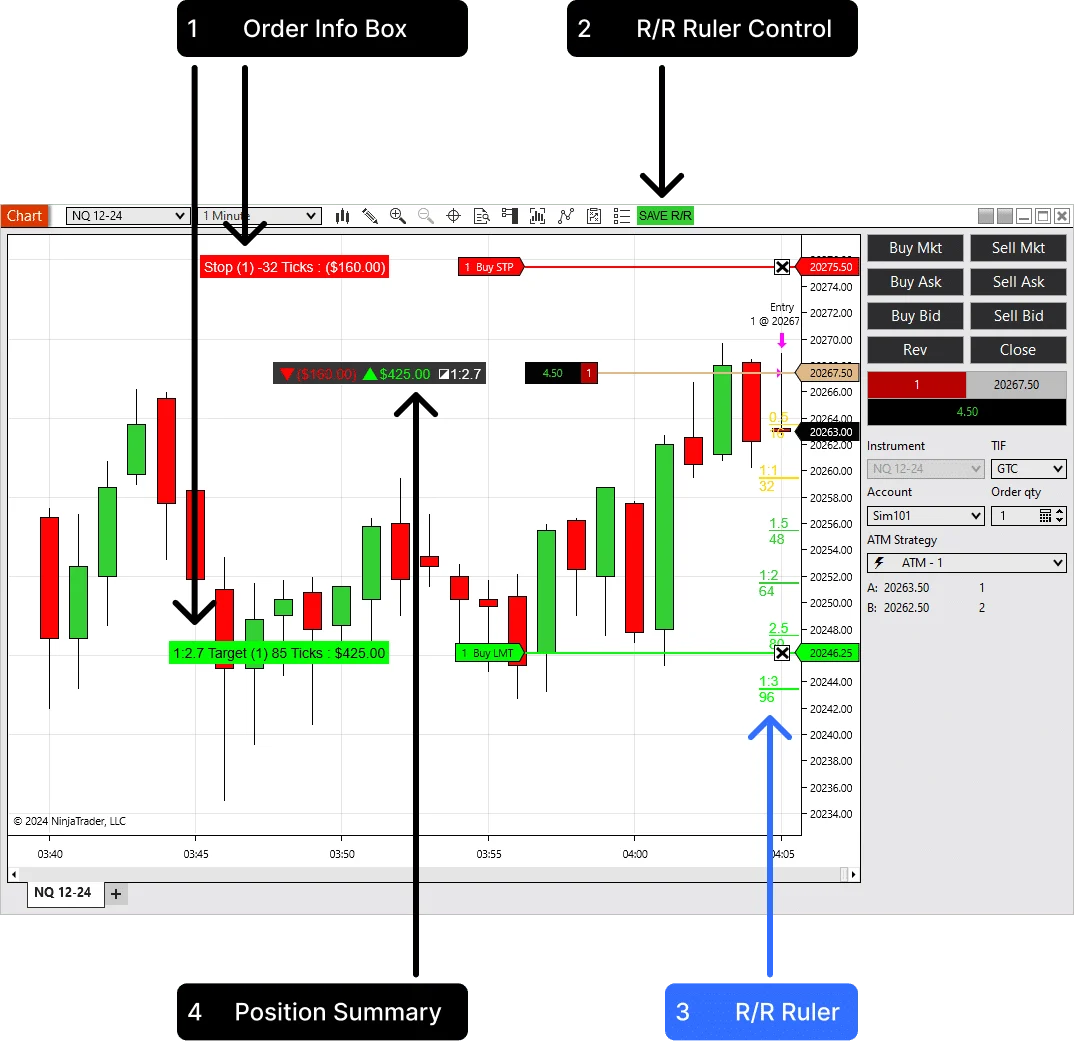
Advanced Trader risk reward ruler levels
13

Settings that matter

These controls change how the indicator fits into the trading screen.

Info Box Display

Value format

Show ticks, currency, or both on stop and target order boxes.

Summary Display Position

Chart placement

Move the summary to a chart corner or attach it near the entry line.

Stop Save Method

Ruler control

Use the chart button or a function-key hotkey to save the stop reference.

Hotkey Behaviour

Input style

Choose press-to-save or hold-to-reset behavior for faster live use.

Show Fractional Levels

R detail

Show or hide half-step and custom fractional reward levels.

Level #1 - #6

Target model

Define the R levels that match your trading plan instead of using one fixed ruler.

14

How it works behind the chart

The indicator uses live chart account context and custom rendering. The trader does not need to type in position size or stop price manually.

Inputs

Account, position, and working orders

Advanced Trader reads the active Chart Trader account, current position, average entry price, and working stop and target orders for the chart instrument.

Calculations

Ticks, points, currency, and R/R

It converts entry-to-order distance into ticks or points and can calculate currency values using instrument point value and position size.

15

Why this indicator

It is practical because it uses the real open trade, not a manual drawing detached from the account.

  • It reads the selected account

    The display follows the Chart Trader account and the chart instrument, which keeps the risk view tied to the active trading context.

  • The summary handles more than one order

    The position summary is built for total risk and reward, which is more useful than reading each line in isolation.

  • The saved ruler is fast enough for live use

    The toolbar button and hotkeys make the stop reference easy to save without leaving the chart.

16

Choose your license

Start with the trial, then choose annual or lifetime access if the live risk view fits your NinjaTrader workflow.

Trial

14 days

Test Advanced Trader with your own NinjaTrader charts before choosing a plan.

License

Annual Advanced Trader

$159 / year
  • Best for active NinjaTrader users

    Use the indicator for one year with updates and support.

  • Includes

    Order info boxes, position summary, R/R ruler levels, hotkey controls, and customizable styling.

Start Free Trial - No Credit Card Required. The trial is available once per user.

17

Questions before checkout

Short answers for the buying questions that usually come up first.

Does Advanced Trader work with NinjaTrader 8?

Yes. It is built as a NinjaTrader 8 chart indicator.

Does it place live trades?

No. It reads the selected Chart Trader account and displays risk, reward, and order information on the chart.

Can I show risk in dollars?

Yes. The display can show ticks, currency, or both, based on the indicator settings.

Can I customize where the summary appears?

Yes. The summary can sit in a chart corner or near the entry line, with adjustable colors, outline, and opacity.

Can I use a hotkey for the R/R ruler?

Yes. F4 is the default, and the settings include F2, F3, F4, and F6 through F12.

Can I transfer my license to another computer?

Yes. The paid license includes unlimited machine ID changes for transfers.

Keep live risk visible while the trade is open

Start with the 14-day trial, then choose annual or lifetime access if Advanced Trader fits your chart workflow.

Articles

Advanced Trader Indicator for NinjaTrader 8 — Complete Setup, R/R Ruler, Hotkeys & Pro Tips

Advanced Trader - Show live R/R, ticks/points, and $ values for every order in NinjaTrader 8. This expanded guide adds hotkeys, drawing rules, aggregation logic, and pro troubleshooting tips.

Product feedback

Reviews

4.7 109 reviews
  1. Koorosh Taleghani Verified owner
    5/5

    Amazing i recommend it

  2. MSC TRADING Verified owner
    5/5

    Is an absolute necessity for any NinjaTrader 8 user. It boasts numerous invaluable features that streamline trading and enhance efficiency. I particularly appreciate the dynamic risk/reward ruler and the real-time profit/loss display. It's well worth the investment, and the support provided is exemplary.

  3. Gavin Verified owner
    5/5

    simplicity coupled with an impressive set of parameters makes it a must-have for traders of all levels. Kudos for the exceptional service and dedication to customer satisfaction

  4. Wendy Tansill Verified owner
    5/5

    Highly recommend it to others!

  5. MRBOYDWOODMAN Verified owner
    5/5

    I regret purchasing Advanced Trader SO LATE. It is SO AMAZING!!

  6. Sue Barnett Verified owner
    5/5

    A solid five-star choice for traders on a budget.

  7. mr peter willcox Verified owner
    2/5

    Struggling with a slow license issuing process can be frustrating. The Neat add-on is undoubtedly useful, but the delay in acquiring the license hinders the overall experience. A two-star rating reflecting the importance of timely service in the fast-paced world of trading.

  8. Ian Whan Verified owner
    4/5

    A four-star rating for a valuable add-on that simplifies trading tasks

  9. Lee Pankhurst Verified owner
    4/5

    The well-designed Advanced Trader add-on has become a valuable companion during live trading. The real-time profit and risk/reward ruler functionalities are commendable. While easy to install, a bit more customization options would be appreciated. Overall, a four-star experience that aligns well with my trading needs.

  10. MRS B HOWARD Verified owner
    5/5

    The Advanced Trader indicator proves to be an excellent enhancement. Inclusion of the Risk-Reward Ruler significantly boosts trading precision. Affordable advantage for traders without breaking the budget.

  11. Nigel Evans Verified owner
    5/5

    The Advanced Trader is a true trading revolution within Ninja! Its simplicity is nothing short of amazing, making it a must-have for traders. The active support and user-friendly design, coupled with a great set of indicators (including free ones), create a seamless experience even for a trading novice like myself. Kudos for this well-crafted tool!

  12. Maintenance guy Verified owner
    5/5

    The Advance is a trading revolution in Ninja! Simple to use, highly recommended.

  13. Robert Ashman Verified owner
    5/5

    Great set of indicators, even for beginners. Active support adds immense value.

  14. Mervyn Miller Verified owner
    5/5

    Grateful for the dedication. Perfect company, aiding traders to avoid unnecessary expenses. A valuable resource for new traders.

  15. Mrs Hughes Verified owner
    5/5

    A flawless experience. Genuine add-ons at competitive prices. Quick service. A must for NT8 users.

  16. Marzena Verified owner
    4/5

    Indicators delivered perfectly, albeit a delay due to my spam folder. Works flawlessly. Exactly what I purchased.

  17. MKD56 Verified owner
    5/5

    have been using Advanced Trader for a few months now and I am very impressed with it. helps quickly assess the risk and reward of each trade and manage orders effectively. highly recommended!

  18. Jane Warner Verified owner
    4/5

    It has its merits, but it didn't blow me away. The calculations are helpful, but I expected a bit more from the customization options. The risk/reward feature is a strong point.

  19. Tad Pawlowski Verified owner
    5/5

    It is a must-have tool for any NinjaTrader 8 user. It has so many useful features that make trading easier and more efficient. I especially like the dynamic risk/reward ruler and the real-time profit/loss display. It’s well worth the price and the support is excellent.

  20. Lorna Whitton Verified owner
    5/5

    Since integrating this impressive tool into my trading strategy, it has effectively replaced the need for the 2-3 indicators I relied on previously.
    Its seamless functionality and accurate insights have elevated my trading experience to a whole new level. Thank you Team!

Advanced Trader

Free download

Read live risk, reward, stops, targets, and R/R levels directly on the chart.

$0 for 2 weeks
Download