1. Home
  2. Shop
  3. Auto-Traders
  4. Reversal Auto-Trader
Automated reversal strategy

Automate the reversal setup. Keep control of the risk.

Reversal Auto-Trader trades confirmed reversal setups from MAS templates, with the stop, target and session rules already set.

NinjaTrader 8 · Pre-built templates · No trial

Access

Same strategy. Different terms.

Monthly
$259 / month $197 −24% Save $62
A month to judge the entries.
  • Renews monthly
  • Cancel anytime
  • Unlimited Machine ID changes
  • Support and remote assistance
  • Updates
Get monthly
Annual
$1,259 / year $1,129 −11% Save $130
Best value across a year.
  • Renews yearly
  • Cancel anytime
  • Unlimited Machine ID changes
  • Support and remote assistance
  • Updates
Get annual
Lifetime No renewal
−21% · Save $411
$1,990 / once $1,579 −21% Save $411
Pay once, keep the strategy.
  • One payment
  • No renewal
  • Unlimited Machine ID changes
  • Support and remote assistance
  • Updates
  • New feature requests
Get lifetime
Weekly
$70 / week $67 −5% Save $3
One week of live behaviour.
  • Renews weekly
  • Cancel anytime
  • Unlimited Machine ID changes
  • Support and remote assistance
  • Updates
Get weekly
Quarterly
$499 / 3 months $369 −27% Save $130
A full quarter of sessions.
  • Renews quarterly
  • Cancel anytime
  • Unlimited Machine ID changes
  • Support and remote assistance
  • Updates
Get quarterly
Semi-Annual
$1,036 / 6 months $829 −20% Save $207
Six months at a lower monthly rate.
  • Renews every six months
  • Cancel anytime
  • Unlimited Machine ID changes
  • Support and remote assistance
  • Updates
Get six months

Prices in USD. No trial. Every plan includes the strategy, pre-made template sets. Just load the template and enable the strategy.

What you get

A template, not a hundred settings.

01

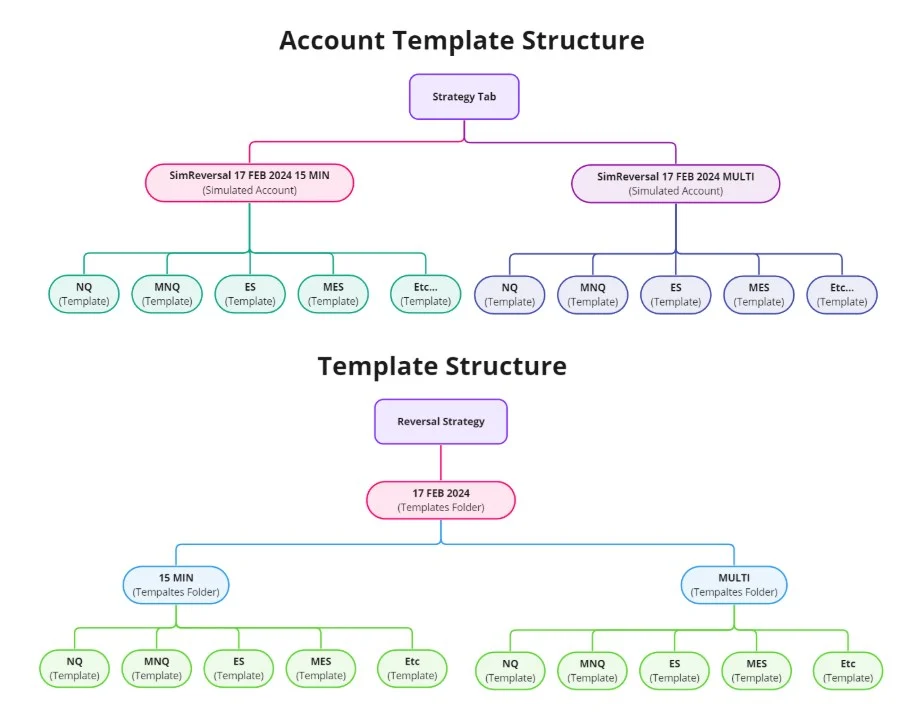
Templates with the settings already set

Entry, stop, target and session rules come pre-defined, so you are not building a strategy from scratch.

02

Attach it to one account

Choose the account the strategy should trade and enable it there.

03

Built on reversal setups

Templates trade the confirmed reversal setups the indicator marks.

04

Review it in the log

Every closed trade is written to a CSV log with net P/L.

How it works

Four steps to a running strategy.

1

Add the strategy

Import it into NinjaTrader 8 and add it to the instrument you trade.

2

Load a template

Pick the template for the instrument and session you want to trade.

3

Choose the account

Select the account the strategy is allowed to trade.

4

Enable it

Turn it on and watch the first session before you scale up.

Inside a template

What the template already sets.

You load it, then adjust only what your instrument needs.

Entry rule
Confirmed reversal setup
Stop
The other side of the setup.
Target
Measured from the setup range.
Session window
The hours the template may trade
Risk caps
Daily loss and target, if the template sets them
Trade log
One CSV line for every closed trade

Template settings are shown in NinjaTrader when you load one.

What traders say after testing.

Product feedback

Reversal Auto-Trader · customer reviews

4.2 99 reviews
  1. Penny Verified owner
    5/5

    .Gonna be honest this strategy annoyed me at first. Like genuinely. I kept thinking it was missing obvious reversals and I was sitting there watching price turn without it doing anything. I almost stopped using it. The problem was I was treating it like a scalper and it’s not that. I had it running all day, through lunch, through low volume, even during news once which was stupid. After a few weeks (and a few emails) I realized it only really makes sense when structure is clean. Once I stopped interfering and stopped changing settings every red trade it started to behave more logically. Still not perfect but way better than my manual mess.

  2. Mr David Brown Verified owner
    4/5

    I’ve been running the Reversal Strategy for about a month. First week was rough, mostly because I didn’t understand how strict the logic is. I expected more trades and thought something was wrong. After slowing down and actually reading the settings, I realized it’s designed to wait for proper structure, not just any pullback. Once I limited it to specific hours and stopped changing parameters every day, the behavior became predictable. It doesn’t win every trade but losses are controlled and it doesn’t spiral.

  3. Usman Chaudhry Verified owner
    4/5

    Used it on a small prop eval with strict hours and one contract. It didn’t overtrade and respected the stops. That alone saved me from myself. Not flashy but it did its job Orders go in clean, stops are where they should be, no weird behavior. That already puts it above a lot of other bots I’ve tried.

  4. well pleased Verified owner
    5/5

    I just extended my license to a full 1-year term, and honestly thank you for the 30% discount on that - big help. After running the strategy for a while, I can say it’s been performing really well overall. The structure, the logic, and the way the trades are executed all make sense once you see it in action day after day.

    One thing I’d tell new users though: don’t assume every template set behaves the same. That’s something I learned the hard way. Some sets absolutely crush it in trending weeks, while others do better when the market is choppier or slower. It’s not a “plug everything in and walk away” kind of system. You really need to test, switch between sets when needed, and understand which ones match the current market conditions.

    Once you do that, the strategy becomes very consistent and way easier to manage. With the right set running, results are smooth and controlled, and I feel a lot more confident trading with it now than when I first started.

    Overall, super happy with the upgrade and performance - just make sure you’re choosing the right template set for the environment you’re trading in.

  5. Rod Vass Verified owner
    5/5

    I loaded ONLY the 10-Minute Set for NQ on a single evaluation account (they tell you 1 set per account for a reason), and holy hell… the discipline is unreal.
    No overtrading, no double signals, nothing weird.
    The break-even move triggered exactly how Apex requires so the trailing drawdown stayed untouched.
    Honestly the 10-MIN set for NQ feels like it was made specifically for evaluations.

  6. Andrew Hyde Verified owner
    4/5

    I’ve blown so many Apex accounts from stupid manual overtrades.
    Reversal Strategy + templates = solved. But Had a couple meh trades during lunch periods

Need a hand with the settings?

Tell us the instrument and session you trade. We will check the template with you.

Questions

Before you start it.

How do I start it?

Add the strategy, load a template, choose the account and enable it.

What is in a template?

Pre-defined entry, stop, target and session settings for one way of trading.

Which platform does it run on?

NinjaTrader 8.

Can I change the settings?

Yes. Load a template as the starting point, then adjust what you need.

Does it place trades?

Yes. Once enabled on an account, it sends the entries the template defines.

When does it trade?

During the hours set in the template.

What does it not do?

It does not supply a data feed, a broker account or a profit guarantee.

How do I review it?

The CSV trade log records every closed trade with net P/L.

Can I cancel my subscription?

Yes. Cancel from My Account → Subscriptions. The plan stops renewing.

Can I move the license to another machine?

Yes. License transfers are included.

Load a template and turn it on.

Pick a term and read the log.