1. Home
  2. Shop
  3. Auto-Traders
  4. J Strategy Auto-Trader
Low-frequency session strategy

One trade a day, at the session open.

J Strategy is built for low-frequency trading: one trade per template per day, typically at the US session open, aligned with the direction set before the open.

NinjaTrader 8 · One trade per template per day · No trial

Access

Same strategy. Different terms.

Monthly
$349 / month $279 −21% Save $70
A month to judge the entries.
  • Renews monthly
  • Cancel anytime
  • Unlimited Machine ID changes
  • Support and remote assistance
  • Updates
Get monthly
Annual
$1,999 / year $1,579 −22% Save $420
Best value across a year.
  • Renews yearly
  • Cancel anytime
  • Unlimited Machine ID changes
  • Support and remote assistance
  • Updates
Get annual
Lifetime No renewal
−35% · Save $1,211
$3,490 / once $2,279 −35% Save $1,211
Pay once, keep the strategy.
  • One payment
  • No renewal
  • Unlimited Machine ID changes
  • Support and remote assistance
  • Updates
  • New feature requests
Get lifetime
Weekly
$99 / week $89 −11% Save $10
One week of live behaviour.
  • Renews weekly
  • Cancel anytime
  • Unlimited Machine ID changes
  • Support and remote assistance
  • Updates
Get weekly
Quarterly
$899 / 3 months $729 −19% Save $170
A full quarter of sessions.
  • Renews quarterly
  • Cancel anytime
  • Unlimited Machine ID changes
  • Support and remote assistance
  • Updates
Get quarterly
Semi-Annual
$1,399 / 6 months $1,109 −21% Save $290
Six months at a lower rate.
  • Renews every six months
  • Cancel anytime
  • Unlimited Machine ID changes
  • Support and remote assistance
  • Updates
Get six months

Prices in USD. No trial. Every plan includes the strategy, pre-made template sets. Just load the template and enable the strategy.

What you get

The set carries the rules. You choose the account.

01

Session rules are already set

The set defines the opening window, entry, stop and target.

02

One trade per template

The set is designed around one trade per template per day.

03

Size adapts to the stop

A wider stop means fewer contracts.

04

Review every closed trade

The CSV log records each closed trade.

How it works

Four steps to a running strategy.

1

Add the strategy

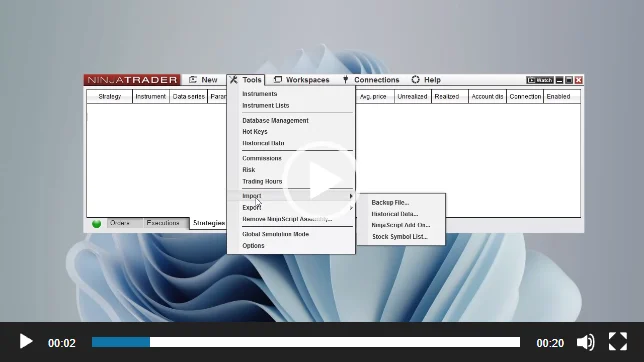
Import it into NinjaTrader 8 and add it to the instrument.

2

Load a template set

Pick the set for the session and instrument you trade.

3

Choose the account

Select the account it may trade.

4

Enable it

Turn it on and watch the first session before scaling.

Inside a set

What the set already fixes.

You load it, then adjust only what your instrument needs.

Session
The opening session window
Entry
One trade per template per day
Stop and target
Set in the template
Size
Falls as the stop widens
Risk caps
Daily loss and target
Log
One CSV line per closed trade

Sets are NinjaTrader chart templates. The strategy does not load them for you.

What traders say after testing.

Product feedback

J Strategy Auto-Trader · customer reviews

4.6 83 reviews
  1. Firstfield Verified owner
    5/5

    Just started-made a little on ES, but I’m still lost with the config. Latest update’s dope-turned a flat week into profit. Still gotta babysit it sometimes, but I’m liking this vibe.
  2. david cusworth Verified owner
    3/5

    Eh, it’s okay. Made some bucks on MNQ, but the setup’s a total mess-half the time I’m guessing what’s what. Support’s cool, but I expected more auto-magic for the price. Might stick with it, might not.

  3. ian scarfe Verified owner
    5/5

    All ok, thanks. I’m optimizin for my own markets myself.

  4. darryl Verified owner
    5/5

    An intresting trading strategy! It’s my first time seeing this kind of approach to automated trading systems (in this case, updating templates every two weeks to adjust the strategy to market conditions). I used the auto-trader on a cash account. There were some small drawdowns, but nothing over-natural. One trade covered everything and even made a profit.

    For now, I’m trying to withdraw all the profits I’ve earned and keep the balance at the same level it was when I started, so I don’t lose the money I’ve made. Everything works exelent! Thank you.

  5. Jeremy Verified owner
    4/5

    Large account auto-trader. Have failed few funded accounts (small ones from one big funding company). On larger one worked better actually. The most profitable tempalte for me was NQ, hope this infomration helps someone

  6. Graeme Renwick Verified owner
    5/5

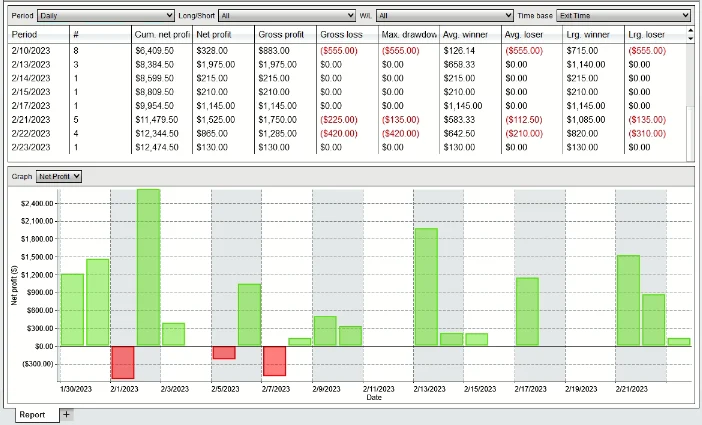
    There are times when it loses. It can be 1-2-3 days of losses, but it becomes positive at the end of the month somehow. that's what really important. I had to set a hard limit for daily loss to work with funded accounts. And it worked. Qualified few apex accounts now it money zone

Need a hand with the settings?

Tell us the instrument and session you trade. We will check the set with you.

Questions

Before you start it.

Which platform does it run on?

NinjaTrader 8.

How many trades per template?

J Strategy is designed around one trade per template per day.

Where do the stop and target come from?

The template sets them. Load the set that fits your instrument.

How is size set?

From the stop distance. A wider stop means fewer contracts.

When does it stop trading?

The template sets a pre-close halt; the default is 60 minutes.

Does the log work in backtest?

No. It records realtime trades only.

What does it not do?

It does not supply data, a broker account or a profit guarantee.

How many accounts does one licence cover?

One account per running instance. Ask us about licence terms.

Can I cancel my subscription?

Yes. Cancel from My Account → Subscriptions. The plan stops renewing.

Can I move the license to another machine?

Yes. License transfers are included.

Load a set and turn it on.

Start with a month and read the log.