MANAGED TRADING+ FREE INDICATORS+ TRADE COPYING+ AUTOMATED TRADING+ ENTRY SIGNAL INDICATORS+ TRADE INDICATORS+ QUALITY OF LIFE ADD-ONS+ NINJATRADER SOLUTIONS+ MANAGED TRADING+ FREE INDICATORS+ TRADE COPYING+ AUTOMATED TRADING+ ENTRY SIGNAL INDICATORS+ TRADE INDICATORS+ QUALITY OF LIFE ADD-ONS+ NINJATRADER SOLUTIONS+
Free Indicators Pack

NinjaTrader 8 automated strategy

Reversal Strategy

Reversal Strategy for NinjaTrader 8 with MAS pre-made template sets, bi-weekly updates, trade logs, support, and remote help on request.

Choose access See details

Templates included

Remote support on request

Bi-weekly updates

Strategy

Reversal Strategy

(87 customer reviews)

From: $70 / week

Reversal Strategy is the MAS strategy for traders who want automation around reversal-style trades, validation, stale setup control, and more.

Read More

Built for NinjaTrader 8 Pre-made template sets included Bi-weekly set updates Trade log for session review
01

A reversal strategy package

Reversal Strategy is the MAS strategy for traders who want automation around reversal-style areas, validation, stale setup control, and set updates.

What it is about

Reversal areas with a time limit

Reversal Strategy is built around pivot-style reversal areas and confirmation. The important user-facing point is the discipline: setups are validated, managed, and not left active forever.

Reversal-style automation package Stale setup control before entries stay active too long Bi-weekly template updates and support resources

Reversal areaThe package is organized around reversal-style opportunities, not momentum runs or session-open structure.
ValidationThe loaded set controls how the strategy filters and prepares the setup.
Keep-alive controlConfirmed setups are not meant to sit around indefinitely if the market moves on.
Update cycleBi-weekly set refreshes help keep the package current during active access.
02

How Reversal Strategy differs from the other strategies

All three strategies use MAS template sets. Reversal Strategy is the one built around reversal areas and whether a setup is still fresh enough to use.

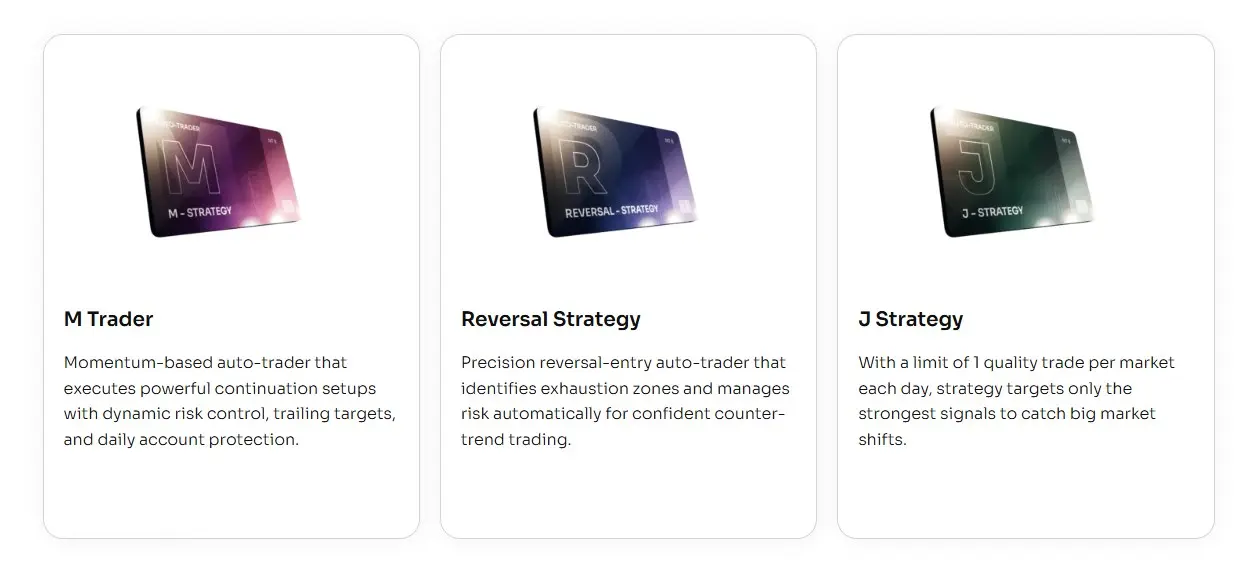
M Trader

Momentum package

More focused on momentum-style movement, active management, reports, and update notes.

J Strategy

Session structure

More focused on the opening-session workflow, staged testing, and one-trade-per-template review.

Reversal Strategy

Reversal areas

Best fit when you want a reversal-focused package with setup validation, stale setup control, and set updates.

03

Start with MAS template sets

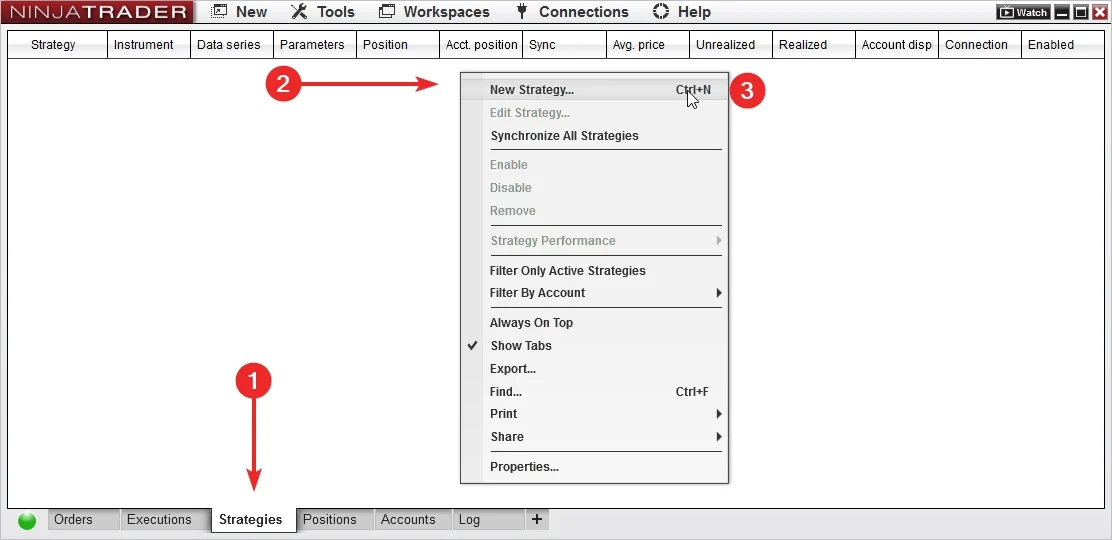
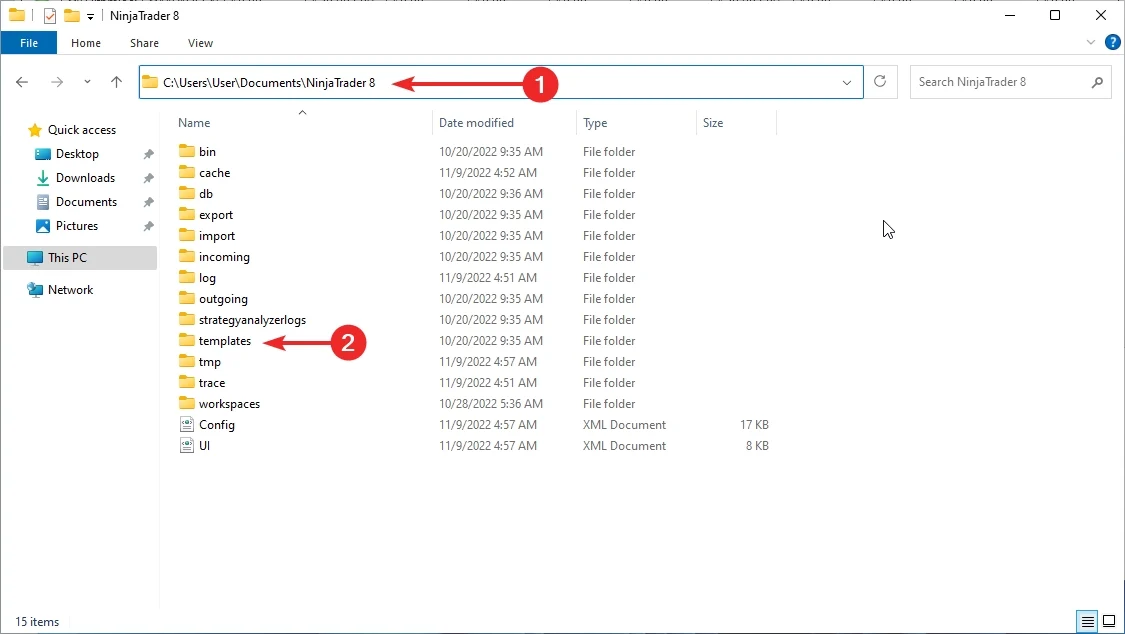
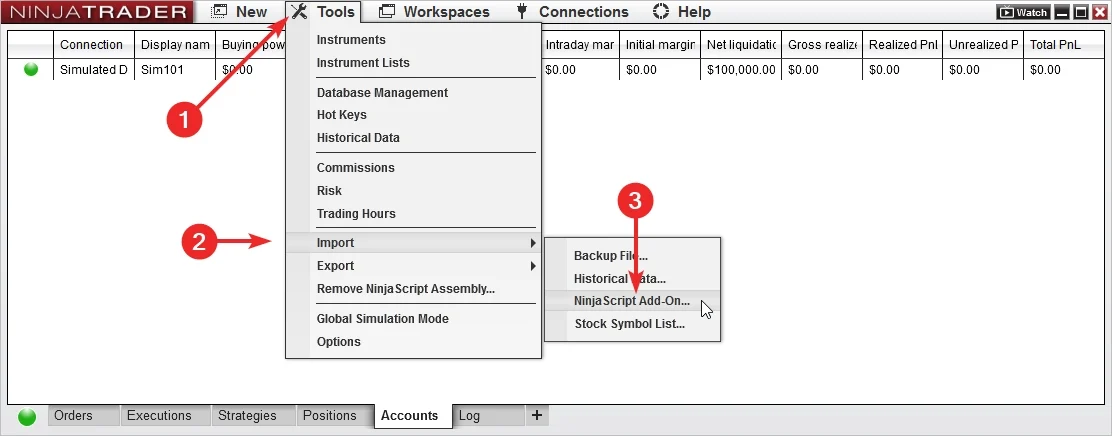
Start by importing the add-on and loading a MAS template set in NinjaTrader 8.

Import the add-on

Add Reversal Strategy to NinjaTrader 8, confirm it appears in the platform, and keep the first session focused on installation.

Load a ready set

Use MAS pre-made template sets as the starting point. Test sets on separate accounts before choosing what to run live.

04

Import, load, test, review

Import the latest files, load a template set, test it, then review the output.

Workflow

Template set workflow

Use the same order each time so set testing stays clean and support questions are easier to answer.

1
Import

Install the add-on and the latest MAS template set package.

2
Load set

Select a MAS pre-made template set in NinjaTrader 8.

3
Test account

Run the set in a test account or test environment.

4
Review

Check logs and behavior before changing sets.

05

What the template sets handle

Template sets keep the setup consistent while the strategy runs inside NinjaTrader 8.

Ready setup values

  • Template sets

    Start from MAS maintained sets instead of building the setup yourself.

  • Consistent testing

    Run each set on its own test account so results and notes stay easy to compare.

Automated execution

  • Platform based

    The strategy runs inside NinjaTrader 8 after you load the add-on and template set.

  • Repeatable steps

    Automation handles the execution sequence after the selected set is loaded.

Review and updates

  • Trade log

    Use recorded session behavior for review and support questions.

  • Bi-weekly updates

    MAS refreshes the template sets every two weeks.

01

Pre-made template sets are included with access.

02

Template set updates are delivered bi-weekly.

03

Support and remote help are available on request.

06

Test each template set first

Use a test account or test environment before live use. Test sets separately, then choose what belongs on the main account.

Test one set per account

Load a set, let it run long enough to understand behavior, then review the log before changing anything.

Import the latest add-on and template set package. Load a MAS template set in NinjaTrader 8. Run the set in a test account or test environment. Review the trade log before moving templates or sets to the main account. Remember that past examples do not guarantee future results.
07

Template package included

Start with a maintained strategy package and included template sets.

Install

Add it to NinjaTrader 8

Import the strategy, confirm it appears in the platform, and keep the first session focused on a clean install.

Load

Use a MAS set

Load a pre-made template set from the package before you begin testing.

Review

Read the session output

Use logs and order history to understand what happened before changing sets or extending access.

08

Keep template sets current

MAS refreshes template sets bi-weekly, so the routine is import, load, test, and review.

Download and import the latest update package. Load the template set you want to test. Run different sets on separate test accounts when comparing them. Review the log before changing sets.
Update rhythm

Bi-weekly set refresh

MAS updates template sets every two weeks. Keep notes on which set you tested and when.

09

Less setup work

Access includes the strategy add-on, template sets, updates, and support resources.

Sets do the setup work

Start from MAS pre-made template sets instead of spending the first session rebuilding the setup.

  • Faster start

    Import, load a set, and begin testing inside NinjaTrader 8.

  • Cleaner notes

    Track which set you tested instead of changing many variables at once.

Automation handles execution steps

The strategy takes over the repetitive trading sequence after the add-on and template set are loaded.

  • Repeatable workflow

    Use the same import, load, test, and review process for each set.

  • Clearer support

    Recorded behavior makes installation and template-set questions easier to diagnose.

10

Templates, updates, and support

Access includes MAS pre-made template sets, bi-weekly updates, automated strategy support, and remote support on request.

Templates

Pre-made template sets

Use the included sets as the starting point for organized testing.

Updates

Bi-weekly updates

MAS refreshes the template sets every two weeks during active access.

Help

Remote support on request

When installation or template-set loading needs a second look, remote support is available on request.

11

Choose your access

Start with the common plans. Open the full list for quarterly, six-month, or annual access.

Included with access

Strategy access, pre-made template sets, bi-weekly updates, and support

Choose a license term, import the add-on, load a set, and test it before live use.

Weekly access

Weekly Plan

$70 / week
  • For first checks

    Use for a short test before choosing a longer term.

  • Includes

    Strategy access, pre-made template sets, bi-weekly updates, support, and remote support on request.

Lifetime access

Lifetime Plan

$1,990 / once
  • No recurring license

    Use when you want long-term access.

  • Includes

    Strategy access, pre-made template sets, bi-weekly updates, support, and remote support on request.

12

Questions before checkout

Short answers about template sets, testing, support, and access.

What platform is it for?

Reversal Strategy is built for NinjaTrader 8.

Is Reversal Strategy automated?

Yes. It can place and manage trades inside NinjaTrader 8 after the add-on and template set are loaded.

Are template sets included?

Yes. Reversal Strategy includes MAS pre-made template sets for NinjaTrader 8.

Do I need to build templates myself?

No. Start with the included sets and test them in your own environment.

How often are template sets updated?

MAS updates Reversal Strategy template sets bi-weekly.

Should I test it first?

Yes. Load each set on a test account or test environment, review the log, then choose what belongs on the main account.

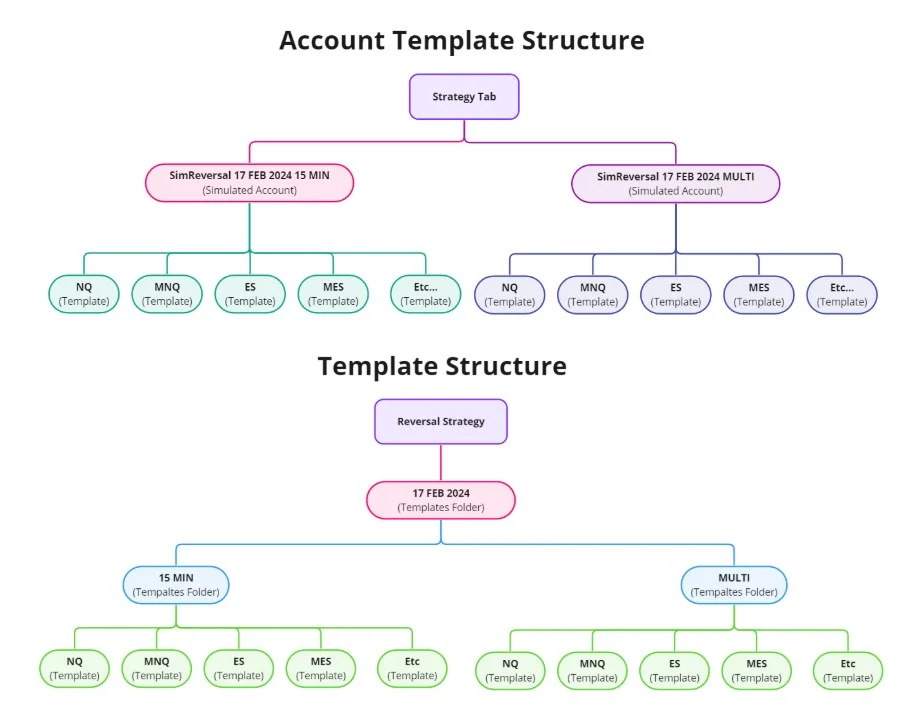
Can a set include several templates?

Yes. Test the set first, then keep the templates you want to run on the main account.

Can it trade more than once per day?

Yes. Reversal Strategy is a regular automated strategy and can take multiple trades during a day depending on the loaded set and market behavior.

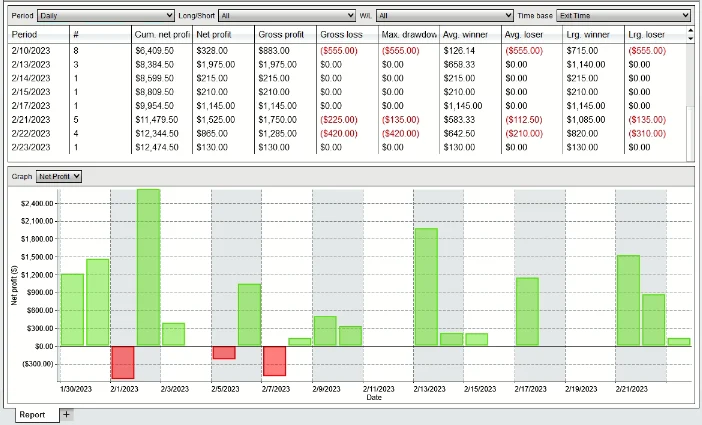
Does it keep trade records?

Yes. The strategy can keep a trade log for session review and troubleshooting.

Can I get setup help?

Yes. Remote support is available on request for installation and template-set loading questions.

Does it guarantee profit?

No. Automated trading carries risk. No strategy, template, report, or example can promise future results.

Start with Reversal Strategy template sets

Choose access, import the add-on, load the MAS template sets, and test the setup in NinjaTrader 8 before live use.

Articles

Reversal Strategy for NinjaTrader 8 — Full Setup, Testing & Risk Guide

Step-by-step guide to install, configure, and test the Reversal Strategy in NinjaTrader 8. Includes risk controls, PnL limits, and troubleshooting tips.

How to Test and Use Templates for Automated Trading (NinjaTrader 8)

Learn how to effectively test and use templates for automated trading using NinjaTrader 8. Evaluate performance and use templates wisely. Free strategies available.

NinjaTrader 8 Automated Strategy Not Working? The Definitive Fix Guide

Is your NinjaTrader 8 strategy not placing trades or won’t enable? Follow this checklist to fix data series, template, session, and license issues.

How to Add a Strategy in NinjaTrader 8 (Control Center & Chart Methods)

Learn two methods to add and enable strategies in NinjaTrader 8 — via Control Center and chart. Step-by-step with screenshots and troubleshooting.

How to Manually Import Strategy Templates Into NinjaTrader 8?

Step-by-step instructions to manually import strategy templates into NinjaTrader 8. Includes best practices, file format tips, and troubleshooting help.

How to Install an Automated Trading Strategy in NinjaTrader 8

This step-by-step tutorial walks you through installing an automated strategy in NinjaTrader 8. Whether you’re importing your first file or troubleshooting, you’ll find practical tips for a smooth setup.

Product feedback

Reviews

4.2 87 reviews
  1. Mr M Hopton Verified owner
    5/5

    Superb simplicity. Outstanding support team. A fantastic strategy suitable for diverse traders. Highly recommended!

  2. Poppy cat Verified owner
    4/5

    Bought right after your email with trading results. They're impressive. So far, after a week, my results are lower than yours, but despite that I am satisfied. Thank you.

  3. Gary Miller Verified owner
    4/5

    Some of the templates you offer don't function as expected. Specifically, some templates yield negative trades, which adversely impacts overall performance. While some templates are profitable and offset losses, it would be more beneficial if every trade resulted in a positive outcome, leading to improved results. Nevertheless, I appreciate the 40% account gain for the month.

  4. Mary Green Verified owner
    4/5

    Works.Strategy trades in the plus - is the positive part.
    On the negative side, the strategy requires a server that works 24/7, because I, for example, find it difficult to keep my computer on all the time.

  5. Paul Ross Verified owner
    3/5

    Is it just me, or is it better to take J Strategy? In a month of trading the strategy made many times less money than another strategy from your site. What is the point?

  6. Nicola Verified owner
    5/5

    Even though I don't like algorithmic trading because of the difficulty of setting it up, your team has done a great job of offering pre-made templates for each market. Thanks for that.

  7. Julie Crouchman Verified owner
    5/5

    Works like a charm. Crude oil is my pick for this.

  8. Tony Osborne Verified owner
    5/5

    Utilizing the strategy has been a game-changer for me over the past few months. strategy, grounded in price action, sets apart from delayed indicators, leading to outstanding results. The inclusion of customizable templates has been a boon, allowing me to seamlessly adapt to the ever-changing market. Thank you.

  9. Mr Vernon Verified owner
    4/5

    My experience with the Reversal Auto thus far can be summarized as 'not bad'. While it doesn't fully meet my initial performance expectations, it doesn't fall into the realm of disappointment either. I'm in the process of evaluating its long-term worthiness of investment.

  10. Helen T N Verified owner
    4/5

    Promising Strategy, Requires Dedication to Master.
    However, the payoff in terms of improved trading performance and accuracy can be well worth the initial learning investment

  11. Sheetal Pathak Verified owner
    3/5

    Please activate my license! Thank you!

  12. Mr D. Millhouse Verified owner
    3/5

    Thank you for the valuable experience of using this strategy for a month. However, due to the lack of documentation, it has become excessively complex to implement. Opting for a managed option would be a more accessible choice for those who prefer not to delve deeply into this auto-trading endeavor.

  13. Joanne Verified owner
    3/5

    the strategy does not work as well as the same indicator (reversal indicator) probably because the strategy does not understand the current market situation.
    Using the indicator, you can filter out periods when it is better not to trade and skip a trade.

  14. Beth Davies Verified owner
    4/5

    Doesn't work as well as it can with the pre-made templates the developer provides. I recommend anyone who buys it to try working with tick chart. For me it gives a result much better than the minute chart.

  15. Fitness Harrogate Verified owner
    4/5

    Positive: The strategy is performing exceptionally well and meeting expectations.

    Negative: However, it lacks a trailing stop and break-even feature. I strongly recommend prioritizing the addition of these functionalities. This adjustment has the potential to significantly enhance the strategy's performance, even though it's already quite effective. Thank you.

  16. Jeff Duffield Verified owner
    3/5

    Team, I'd like to propose a focus on documentation. The strategy itself is excellent, but there's a learning curve involved. This will help users get the most out of it.

  17. Ron Hanson Verified owner
    4/5

    Waiting for you guys to add trailing stop and BE option. It will improve the strategy even more!

  18. Alex Fitzpatrick Verified owner
    5/5

    Ty for the trial. Let's see how the first month will go after the purchase.

  19. Jan Swietlik Verified owner
    2/5

    While the notion of spotting market reversals intrigued me, I became doubtful about its execution. While I value the concept, it required more time and effort than I could commit, especially with the uncertain outcomes involved.

  20. Tarquin Verified owner
    5/5

    Intriguing Reversal Strategy. Merging my tech-art perspective, it's like decoding market patterns. Demands attention but resonates with my analytical mindset. Exciting addition to my routine. - Tarquin Holloway

Reversal Strategy

Quick access

For traders who want automation around reversal-style trades, validation, stale setup control, and more.

$70 / week
Get Weekly License