MANAGED TRADING+ FREE INDICATORS+ TRADE COPYING+ AUTOMATED TRADING+ ENTRY SIGNAL INDICATORS+ TRADE INDICATORS+ QUALITY OF LIFE ADD-ONS+ NINJATRADER SOLUTIONS+ MANAGED TRADING+ FREE INDICATORS+ TRADE COPYING+ AUTOMATED TRADING+ ENTRY SIGNAL INDICATORS+ TRADE INDICATORS+ QUALITY OF LIFE ADD-ONS+ NINJATRADER SOLUTIONS+
Free Indicators Pack

NinjaTrader 8 automated strategy

J Strategy Auto-Trader

J Strategy for NinjaTrader 8 with MAS pre-made template sets, guided setup, trade logs, updates, support, and remote help on request.

Choose access See details

Templates included

Remote support on request

Bi-weekly updates

Strategy

J Strategy

(71 customer reviews)

From: $99 / week

J Strategy is the MAS strategy for traders who want a structured session routine, template-set testing, logs, and controlled review.

Read More

Built for NinjaTrader 8 Pre-made template sets included Set-based testing workflow Trade log for session review
01

A session-open strategy package

J Strategy is the MAS strategy for traders who want a structured session routine, template-set testing, logs, and controlled review.

What it is about

Session structure before signals

J Strategy is built around the start of the active session. It gives users a session-based automation package with a clean testing routine, without asking them to rebuild the setup from scratch.

Opening-session style workflow One-trade-per-template review is easier to track Trade logs help with testing and support questions
Session startThe package is organized around the active session rather than pure momentum or reversal areas.
Reference levelsTemplate settings give the strategy its starting framework inside NinjaTrader 8.
Controlled testingThe set-based workflow keeps each template easier to compare after the session.
Trade logRecorded behavior gives users and support a better review trail.
02

How J Strategy differs from the other strategies

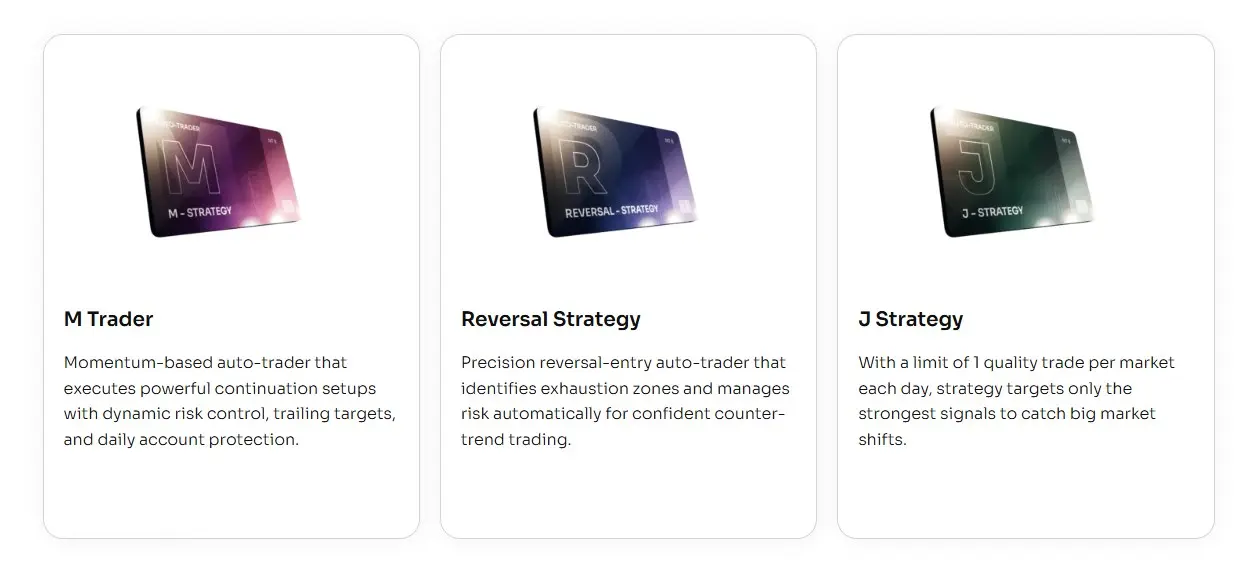
All three strategies include template sets. J Strategy is the one that feels most structured around the session and review routine.

M Trader

Momentum package

More focused on momentum-style movement, active management, reports, and update notes.

J Strategy

Session structure

Best fit when you want a session-based strategy, organized set testing, and trade logs for review.

Reversal Strategy

Reversal areas

More focused on reversal-style setups, confirmation, stale setup control, and bi-weekly set updates.

03

Start with J Strategy template sets

Import the add-on, load a MAS template set, and test it inside NinjaTrader 8 before going live.

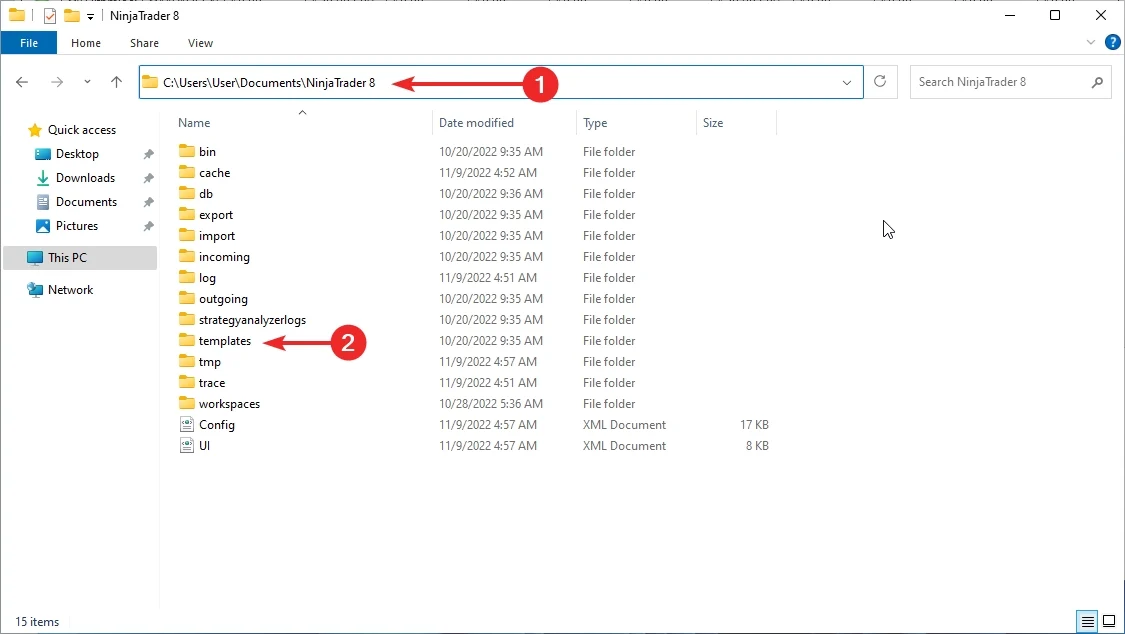
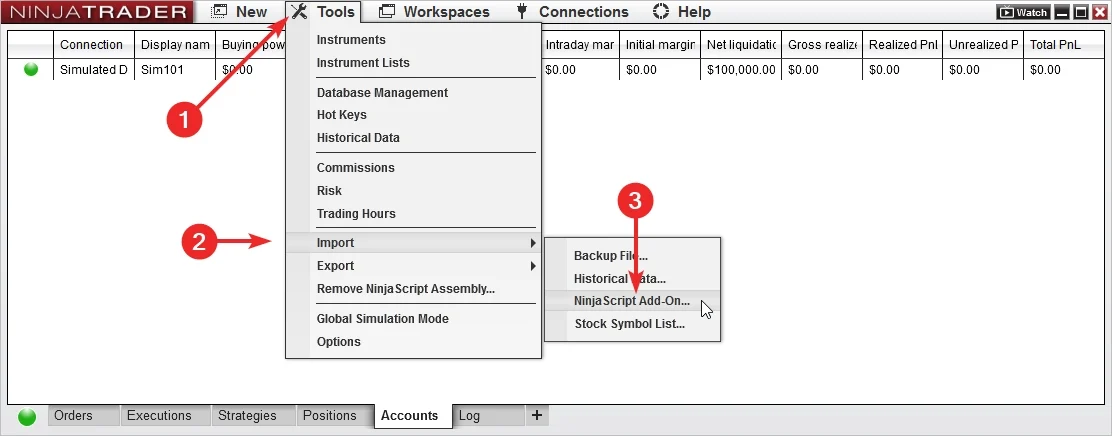
Import the add-on

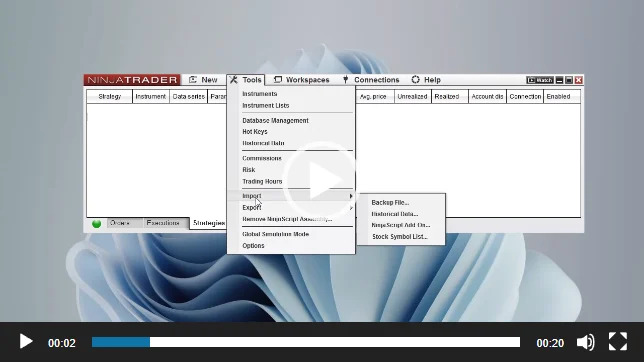
Add J Strategy to NinjaTrader 8, confirm it appears in the platform, and keep the first session focused on installation.

Load a ready set

Use a MAS pre-made template set as the starting point. Test sets on separate accounts before choosing what to run live.

04

Import, load, test, review

The shared strategy routine is simple: import the files, load a template set, test it, and review the output.

Workflow animation

Template set workflow

Use the same order each time. It keeps set testing cleaner and gives support a better record to review.

1
Import

Install the add-on and template package in NinjaTrader 8.

2
Load set

Select a MAS pre-made template set to test.

3
Test account

Run the set in a test account or test environment.

4
Review

Check behavior and logs before changing sets.

05

What the template sets give you

Template sets give J Strategy a consistent starting point while the strategy handles automation inside NinjaTrader 8.

Ready setup values

  • Template sets

    Start from MAS maintained sets instead of building the setup yourself.

  • Cleaner comparison

    Run each set on its own test account so notes and results stay readable.

Automated execution

  • Platform based

    The strategy runs inside NinjaTrader 8 after the add-on and template set are loaded.

  • Daily template review

    J Strategy is designed around one trade per template per day, making each template easier to review.

Logs and updates

  • Trade log

    Use recorded session behavior for review and support questions.

  • Product updates

    Keep the add-on and template package current during active access.

01

Pre-made template sets are included with access.

02

Set testing works best on separate test accounts.

03

Support and recent updates are included during active access.

06

Test each template set first

Use a test account or test environment before live use. Test sets separately, then choose what belongs on the main account.

Test one set per account

Load a set, let it run long enough to understand behavior, then review the log before changing anything.

Import the latest add-on and template package. Load a MAS template set in NinjaTrader 8. Run the set in a test account or test environment. Review the trade log before moving templates or sets to the main account. Remember that past examples do not guarantee future results.
07

Guided setup, set first

Use the setup guide to install the add-on, then start testing from the included template sets.

Install

Add it to NinjaTrader 8

Import the strategy, open the setup guide, and confirm the add-on is available in the right NinjaTrader workspace.

Load

Choose a MAS set

Load a pre-made template set from the package before you begin testing.

Review

Read the session output

Use the log and order history to understand what happened before changing sets or extending access.

08

Keep the same set routine

A repeatable import, load, test, and review routine makes J Strategy sets easier to compare over time.

Daily workflow

Load, test, review

Keep notes on which set you tested, when you tested it, and what the trade log showed.

Open NinjaTrader 8 and confirm the workspace, data, and connection. Load the template set you want to test. Run different sets on separate test accounts when comparing them. Review the log before changing sets.
09

Less setup work

J Strategy gives you a maintained strategy package, template sets, updates, and support resources.

Sets do the setup work

Start from MAS pre-made template sets instead of spending the first session rebuilding the setup.

  • Faster start

    Import, load a set, and begin testing inside NinjaTrader 8.

  • Cleaner notes

    Track which set you tested instead of changing many variables at once.

Useful for repeat testing

A set-based routine is easier to compare than a session that changes from one test to the next.

  • Keep the same process

    Use the same import, load, test, and review steps for each set.

  • Clearer support

    Recorded behavior makes installation and template-set questions easier to diagnose.

10

Templates, updates, and support

Access includes MAS pre-made template sets, setup resources, recent product updates, and remote support on request.

Templates

Pre-made template sets

Use the included sets as the starting point for organized testing.

Updates

Recent updates

Access includes recent product updates during the license term shown in the pricing plan.

Help

Remote support on request

When installation or template-set loading needs a second look, remote support is available on request.

11

Choose your access

Start with the common plans. Open the full list if you want the quarterly or six-month options.

Included with access

Strategy access, pre-made template sets, updates, and support

Choose a license term, import the add-on, load a set, and test it before live use.

Weekly access

Weekly Plan

$99 / week
  • For first checks

    Use when you want a short license window before choosing a longer term.

  • Includes

    Strategy access, pre-made template sets, updates, support, and remote support on request.

Lifetime access

Lifetime Plan

$3,490 / once
  • No recurring license

    Use when you want long-term access without subscription renewals.

  • Includes

    Strategy access, pre-made template sets, updates, support, and remote support on request.

12

Questions before checkout

Short answers about template sets, testing, support, and access.

What platform is it for?

J Strategy is built for NinjaTrader 8.

Is J Strategy an automated strategy?

Yes. It can place and manage trades inside NinjaTrader 8 after the add-on and template set are loaded.

Are template sets included?

Yes. J Strategy includes MAS pre-made template sets for NinjaTrader 8.

Do I need to build templates myself?

No. Start with the included sets and test them in your own environment.

Can a set include several templates?

Yes. J Strategy sets can include several templates running on the same account.

How are J Strategy sets tested?

Load a set to a test account or test environment, review the trade log, then choose what belongs on the main account.

How often can a template trade?

J Strategy is designed around one trade per template per day.

Does it keep trade records?

Yes. The strategy can keep a trade log for session review and troubleshooting.

Can I get setup help?

Yes. Remote support is available on request for installation and template-set loading questions.

Does it guarantee profit?

No. Automated trading carries risk. No strategy, report, or template can promise future results.

Start with the J Strategy template sets

Choose access, import the add-on, load the MAS template sets, and test the setup in NinjaTrader 8 before live use.

Articles

How to Test and Use Templates for Automated Trading (NinjaTrader 8)

Learn how to effectively test and use templates for automated trading using NinjaTrader 8. Evaluate performance and use templates wisely. Free strategies available.

J Strategy for NinjaTrader 8 — Complete Setup, Testing & Troubleshooting Guide

Learn how to install, configure, test, and troubleshoot the J Strategy for NinjaTrader 8. Step-by-step guide for reliable automated trading.

NinjaTrader 8 Automated Strategy Not Working? The Definitive Fix Guide

Is your NinjaTrader 8 strategy not placing trades or won’t enable? Follow this checklist to fix data series, template, session, and license issues.

How to Add a Strategy in NinjaTrader 8 (Control Center & Chart Methods)

Learn two methods to add and enable strategies in NinjaTrader 8 — via Control Center and chart. Step-by-step with screenshots and troubleshooting.

How to Manually Import Strategy Templates Into NinjaTrader 8?

Step-by-step instructions to manually import strategy templates into NinjaTrader 8. Includes best practices, file format tips, and troubleshooting help.

How to Install an Automated Trading Strategy in NinjaTrader 8

This step-by-step tutorial walks you through installing an automated strategy in NinjaTrader 8. Whether you’re importing your first file or troubleshooting, you’ll find practical tips for a smooth setup.

Product feedback

Reviews

4.6 71 reviews
  1. A Vowles Verified owner
    4/5

    Strategy is fast, efficient, and really simple to integrate into your existing NinjaTrader setup. The automation is great, but I’ve had a few trades where it didn’t quite execute as expected. It’s not perfect, but it’s still very useful for my day-to-day trading. I think it would work even better if there were more adjustable parameters

  2. Peter Hathaway Verified owner
    4/5

    I thought the strategy would be a set-and-forget solution, but I found that you need to adjust the parameters from time to time to fit the market conditions

  3. GLOBAL TECHNOLOGIES RACING Verified owner
    5/5

    Good auto-trader. Have used it on larger account of bluenox. Worked like a charm//.

  4. Steve Mowlam Verified owner
    5/5

    The only strategy that have performed better than me trading manually, which is quite surprising. Thank you for the trader and opportunity to test it before making a purchase.

  5. Charlie Bailey Verified owner
    5/5

    J Strategy looked promising and straight-forward, but I encountered several challenges. The setup process was much more complicated than I anticipated, and I had to reach out to support multiple times just to get things running. In my first week using J Strategy after the "correct" setup, I earned six times what I invested-all without even fu**g touching my computer!
    The strategy has been a total surpise. It’s highly profitable, and I’ve already added it to my main trading arsenal. IMPORTANT: Setup process is not the easiest!!!!

  6. V.Morgan Verified owner
    4/5

    Just okay-expected more!
    J Strategy is just okay in my opinion.. It does what it’s supposed to, but I found the perforamnce a bit underwhelming. I’ve had some profitable trades, but not enough to justify the price. I’ll keep using it for now, but I expected a bit more gains from this add-on.

  7. Nick Parks Verified owner
    5/5

    I've experimented with a lot of trading strategies, but J Strategy is in a league of its own. It has provided consistent results and the level of precision in its algorithm is phenomenal. You can tell the team put a lot of thought into creating this strategy. I’m thrilled with my decision to switch to J Strategy.

  8. Ludwika Mcnamara Verified owner
    5/5

    Definitely recommend giving it a try if you’re looking to diversify your trading strategies. Latest update gave it much more stability Thank you!

  9. Cheryl Verified owner
    4/5

    Strategy is solid and flexible, but I had a few issues with the setup process. The algorithm adapts well to market conditions, and I’ve seen consistent profits, but the configuration wasn’t as smooth as I’d hoped. Customer service was helpful, but there’s room for improvement. Overall, a good strategy once you get it working the way it should as it requires constant tempalte updates to keep the positive curve.

  10. Daniel Verified owner
    4/5

    I’ve been using J Strategy for a bit, and while it does what it claims, I haven’t seen the huge gains that some others have mentioned. The strategy is solid and profitable, but for me, it’s just been decent-nothing extraordinary. The support team is responsive, but I feel the tool needs more refinement to really stand out. It works, but it’s not life-changing. Enough to cover monthly expenses.

  11. Jake Newton Verified owner
    4/5

    strategy is quite interesting, as it works across multiple markets and helps stabilize profit curve. It's an excellent choice for traders looking to diversify their portfolios. recommend giving it a try.

  12. James Verified owner
    5/5

    Have you ever made a significant income in just one week, all without even touching the computer? In my first week using it, I earned significantly more than what I initially invested in it-six times more, in fact. Strategy has not only been incredibly profitable but also a game-changer for my financial strategy. I recommend this trading solution; it's a valuable addition to my arsenal and has brought me great satisfaction.

  13. James Verified owner
    5/5

    Have you ever made a significant income in just one week, all without even touching the computer? In my first week using it, I earned significantly more than what I initially invested in it—six times more, in fact. Strategy has not only been incredibly profitable but also a game-changer for my financial strategy. I recommend this trading solution; it's a valuable addition to my arsenal and has brought me great satisfaction.

  14. Lynne Verified owner
    5/5

    God bless you

  15. Sis Sos Moss Verified owner
    4/5

    J Strategy has been pretty good for me overall. Auto itself is solid, helping me make some decent profits. I like how flexible it is, adapting to different market situations like a champ. But, gotta be real with you, I've had some ups and downs with the support team. They usually get back to me when I hit them up, but there've been times when I felt like they didn't fully get what I needed. Their responses sometimes felt a bit too generic, you know? But hey, they've always been nice and professional about it. So, even though support could be better, it's not a total dealbreaker for me. I'd still give J Strategy a solid four stars – it works well, but could definitely step up its support game.

  16. Tracey Brassett Verified owner
    5/5

    indicator is highly effective, pinpointing precise entry points and enabling good market entries on price retracements rather than chasing highs. Its accuracy has greatly helps

  17. Carlos L Verified owner
    5/5

    So, during the triall period, I decided to put my qualified 25k account to the test with it and let me tell you, it was quite the experience. I had heard some good things about this strategy, but I wanted to see for myself if it could really deliver the results it promised. And boy, did it deliver. They've created a tool That's not only effective but also adaptable to different account sizes and trading styles. Plus, the support team was there every step of the way, answering any questions I had and providing guidance when needed.

    (To one who wonders: I have used only micro tempaltes after filtering the "negative" markets.)

  18. Paul Myers Verified owner
    5/5

    Okay, so here's my take on J Strategy. Overall, it's been pretty solid for me. I've been using it for a few months now, and I've seen some good results. Strat seems to be doing its thing, and I've been able to achieve consistent profits. That being said, there were a few bumps along the way. The setup process was a bit of a headache, and I had some issues getting everything configured the way I wanted. But once I got past that initial hurdle, it's been smooth sailing. So yeah, I'd recommend it – just be prepared to put in a little bit of work upfront. Four stars from me.

  19. Christine Verified owner
    5/5

    I've tried a BUNCH of different trading strategies in the past, but nothing comes close to thisone. Seriously, you guys have created something special here

  20. John Castle Verified owner
    5/5

    J Strategy is si,ply great. plain and simple. The algorithm's ability to adapt to changing market conditions sets it apart from the competition. Plus, the support team is second to none. Couldn't be happier with my decision to invest in this tool.

J Strategy Auto-Trader

Quick access

Wth pre-made template sets, guided setup, trade logs, updates, support, and more.

$99 / week
Get Weekly License